Up to FM24, the end of every season brought a review of what went well and what did not. Season Review FM27 brings that review back: when your club plays its last league match, the mod writes the story of the season into a report. It was made by fkapl (fk4pl on GitHub), it is free and its code is open. Also, since version 0.2.0 you can read it all in a panel inside the game.
What Season Review FM27 does
The mod reads your career and puts everything into one report, split by topic:
- The season in brief: your finish, your record, the media prediction and what the board expected, with its verdict.
- League and cups: home and away numbers, the longest winning and unbeaten runs, and key moments such as the biggest win.
- Players: player of the season, top scorers, assists, ratings, young players aged 21 and under, and players out on loan.
- The club: transfers, finances, injuries and how the board and supporters feel.
The report is an HTML file that opens in your browser without internet and prints cleanly. There is also a Markdown copy, handy for forums. The text is in English by default, with Turkish as well. So anyone can translate it: just copy the English file in the lang folder and change the text.
The in-game panel
In 0.2.0, you press F10 in a career and the report opens on top of the game, in seven tabs: summary, league, players, transfers, finances, injuries and board. In other words, you do not need to leave FM to read it. On the other hand, at any point in the season, Ctrl+F8 saves an interim report with what has been played so far. It takes 20 to 40 seconds, but the game stays usable.
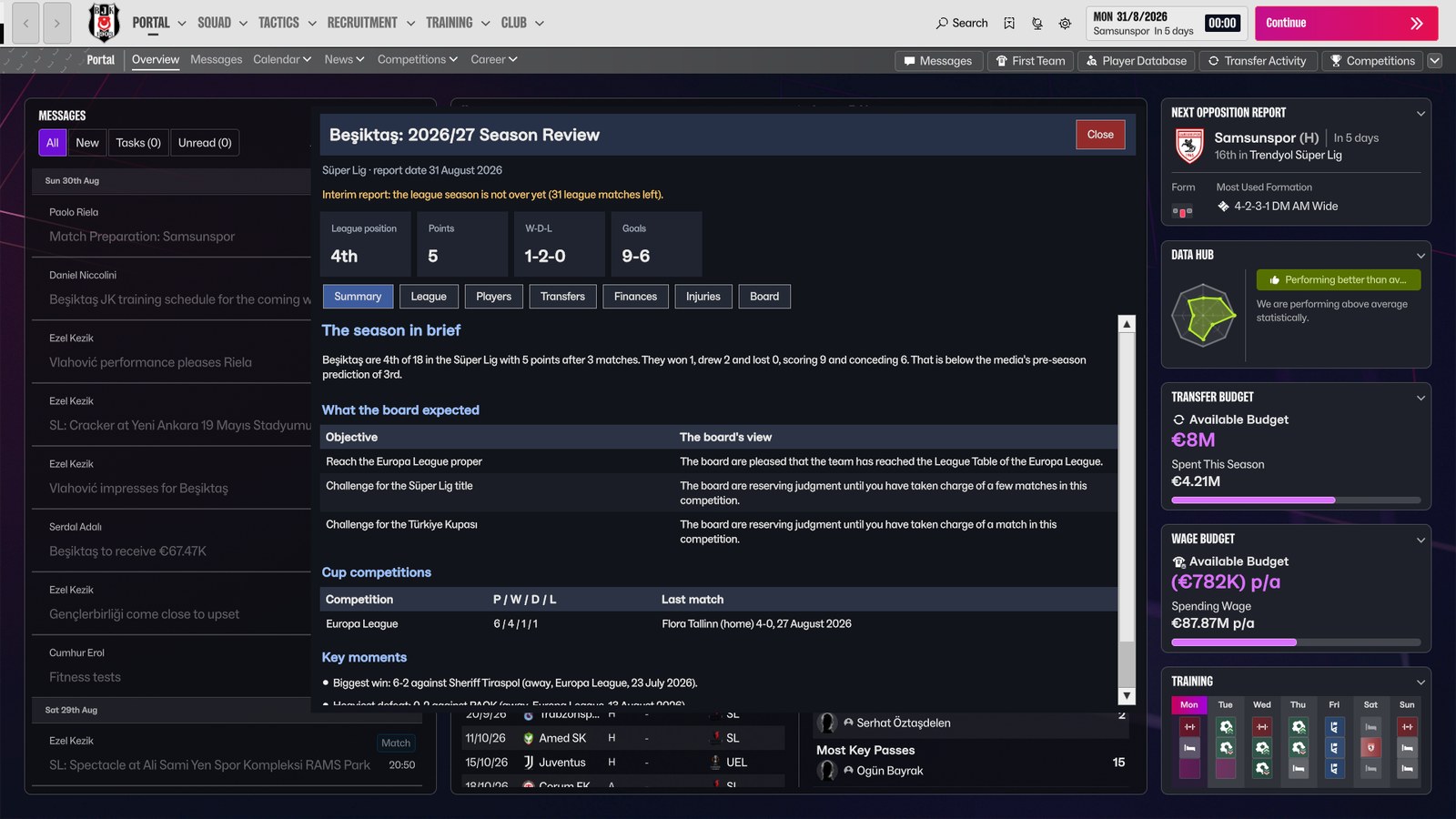
The summary tab, with what the board expected (Image: fkapl)
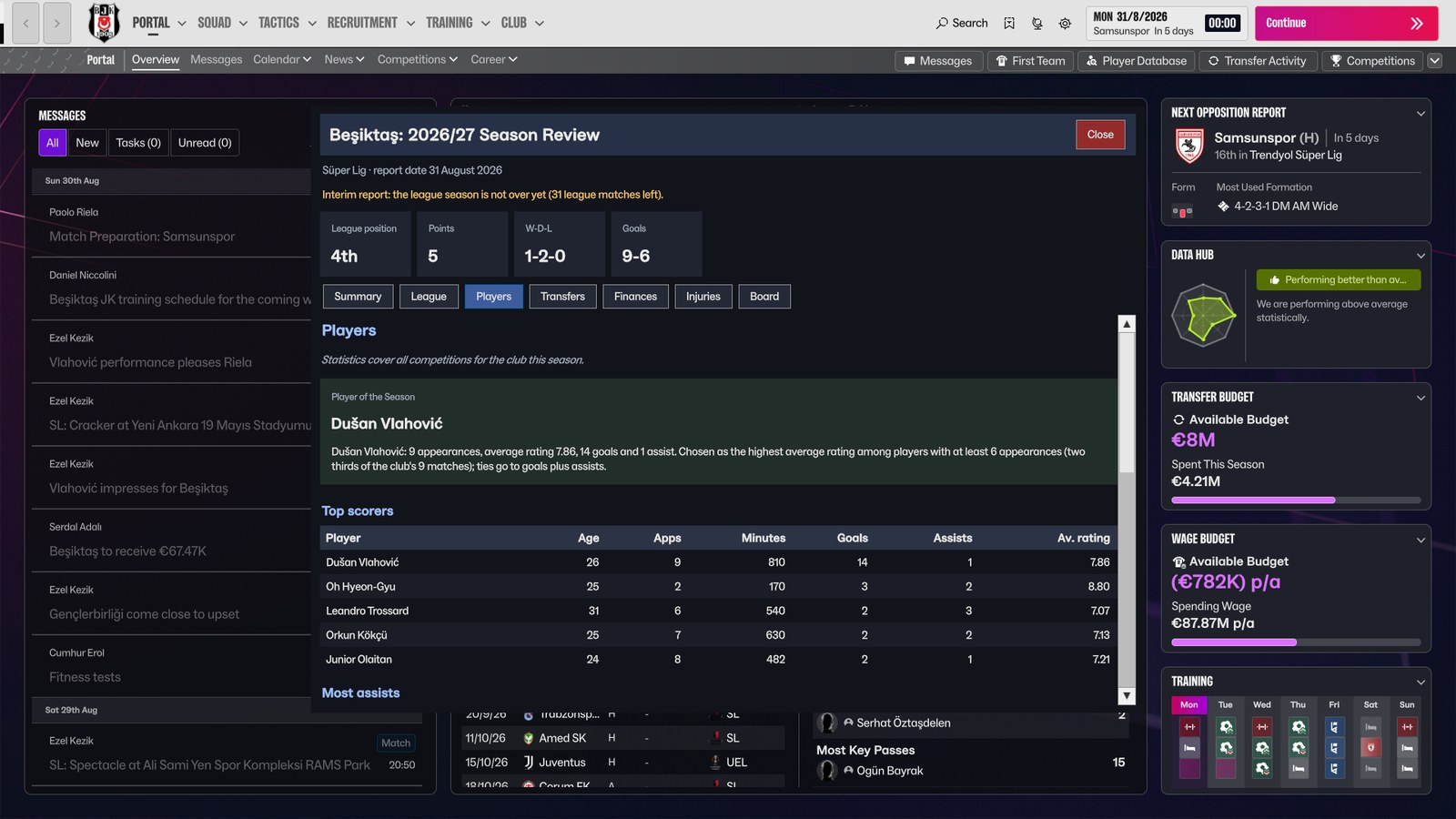
Player of the season and the top scorers (Image: fkapl)
Who it is for
It is for anyone who plays long careers and likes to look back at the end of each season. It also suits players who write up their save on a forum, thanks to the Markdown copy. If you want to keep every season in one place, add FM Season Hub. For your manager’s own story, see Manager Career History 27. Finally, for a review after every match, there is FM27 Analyst.
Download Season Review FM27
The version is 0.2.0, from 14 November, and the ZIP is 88 KB. It was tested with FM27 27.0.1 on Steam and BepInEx 6.0.0-be.793. However, the author built it on Linux (with Proton): it should work on Windows, but he has not tested it there yet. On Mac, it probably does not work. The code is on GitHub, under the MIT licence.
Download – Season Review v0.2.0
1. BepInEx (skip this if you already use BepInEx mods in FM27)
- First, back up your saves, in
Documents\Sports Interactive\Football Manager 27\games. - Then download BepInEx 6.0.0-be.793 (Unity IL2CPP, Windows x64) from the official builds page.
- On Steam, right-click Football Manager 27 and choose Manage > Browse local files. Extract the ZIP there, next to
fm.exe. - Finally, start the game once, wait for the main menu and quit. The first launch takes a few minutes.
2. Season Review on Windows
Extract the mod’s ZIP and copy its BepInEx folder into the game folder, merging it with the existing one. You should end up with BepInEx\plugins\SeasonReview\SeasonReview.dll and the lang folder.
On Linux
Add WINEDLLOVERRIDES="winhttp=n,b" %command% to the game’s launch options on Steam. Then run the install-linux.sh that comes in the ZIP.
Things to watch
To check it works, look for the line Season Review 0.2.0 loaded in BepInEx\LogOutput.log. Reports are saved in Documents\Sports Interactive\Football Manager 27\SeasonReviews. The mod only reads game data: it never writes to your saves and never shows hidden attributes, CA or PA. For that, use FMPT Chief Analyst.
There are also a few limits. For example, if you holiday from before the last league match into the next season, the report can be missed; in that case, press Ctrl+F8 after that match. Also, FM27 updates can break the mod, because the game has no official way to read its data. If a key clashes with another mod, change it in BepInEx\config\io.github.seasonreview.fm27.cfg with the game closed. To remove it, delete the BepInEx\plugins\SeasonReview folder; on Linux, use install-linux.sh --uninstall. Finally, if you find bugs, the author asks you to report them in the GitHub Issues, with the lines from LogOutput.log.
The files are hosted by their original authors. FMPortugal only points to the official download page — all credit goes to their creators.
Did you make this download? Manage it on FMPortugal →