In FM27, if you start with no managerial past, your profile is empty: nothing in the job history and a two-line biography. Manager Career History 27 (MCH27) changes that. With it, you make up your manager’s past, as a player and as a coach, and write any biography you like. Everything shows up on the game’s own screens, as if FM made it. It is by brown3y (TheFearedBeard), it is free and open source and it is on version 0.5.1.
What Manager Career History 27 does
- Career history: it adds clubs and roles to your manager’s Job History table, with seasons, appearances, goals and moves.
- Your own biography: you add your paragraphs to the Biography panel, with your backstory, philosophy or anything else.
- Crests from your megapack: the mod takes club and competition crests from the logo pack you already have, through the pack’s
config.xml. So you do not need another pack just for this.
Also, the mod is only a visual layer. It never touches FM’s database or your career data, and it reads everything from a separate career.json file.
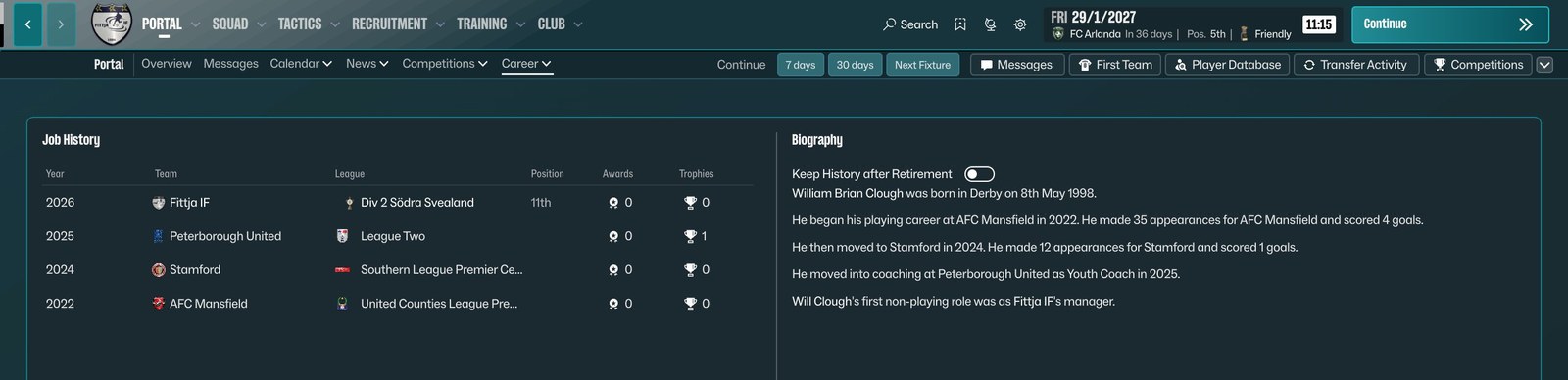
The manager’s history and biography inside FM27 (Image: brown3y)
The MCH27 Studio editor
So you do not have to write the file by hand, the package comes with MCH27 Studio, a Windows program. In the Career entries tab you add rows with the role (player or coach), season, club, club and competition IDs, title, appearances and goals. Then, in the Biography tab, you write your paragraphs. The Studio previews the chosen club’s crest and has a button to look up a club ID online. It also imports a club list from a CSV file.
Best of all, when you save, the game picks up the changes in about a second. In other words, you do not need to restart FM to see the result.
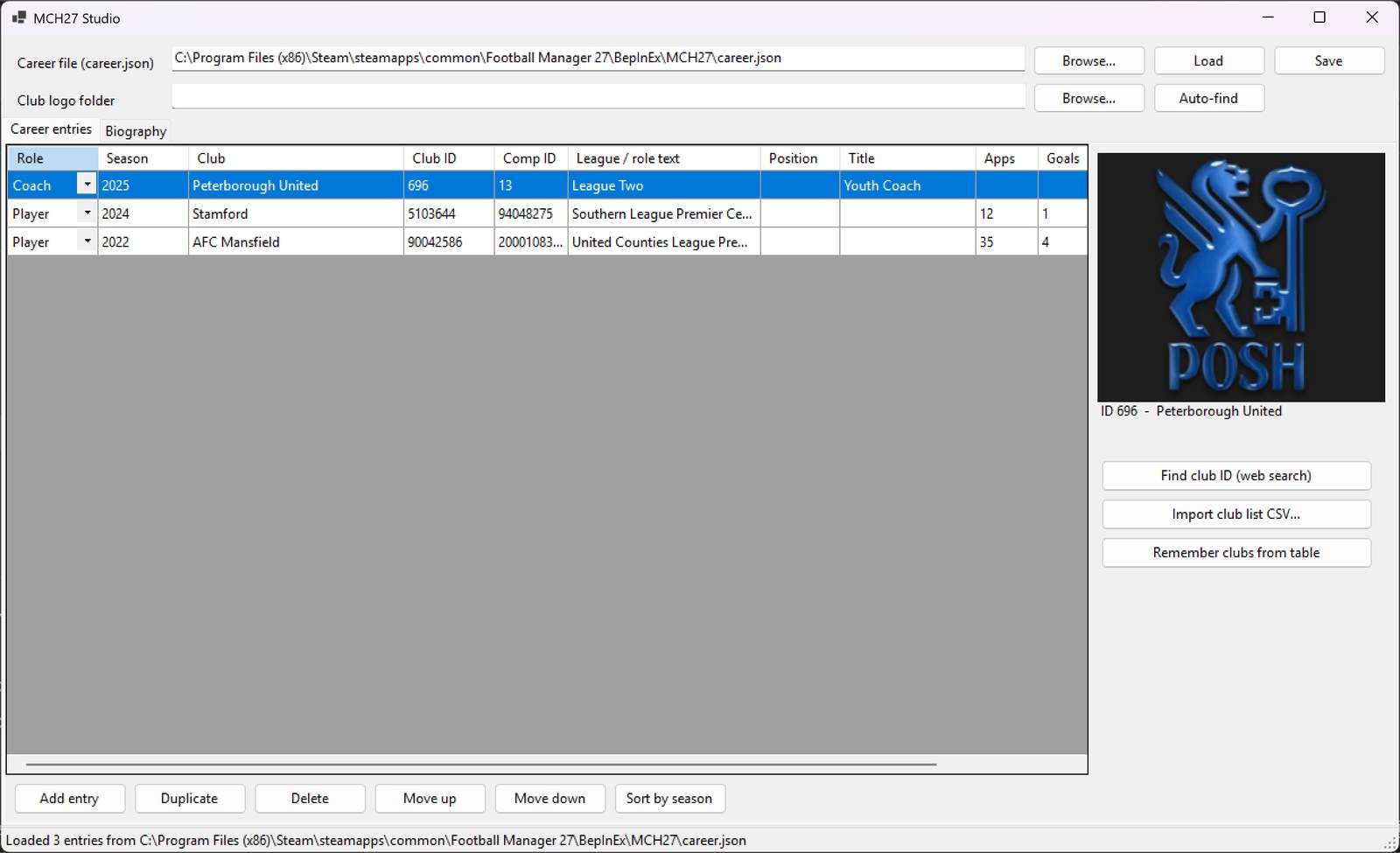
MCH27 Studio, with the manager’s career and the club crest (Image: brown3y)
Who it is for
It is for players who like a story behind their save. For example, a former midfielder who retired early and started as an under-19 coach, or a manager who came up from the regional leagues. It pairs well with ManagerLife, which gives your manager a personal life, and with Manager 3D Head, so you get your own face too.
Download Manager Career History 27
The version is 0.5.1, from 9 November, and the file is about 90 KB. It was tested on FM27 on Steam, on Windows, and the author says it is still a development release. Version 0.5.1 adds competition logos to the league column.
Download – Manager Career History 27 v0.5.1
- First, install BepInEx 6 IL2CPP in the FM27 folder and start the game once, so it creates the
BepInEx\interopfolder. If you already use another BepInEx mod, such as ManagerLife or FaceDrop, you have it. - Then close the game, create the
BepInEx\plugins\MCH27.Careerfolder and copyMCH27.Career.dllinto it, from the ZIP’sPluginfolder. - Next, start FM27. On the first run, the mod creates a sample
BepInEx\MCH27\career.json. - After that, open
MCH27Studio.exe(in theStudiofolder), which needs Microsoft’s .NET 6 Desktop Runtime or newer. Pick thecareer.jsonand the club crest folder of your logo pack; the Auto-find button tries to find it for you. - Finally, fill in the career and the biography, click Save and open your manager’s profile in the game, under Career > History. Your rows show up below FM’s own.
Things to watch and what comes next
For now there is a single career.json for every save. In other words, the same story shows up in all your careers. Linking a history to each save is on the author’s list, along with award and trophy icons, a biography worded more like FM’s own and, maybe, editing the career in-game. Also, one user said the Studio would not open even with .NET 6 installed. If that happens to you, check that you installed the Desktop Runtime and not just the regular runtime. If nothing shows up in the game, the BepInEx\LogOutput.log file lists the lines starting with [MCH27] and says what went wrong.
The files are hosted by their original authors. FMPortugal only points to the official download page — all credit goes to their creators.
Did you make this download? Manage it on FMPortugal →