Want to change an attribute, clear a player’s injury or give your finances a boost halfway through a career? That is what the FM27 In-Game Editor is for: the official Sports Interactive editor that works inside your save. It does not come with the base game, so it pays to know where to buy it and what you need to switch on before you start.
In this guide we explain what it is, how much it costs, how to get it working and what you can edit. At the end we compare it with the free Pre-Game Editor and with the real-time editors made by the community.
What is the FM27 In-Game Editor
The In-Game Editor (IGE) is a paid add-on for Football Manager 27. It came out on the same day as the game, 10 November 2026.
The idea is simple: you change the game world while your career is running. In other words, you do not need to start a new save to change a player, a club or a league. However, there is one rule that SI states on the store page: the editor can only be used when a save game is loaded and active. On the main menu it does nothing.
The editor also got a new look in FM27. According to SI, it is now a full-screen experience, groups information better and shows tooltips on editable fields. As a result, first-time users should need fewer clicks to find what they are looking for.
How much the FM27 In-Game Editor costs and where to buy it
The FM27 In-Game Editor costs €8.99 and is sold on the three PC stores where the game is available:
- Steam, as DLC for Football Manager 27;
- Epic Games Store, as an add-on;
- Microsoft Store, as an add-on for the PC version.
Before you buy, check two things. First, it has to be the FM27 editor: the FM26 one does not work in the new game. Second, buy it on the same account that owns the game. SEGA support warns that if the game is on one account and the editor on another, the editor will not show up.
If you do not have the game yet, see our guide on where to buy FM 2027.
How to enable the editor in your save
This is the step most people miss. When you create a new game with Advanced Setup, there is a list of advanced settings. One of them is Allow use of the In-Game Editor, and it has to stay on.
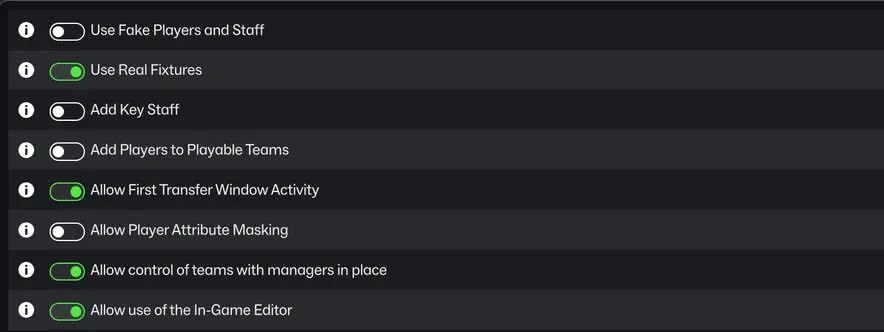
The editor option in the advanced settings of a new save (Image: FM Blog / Sports Interactive)
SI explains that these settings cannot be changed once the save has been created. So if you switched it off, the editor will not work in that career, even if you buy it later. That is why you should always leave it on, even if you do not own the editor yet. It changes nothing in the game until you use it. Our guide to setting up your FM27 save covers the other options.
After buying it, open the game and load your save. The editor is then available inside the career.
What if the editor does not appear?
SEGA support gives a short checklist:
- the editor is the FM27 one and is on the same account as the game;
- no VPN is running;
- your computer’s date, time and time zone are correct;
- on Steam, try launching FM from the In-Game Editor store page and verify the game files;
- on Epic, verify the files and restart the Epic Games Launcher.
In addition, some antivirus programs have caused problems with the editor in the past, such as Avast, Bullguard and BitDefender. If nothing works, the next step is a support ticket with SEGA.
What you can edit with the FM27 In-Game Editor
On the store page, SI highlights three areas. For players, you can change the entire profile: individual attributes such as Dribbling or Pace, plus Current Ability and Potential Ability. For clubs, you can boost the finances and raise the reputation. On its FM27 tips page, SI also mentions editing leagues.
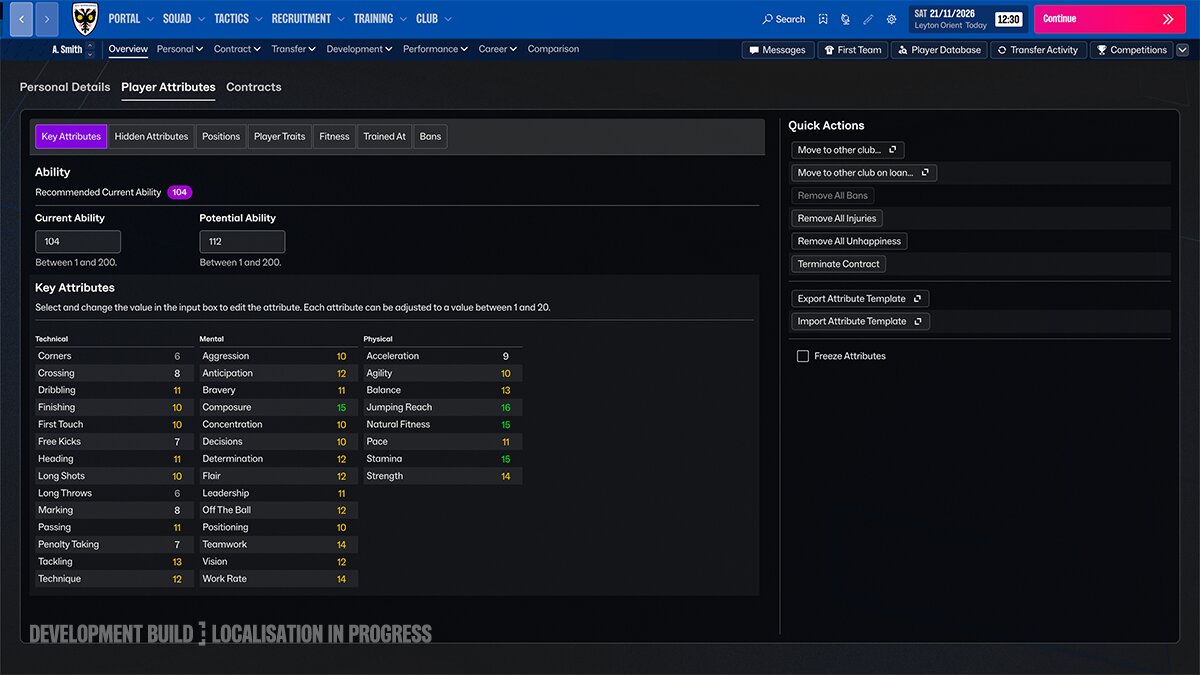
A player profile in the editor, still in a development build (Image: Sports Interactive)
The image SI shared in October gives a clearer idea of the player screen. For example, it has three tabs (Personal Details, Player Attributes and Contracts). Inside the attributes there are also Hidden Attributes, Positions, Player Traits, Fitness and Bans.
Current and Potential Ability range from 1 to 200, while each attribute goes from 1 to 20. On the right you find the quick actions:
- move the player to another club, permanently or on loan;
- remove all bans, injuries or unhappiness;
- terminate the contract;
- export and import an attribute template;
- freeze attributes.
The image comes from a development build, so some names or positions may have changed in the final version.
In-Game Editor or Pre-Game Editor?
They are two different tools and many people mix them up. The Pre-Game Editor is free and also official. On Steam it shows up in your library under Tools. On Epic and the Microsoft Store it is installed separately, like the game.
However, it works before the career, not inside it. With it you can change almost the whole database: players, clubs, competition rules, stadiums, awards, finances and kits. Those changes then go into a new game. For example, it is the tool behind community update databases and custom leagues.
In short, the Pre-Game Editor prepares the world before you start. The FM27 In-Game Editor, on the other hand, lets you change whatever you want in a career that is already running.
What about community real-time editors?
There is also a third option: real-time editors, which also change your save while you play. Our recommendation is FMPT Chief Analyst, the free scout and editor made by FMPortugal. It reads your career straight from the game and, if you switch on edit mode, lets you change your save. It also needs no installation and no account, but it only runs on Windows.
If you want other options, there is FMRTE 27, FMLibreEditor and, for Game Pass, the FM27 Live Editor.
Each one has its own installation and compatibility rules, so read its page before using it. You will find them all in our FM27 editors category.
Still, one difference matters: the FM27 In-Game Editor is the only official one, sold by SEGA and supported by SEGA. The others depend on their authors’ work and updates.
Sources
- Football Manager 27 In-Game Editor on Steam
- Football Manager 27 In-Game Editor on the Epic Games Store
- Football Manager 27 In-Game Editor on the Microsoft Store
- FM27: 2D Match Engine, In-Game Editor and Deeper World Upgrades (Sports Interactive)
- Top Tips for Starting Your First FM27 Save (Sports Interactive)
- SEGA support: In-game Editor not appearing