CalmDark FM27 is a calm, dark skin for Football Manager 27, made by ImmersiveFM, the author of The Director. Instead of FM’s purples and club colours, you get a neutral charcoal look and denser tables. It also redesigns the player profile, the squad and the tactics screens, and it follows the language you play FM in. It is free, for Windows and Mac.
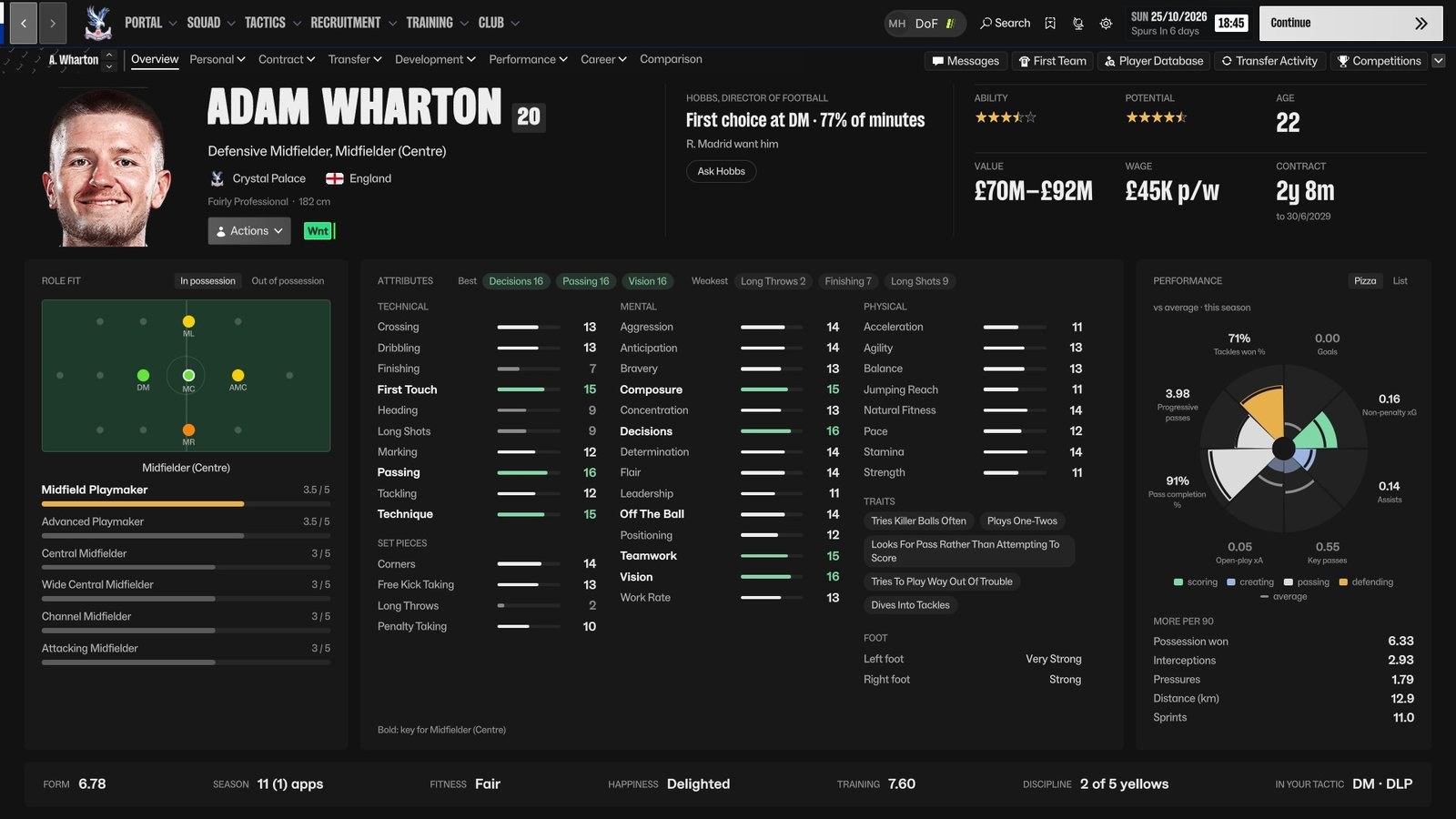
One of your own players, the whole profile on one screen (Image: ImmersiveFM)
What CalmDark changes
- A calm look across the game: first, charcoal backgrounds, fewer boxes and denser tables. So the bright club colours no longer tire your eyes.
- The profile on one screen: role fit, attributes with the best and weakest highlighted, Traits, preferred foot and a performance «pizza» chart. For example, beside the pizza you also get FM’s attribute chart and your coach’s report.
- No cheating: Ability and Potential appear exactly as FM shows them: stars for your players, ranges when scouted and «Unknown» when not.
- A redesigned squad screen: a list grouped by line, with condition and sharpness bars, FM’s status labels and the Match readiness and This Week panels.
- Keyboard shortcuts: Page Up and Page Down step through players on any profile tab. Also, Ctrl+F7 switches between the new profile and FM’s own Overview.
- Works with The Director: finally, with both mods installed, the director of football’s verdict on each player sits in the profile header, with a button to ask him about it.
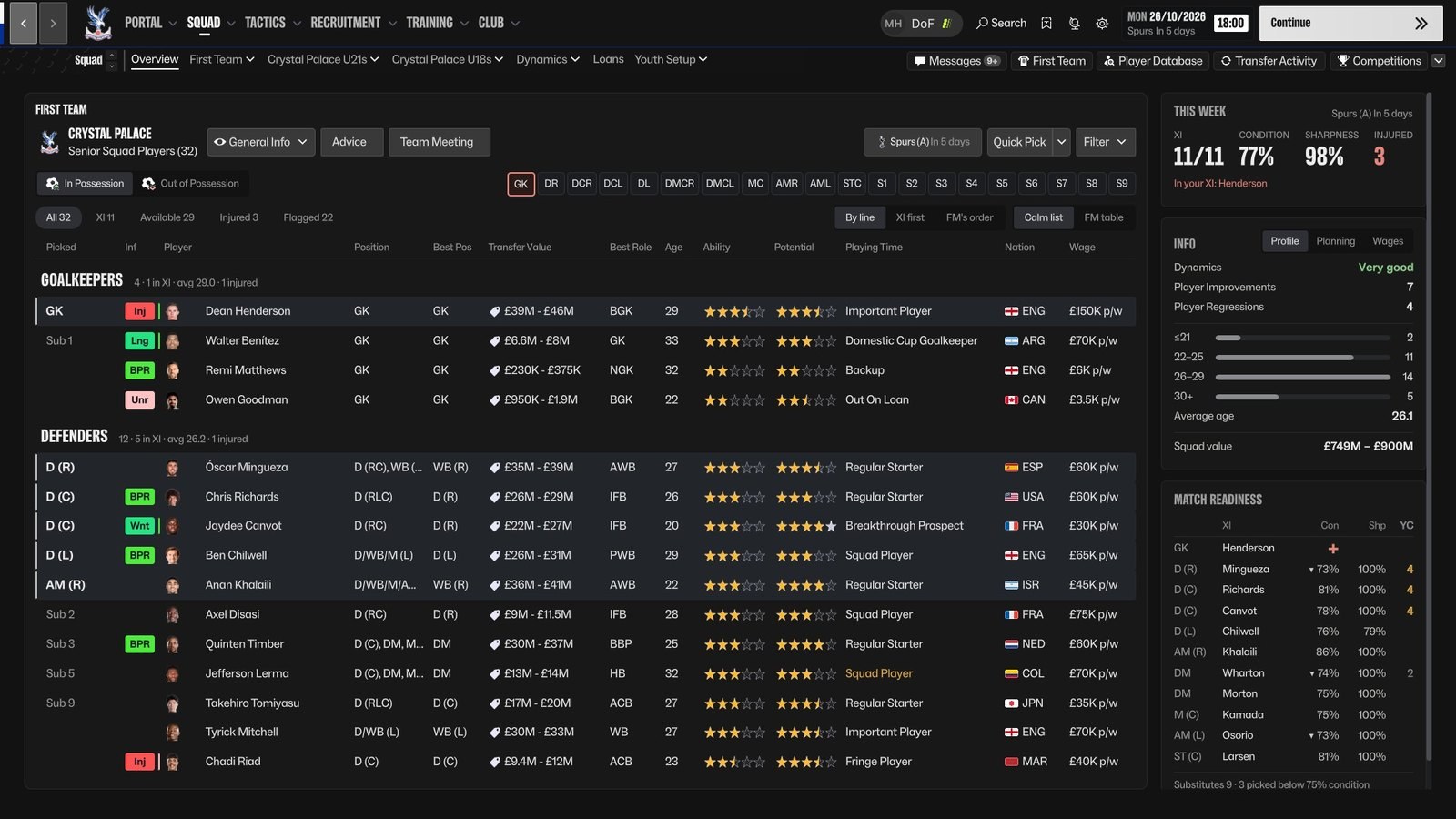
The redesigned squad screen, grouped by line (Image: ImmersiveFM)
The new tactics screen in 0.28.0
The big change in this version is the Tactics screen, redrawn from scratch. The pitch stays on the left, now with player faces. But the squad list also shows who each player will face in the opponent’s predicted line-up. Then, when you pick a player, the panel on the right shows his roles with FM’s stars, and one click gives him another. His Traits, key attributes, instructions and season data are there too.
On the team tab, you see the tactic’s effectiveness, the opponent, set pieces and your game plan. Also, on a Mac FM’s data now shows on every screen, and the installer copes with macOS 27. Finally, the squad list scrolls again on taller screens.
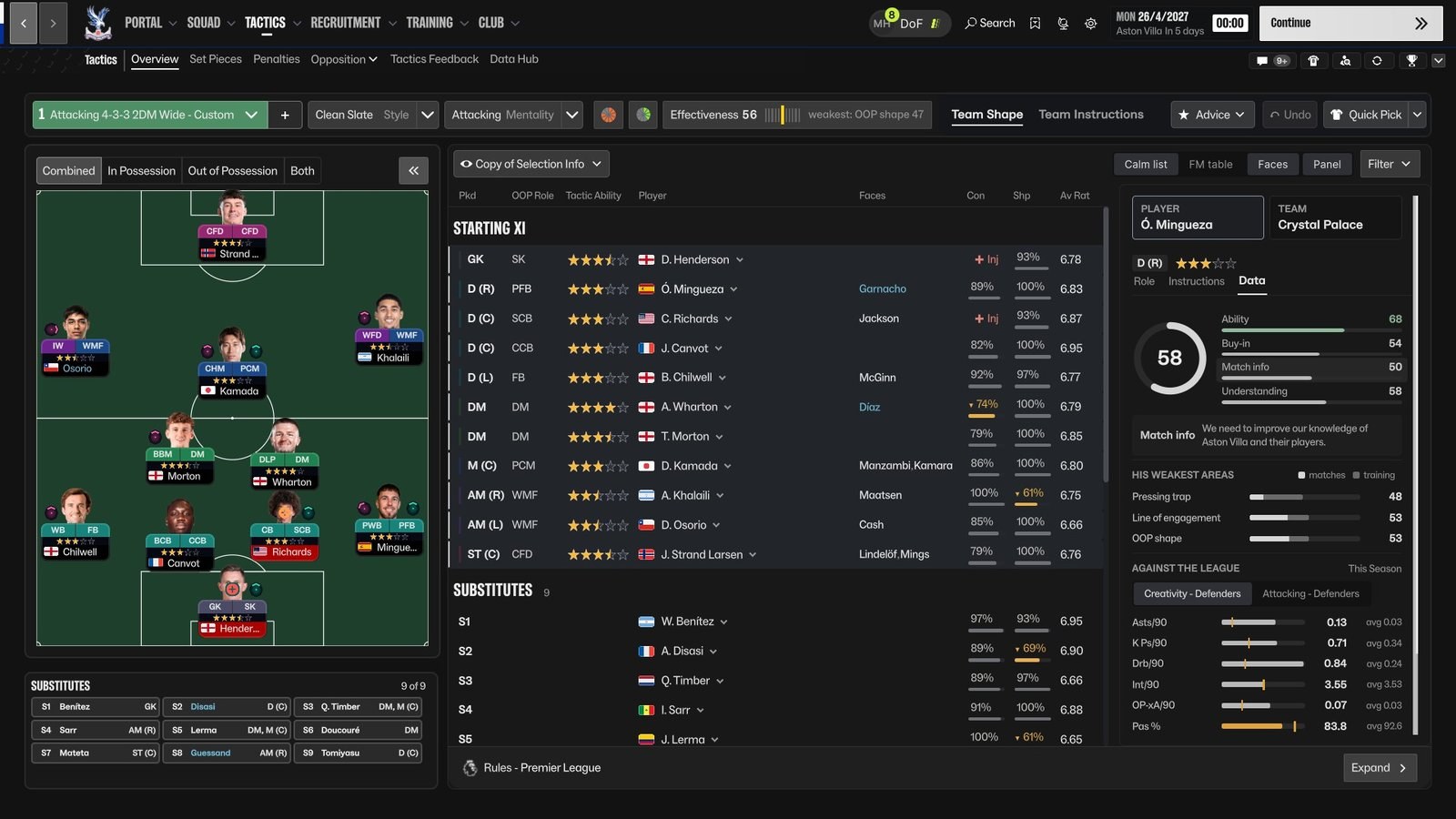
The tactics screen, with each player’s opponent and the side panel (Image: ImmersiveFM)
Who it is for
It is for anyone who spends hours in FM27 and finds the original interface too colourful or too boxy. So the information is tidier and easier on the eyes after many seasons. If you already use The Director, there is even more reason to try it, because both share the same loader. However, CalmDark works perfectly well on its own. The author says the next screens to be redesigned are Club > Staff and the match screens.
CalmDark download
The latest version is 0.28.0, from 6 November, tested on FM 27.0, on Windows and on Apple silicon Macs. The full Windows version is a 39 MB zip with the skin and a small BepInEx plugin, which is included. The Mac version is an installer signed by Apple, for M1 or later and macOS 13 or newer.
Download – CalmDark v0.28.0 (Windows)
Download – CalmDark v0.28.0 (Mac)
If you have an Intel Mac, play on Game Pass or Epic, or do not want mods, there is CalmDark Lite. In other words, it is just the skin, at 25 KB. You get the calm look on FM’s own screens, but without the redesigned ones.
Download – CalmDark Lite v0.28.0
- First, extract the zip. In Steam, right-click Football Manager 27 and choose «Manage» and «Browse local files».
- Then copy everything inside the
1 - into your FM27 folderfolder into the game folder.winhttp.dlland theBepInExfolder should sit besidefm.exe. If you already use The Director, merge the folders. - Next, copy the
calm-darkfolder intoDocuments\Sports Interactive\Football Manager 27\skins. If there is noskinsfolder, create it. - Finally, start FM27, open Preferences and pick «Calm Dark» at the bottom of the window. On a Mac, just open the
.pkg, start the game from Steam and do this last step. For Lite, you only need the last two steps.
Things to watch
The full version includes an unsigned plugin, so Windows SmartScreen may warn you the first time. If so, choose «More info» and «Run anyway». Also, the first FM launch after installing takes a minute longer, but only once. The skin was tested at 1920×1080 and 1440×810, and FM’s Medium and Small display modes are untested. On a Mac, use fn+Up and fn+Down to change player. To uninstall, pick FM’s default skin and delete the BepInEx\plugins\CalmDark folder. On a Mac, however, the uninstaller is in ~/Applications/ImmersiveFM. If you prefer a light theme, see FM27 Light Skin.
The files are hosted by their original authors. FMPortugal only points to the official download page — all credit goes to their creators.