Have you ever wished your FM27 Director of Football was more than a name on the staff list? The Director, by ImmersiveFM, turns him into a colleague you can talk to inside the game. He reads your save, gives his view on every player, builds target lists and plans your transfer windows with you. The mod is also free and already works on FM27.
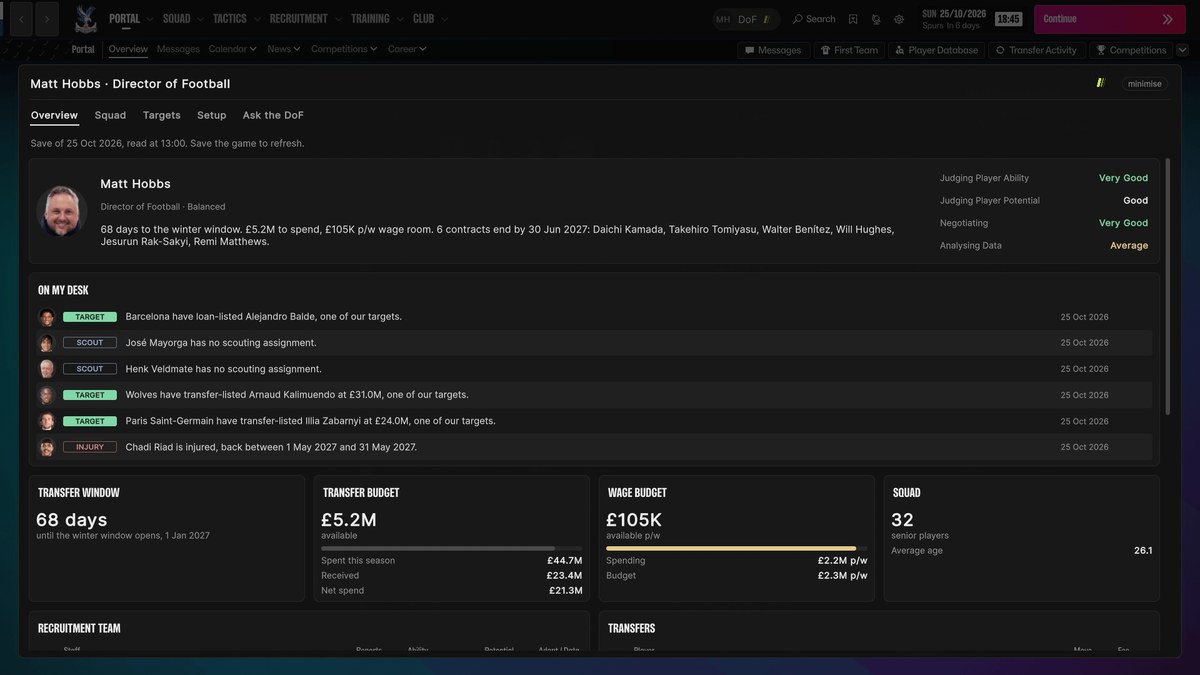
The Director of Football panel, with what is new on his desk (Image: ImmersiveFM)
What The Director’s FM27 Director of Football does
The mod lives inside the game. So there is nothing to export and no separate program to run alongside FM. Just click the DoF button in the top bar, or press F7, and his panel opens over whatever screen you are on.
- He reads your save: he sees the squad, your scouts’ reports, the wage bill, contracts running down, the league table and other clubs’ bids. Every time you save, he catches up.
- On his desk: the Overview shows what changed since you last saved, such as a target listed for sale, a bid for one of your players, an injury or a scout with nothing to do.
- A verdict on every profile: when you open a player, his view sits beside the Actions button. It is sign, stretch or pass, with the reason in one line.
- Depth chart: it shows who is ahead of whom in your tactic, based on minutes played, and where you have no cover.
Targets and transfer windows
Target lists follow the way you recruit, not a generic rating. For example, you pick the FM27 In Possession roles you use, and each name comes with a verdict, a fee, a wage and the reasoning. Then, about 30 days before each window, he proposes two priorities, one sale and how to split the budget. When the window closes, he grades how it went.
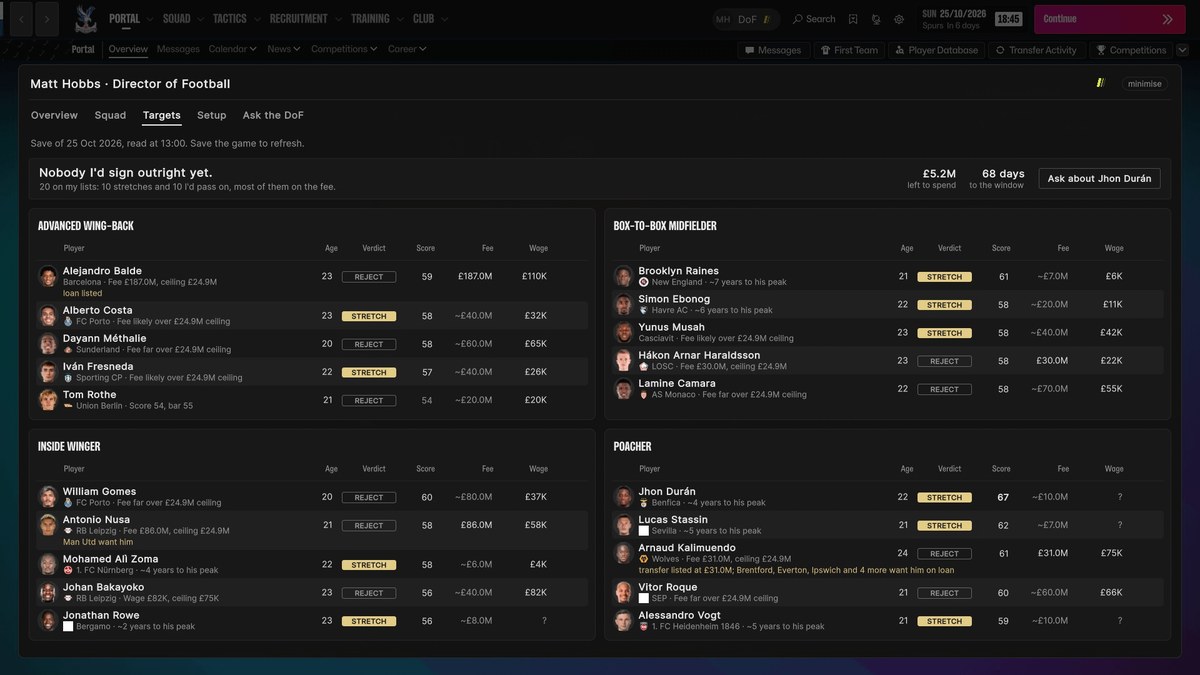
Targets by role, with verdict, fee and wage (Image: ImmersiveFM)
On a new save, he starts with three questions: what the board expects, how you want to build and how you play. He then proposes an approach, such as Moneyball, a trading club or youth development, and sizes your fee and wage ceilings to the budget.
Talk to him
You can also ask him anything about your club. He answers from your save and pushes back when he thinks you are wrong. He does not cheat either, because he only knows what your scouts know. If you have not scouted a player, he tells you so instead of revealing hidden attributes.
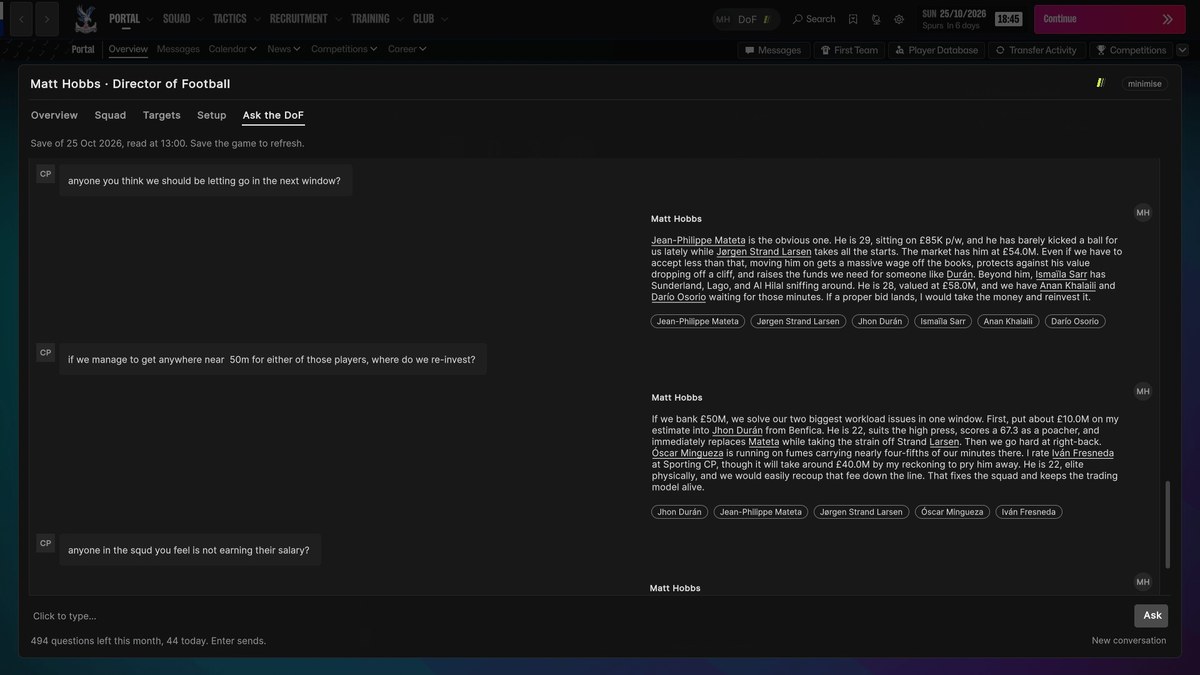
The chat in the Ask the DoF tab (Image: ImmersiveFM)
For the chat, you choose how he reaches an AI model in the Setup tab. You can use your own API key or Claude Code without paying the author anything. Alternatively, there is a hosted version with a Patreon code and nothing to set up. Your save never leaves your computer. Only the question and a summary of your club go to the model you chose.
Bonus: the Calm Dark skin
The author has also released Calm Dark, a free skin that works without the mod. It has dark, neutral colours, fewer boxes, denser tables and a redesigned player profile with per 90 stats. With both installed, the Director’s verdict appears at the top of the profile.
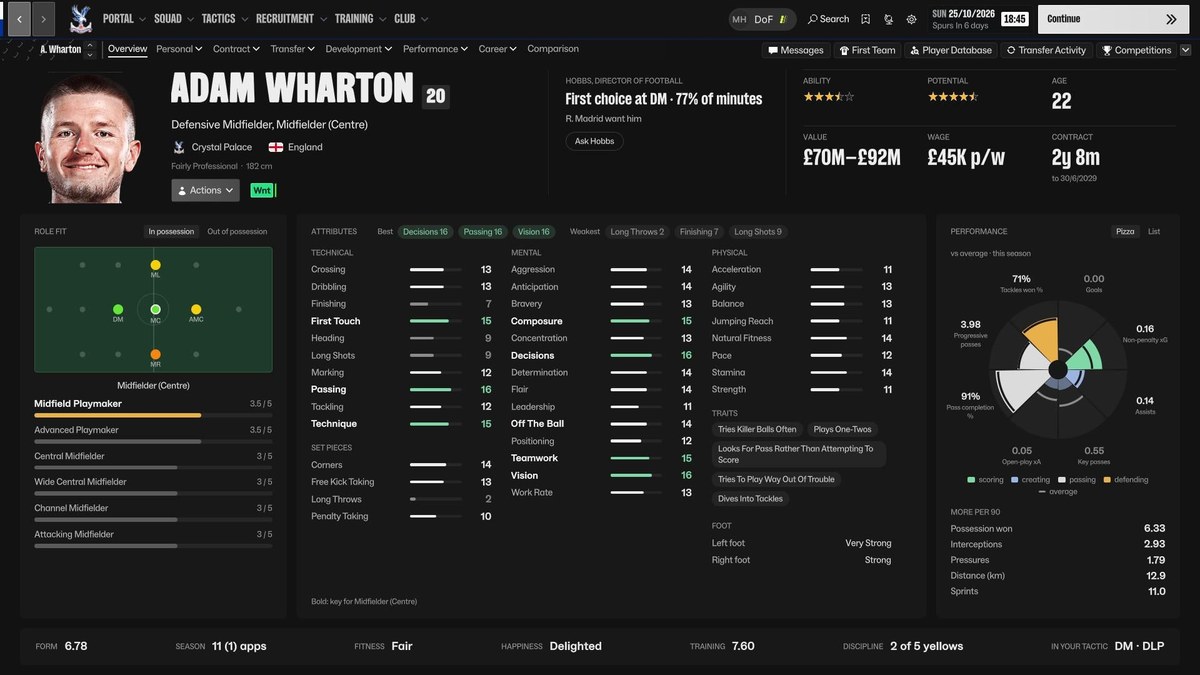
The profile with Calm Dark and the Director’s view at the top (Image: ImmersiveFM)
The Director FM27 download
The mod is for FM27 on Steam. On Windows it is on version 0.70.2, and there is a beta for Mac (Apple silicon).
Download – The Director FM27 (Windows)
Download – The Director FM27 (Mac, beta)
- First, in Steam, right-click Football Manager 27 and choose «Manage» and «Browse local files».
- Then open the TheDirector folder in the .zip and copy everything into that folder, so that
winhttp.dlland theBepInExfolder sit besidefm.exe. - Next, start the game. The first launch takes about a minute longer, but only once.
- Finally, load a save, save it and press F7.
Calm Dark comes in two versions: the full one, for Windows, and Lite, with the skin only, for Mac or for anyone who does not want mods.
Download – Calm Dark Lite v0.26.5
To install it, copy the calm-dark folder to Documents\Sports Interactive\Football Manager 27\skins and pick it in Preferences. For the full version, also copy the contents of the «1 – into your FM27 folder» folder into the game folder.
Things to watch
Since the mod is not digitally signed, Windows may show a warning the first time. If so, choose «More info» and «Run anyway». On FM27 he also cannot read staff attributes from the save yet, and he tells you so. To uninstall, just delete winhttp.dll from the game folder, and your saves stay untouched. If you are looking for other dark skins, see the Nev Skin too.
The files are hosted by their original authors. FMPortugal only points to the official download page — all credit goes to their creators.