FM27 Skip Intro by YoshiAlfie is a small plugin that skips the opening scenes of Football Manager 2027. So the game gets to the screen where you load your save much faster. It is free, weighs less than 10 KB and works with BepInEx 6. Also, the author is the same as Camera & Match Speed, which we already covered in the startup and camera mods.

FM27 Skip Intro (Image: YoshiAlfie)
What FM27 Skip Intro does
- Skips the opening scenes: first, the startup logos and videos no longer show.
- Skips the photosensitivity warning: since version 1.1.1 it also skips the warning. If you want to see it, turn it back on in the mod’s config file.
- Works with skins: as it uses BepInEx 6, it does not touch the game’s files, so it should work with any skin.
- Less than half the time: finally, according to the author, the game starts more than 50% faster.
How much time you save
One player timed it from pressing «Play» on Steam to the load-save screen. Without the mod, it took 68 seconds. With the first version, it went down to 39 seconds. Finally, with 1.1.1, it took 25 seconds. His computer is fast, so times will differ on other PCs, but the saving should be similar.
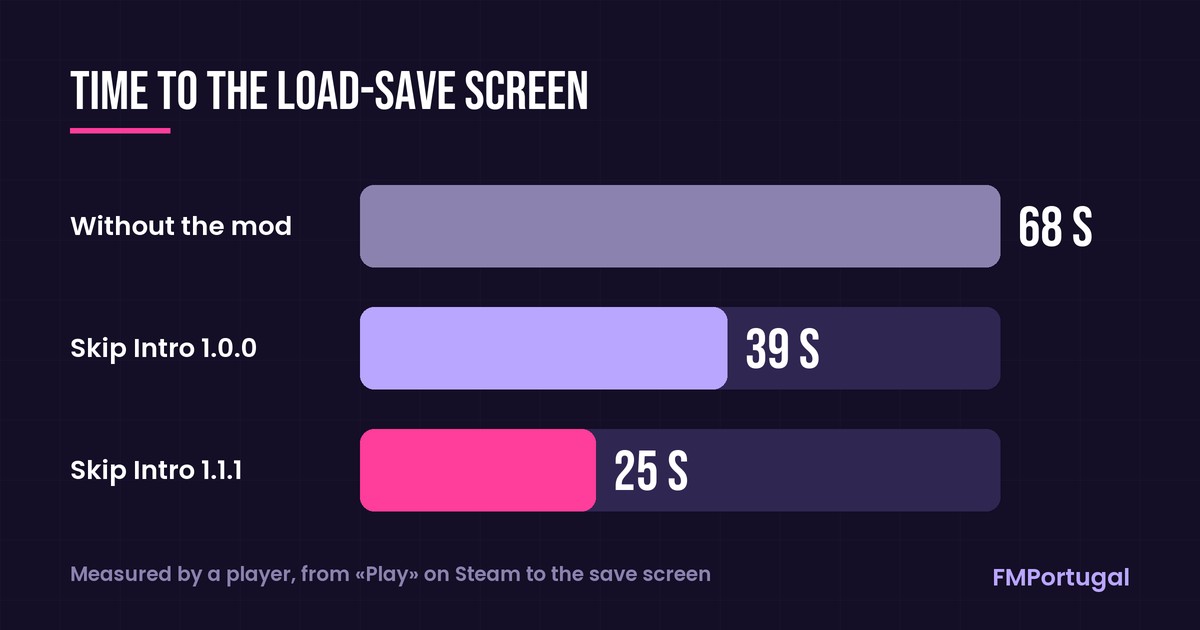
Time to the load-save screen, measured by a player (Image: FMPortugal)
Which startup mod to choose
Two other mods do the same job: FM Kit Creator’s Skip Intro and Faster Game Startup, which we explain in the startup and camera mods. So use only one of them. YoshiAlfie’s is the simplest to install if you already use BepInEx for other plugins. On the other hand, Faster Game Startup does not need BepInEx.
FM27 Skip Intro download
The latest version is 1.1.1, from 2 November. The mod was made on Linux and works the same way on Windows. However, the author has not tested it on Mac, although one player says it works there too. You need BepInEx 6 IL2CPP, which is not included.
Download – FM27 Skip Intro v1.1.1
BepInEx 6 IL2CPP – official page
- First, download the latest
BepInEx-Unity.IL2CPP-win-x64file from the BepInEx page. - Then, in Steam, right-click FM27 and choose «Manage» and «Browse local files». This opens the game folder, which contains
fm.exe. - Next, extract BepInEx into that folder and open the game once. The first launch takes longer. When the game has fully opened, close it.
- After that, extract the mod and put the
FM27SkipIntrofolder inFootball Manager 27\BepInEx\plugins. - Finally, open the game and you should see the shorter startup.
Things to watch
If you already use BepInEx for another plugin, such as Camera & Match Speed, do not install it again: just put the mod in the plugins folder. However, an FM27 update may switch plugins off until a new version of BepInEx or the mod comes out. Also, on Mac you need the Mac version of BepInEx, not the win-x64 one. To remove the mod, delete the FM27SkipIntro folder.
The files are hosted by their original authors. FMPortugal only points to the official download page — all credit goes to their creators.