These three startup and camera mods for FM27 are small, free and fix things many players ask for. For example, FM27 spends about 40 seconds showing logos and videos every time it opens. Some players also want more speed options for highlights and for camera height. So we have gathered Skip Intro, Faster Game Startup and Camera & Match Speed here.
The Camera & Match Speed Mod (Image: YoshiAlfie)
FM27 Skip Intro
Made by the FM Kit Creator team, this plugin skips the logos, licences, loading videos and the photosensitivity warning. So you reach the main menu in about 10 seconds. You can also keep the videos or the warning if you like. It needs BepInEx 6.
Faster Game Startup
The mod by IlluZioNs does the same in a different way: instead of using BepInEx, it replaces two game files. The SI logo loops and the game skips the licence screens. It also works on Windows and Mac. However, only use one of the two startup mods.
FM27 Camera & Match Speed
The plugin by YoshiAlfie adds more speed options for match highlights and changes the height and zoom of the Dynamic Sideline and Broadcast cameras. Since it uses BepInEx 6, it should work with every skin. It was made on Linux and works on Windows, but it has not been tested on Mac.
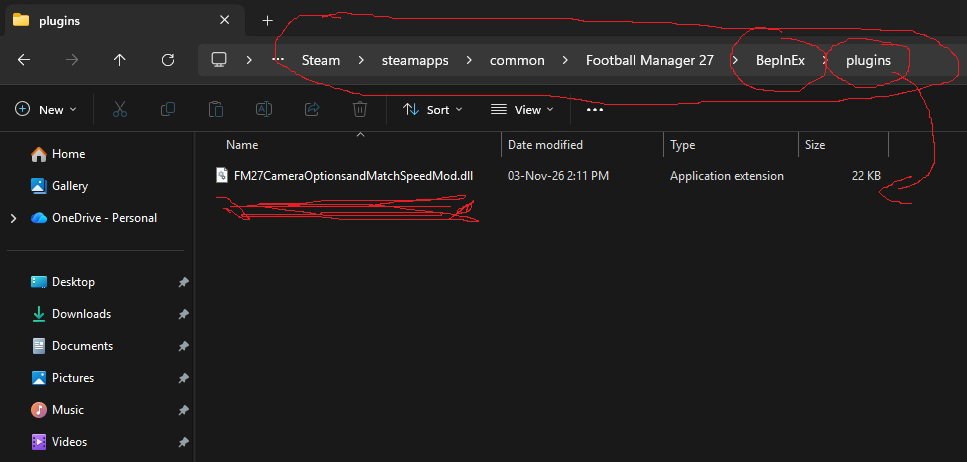
The mod’s file in the BepInEx\plugins folder (Image: YoshiAlfie)
Startup and camera mods download
Skip Intro is version 1.1.0, with the link from the authors’ site. Camera & Match Speed is also on 1.1.0. You need BepInEx 6 IL2CPP for Skip Intro and Camera & Match Speed, but not for Faster Game Startup.
Download – FM27 Skip Intro v1.1.0
BepInEx 6 IL2CPP – official page
Download – Faster Game Startup
Download – Camera & Match Speed v1.1.0
- First, for the BepInEx mods, download the «BepInEx-Unity.IL2CPP-win-x64» file (build 791 or newer) and extract it into the game folder, next to
fm.exe. Start the game once and wait a few minutes. - Then, for Skip Intro, extract the .zip into the game folder, so you end up with
BepInEx\plugins\SkipIntro\SkipIntro.dll. For Camera & Match Speed, put the mod’s folder inBepInEx\pluginsand delete the old version if you had it. - Next, for Faster Game Startup, back up the two original files and copy the new ones into
fm_Data\StreamingAssets\aa\StandaloneWindows64. On Mac, they go intofm.app/Contents/Resources/Data/StreamingAssets/aa/StandaloneOSX. - Finally, start the game.
Things to watch
In Skip Intro, you can keep the videos or the warning in the BepInEx\config\com.fmkitcreator.fm27.skipintro.cfg file. Also, FM27 updates may restore the Faster Game Startup files. If you use TacticalCam 2.0, take care pairing it with Camera & Match Speed, because both change the cameras. Finally, BepInEx 5 does not work with FM27.
The files are hosted by their original authors. FMPortugal only points to the official download page — all credit goes to their creators.