Do your 3D kits look fine in matches but show the wrong colours in the dressing room? Dressing Room Kit Fix solves that. It is a free FM27 plugin by Wannachupbrew that shows custom kits in their real colours in the dressing room. You also do not need to change anything in your kit files.
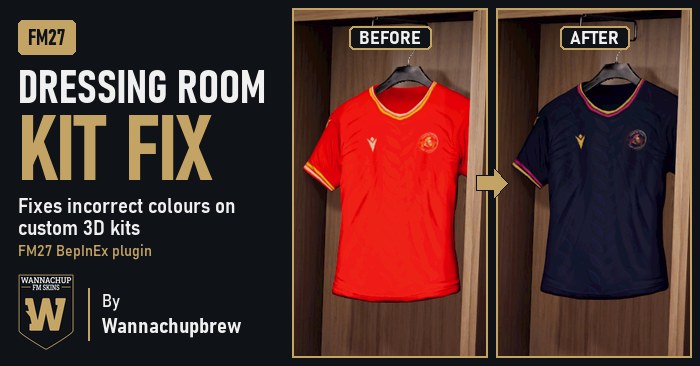
A kit in the dressing room before and after the fix (Image: Wannachupbrew)
The problem Dressing Room Kit Fix solves
It is a game bug that has been around since FM26. When the dressing room copies a custom kit onto the 3D shirt, the colour channels get shifted. In other words, dark colours turn red, orange turns yellow and green turns pink. However, official kits avoid it, because they come ready-made in the game files.
- Dressing room only: the plugin gives the dressing room a correctly prepared copy of the kit, so official kits and matches stay the same.
- Automatic: it finds your 3D kits in
Documents\Sports Interactive\Football Manager 27\graphics\kitsby itself, subfolders included. - Configurable: for example, you can turn the fix off or use another kits folder in the settings file.
Dressing Room Kit Fix download
Version 1.1.0 fixes the UI lag some players noticed in 1.0, most likely caused by 3D newgen faces. Now the plugin only steps in at the moment the dressing room builds a custom kit. There are two packages: the full one already includes BepInEx, which loads the plugin into the game, and the other has the plugin only. It works on FM27 for Windows and was tested on the Steam version.
Download – Dressing Room Kit Fix v1.1.0 (with BepInEx)
Download – Dressing Room Kit Fix v1.1.0 (plugin only)
- First, in Steam, right-click Football Manager 27 and choose «Manage» and «Browse local files».
- Then extract everything from the .zip into that folder. You should now see
version.dlland aBepInExfolder next tofm.exe. - Finally, start the game. The first launch takes a few minutes while BepInEx sets itself up, and a console window may open.
Already have BepInEx for another mod, such as ManagerLife? If so, download the plugin-only package and copy the DressingRoomKitFix folder into BepInEx\plugins in your game folder. That way you avoid having two copies of BepInEx. To update from 1.0, just replace that folder.
Things to watch
Never have both version.dll and winhttp.dll in the game folder. Kits kept in other graphics folders are not fixed either, so move them into graphics\kits. After an FM27 update, the first launch is slow again. If the game stops loading, delete the BepInEx\plugins\DressingRoomKitFix folder and wait for a new version. Finally, if you are looking for kits to use, see the real 2026/27 kits and the FC’12 kits.
The files are hosted by their original authors. FMPortugal only points to the official download page — all credit goes to their creators.