Better Tactics View FM27 is a new view for the table on the tactics screen, the combined squad view. It is by djdookie, the author of Partnership Lines, and it tidies the table into shorter rows, adds the Form column and shows injury risk with an icon. So you see the whole squad at once, without jumping to other screens.
⬇️ Jump to the download: Better Tactics View 1.0
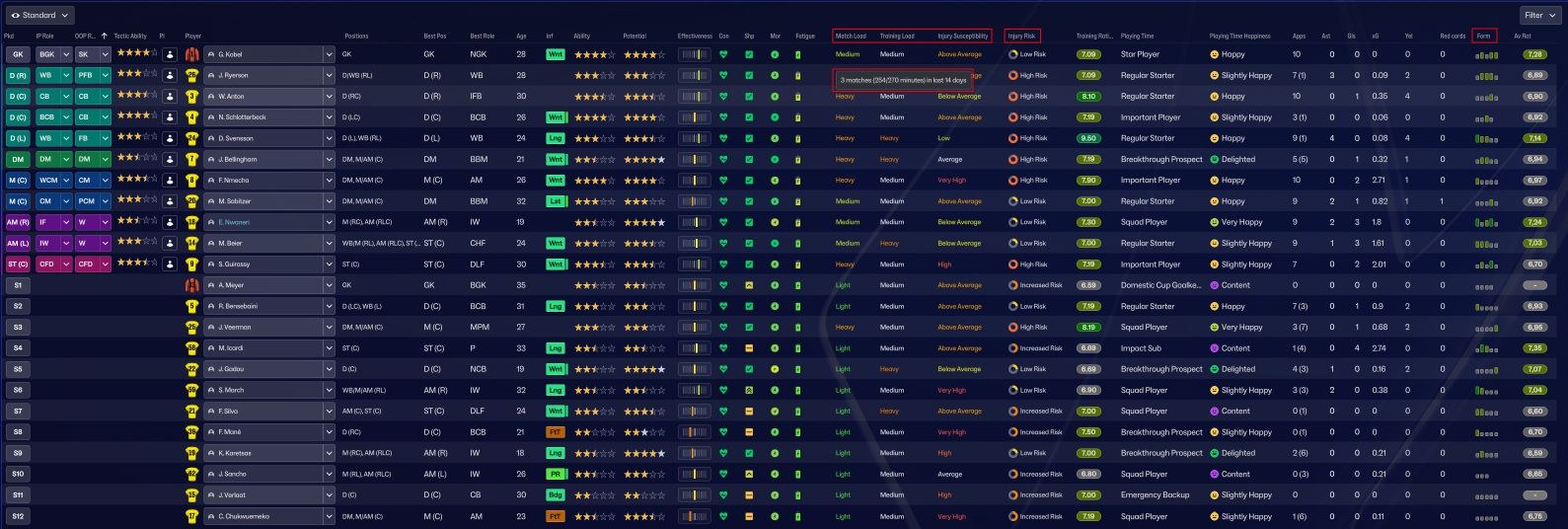
The view on the tactics screen, on an ultra-wide monitor (Image: djdookie)
What it fixes in the table
First, the Match Load, Training Load and Injury Susceptibility columns take three lines each in the game. So rows get taller and the row highlight no longer lines up with the player. The view uses the one-line versions, which FM27 has but does not offer in the column menu. You still see the full text when you hover over a cell.
It also adds the Form column, which exists too but is missing from the menu. Finally, Injury Risk becomes an icon and text instead of the plain pill, and it no longer shows twice.
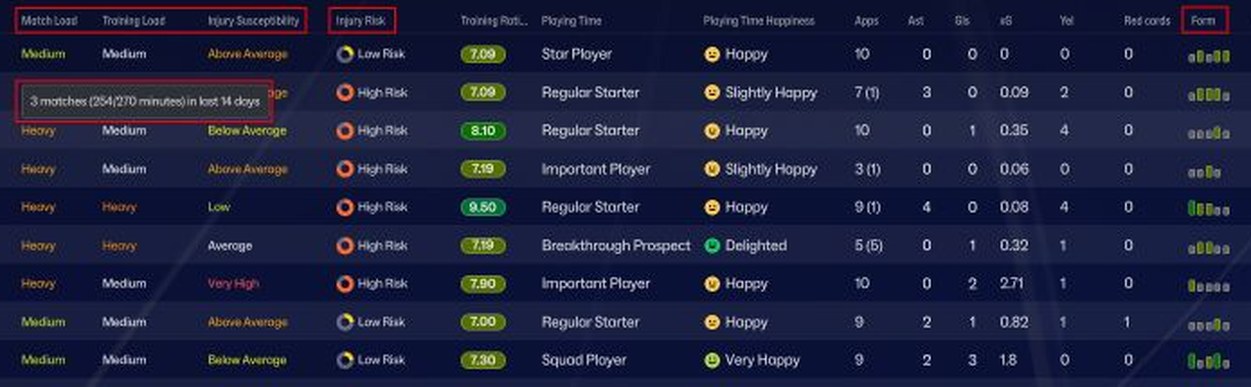
One-line workload cells, the injury risk icon and Form (Image: djdookie)
The two files
The download has two files. Standard.fmf is the view: it sets the columns, their order and width, including the compact Match Load and Form. ui-tablefactories_assets_all.bundle replaces a game file, to put Training Load and Injury Susceptibility on one line and show injury risk as an icon.
However, this second file is a copy of the original from FM27 version 27.0.0, from 2 November, and it only works on that version. As the game is already on 27.1.1, use only the view for now. Without the game file, Training Load and Injury Susceptibility go back to three lines, but Form and the compact Match Load stay.
Who it is for
It is for anyone who picks the starting eleven on the tactics screen and wants to see form, fatigue and workload without opening other screens. It was made for ultra-wide monitors, but you can adjust the column widths to your screen. If you prefer a view with your assistant’s opinion, see the julianomatt tactics view too.
Better Tactics View download
This is version 1.0, from 25 November, in a 153 KB ZIP with the view and the game file.
Download – Better Tactics View 1.0
- First, extract the ZIP anywhere you like.
- Then, on the tactics screen, open the views menu, choose Import view… and select
Standard.fmf. - The view is called «Standard». If you already have a view with that name, rename the new one afterwards.
- Finally, pick the Standard view on the tactics screen.
Do not copy the .bundle file until the author rebuilds it for 27.1.1, because you would replace a newer game file with an older one. If you already copied it, use Steam’s «Verify integrity of game files» option, which puts the original back.
Things to watch
The column names show in English, but the view works with the game in other languages, because it uses the column IDs. Also, as Injury Risk and Overall Injury Risk are the same value, the view keeps only one of them. Finally, after every FM27 update the game file has to be rebuilt by the author, but the view can be used on its own.
Better Tactics View is by djdookie. FMPortugal only points to the file — all credit goes to its creators.
Did you make this download?