YoshiAlfie‘s FM27 skin is a simple dark theme, but it does not come alone. The author has also released UI Tweaks, a plugin that adds useful buttons and columns to several screens, plus a squad view ready to import. All three are free and independent, so you can use just one or all of them together. YoshiAlfie is also the author of FM27 Skip Intro and Camera & Match Speed, which we already covered in the startup and camera mods.
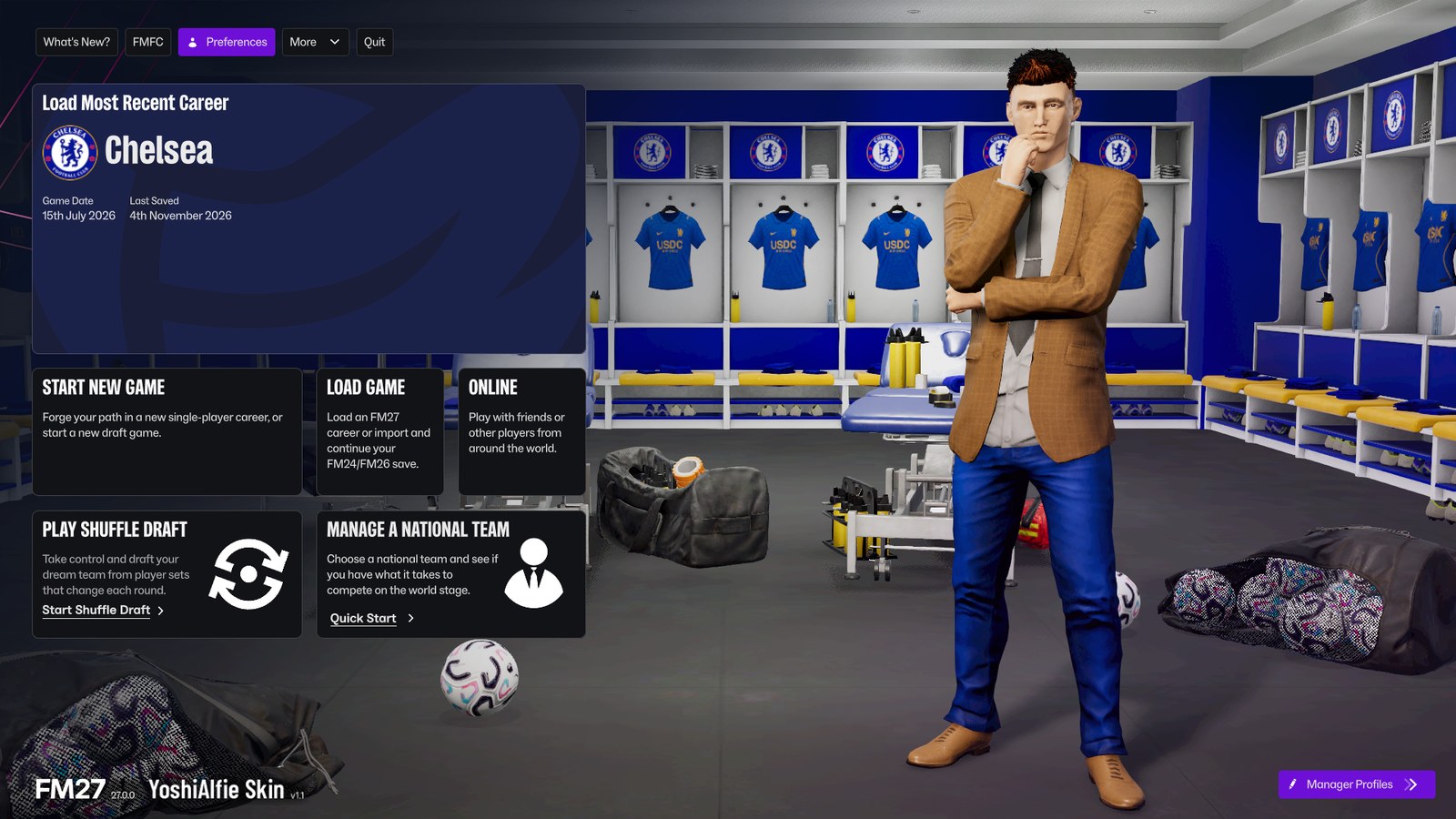
The new main menu in version 1.1 (Image: YoshiAlfie)
The skin: dark, flat and without gradients
YoshiAlfie’s FM27 Skin swaps the game’s look for a charcoal background, with dark boxes and pop-ups. So buttons become flat and purple, and the match commentary text is no longer bold. Version 1.1, from 4 November, brings a cleaner main menu. Also, the author added solid colour blocks where there used to be gradients.
It is a proper skin, kept in your Documents folder, and it does not replace any of the game’s .bundle files. That is why, according to the author, it should keep working after FM27 updates. Even so, he promises to fix it if an update breaks a screen. It weighs just 21 KB.
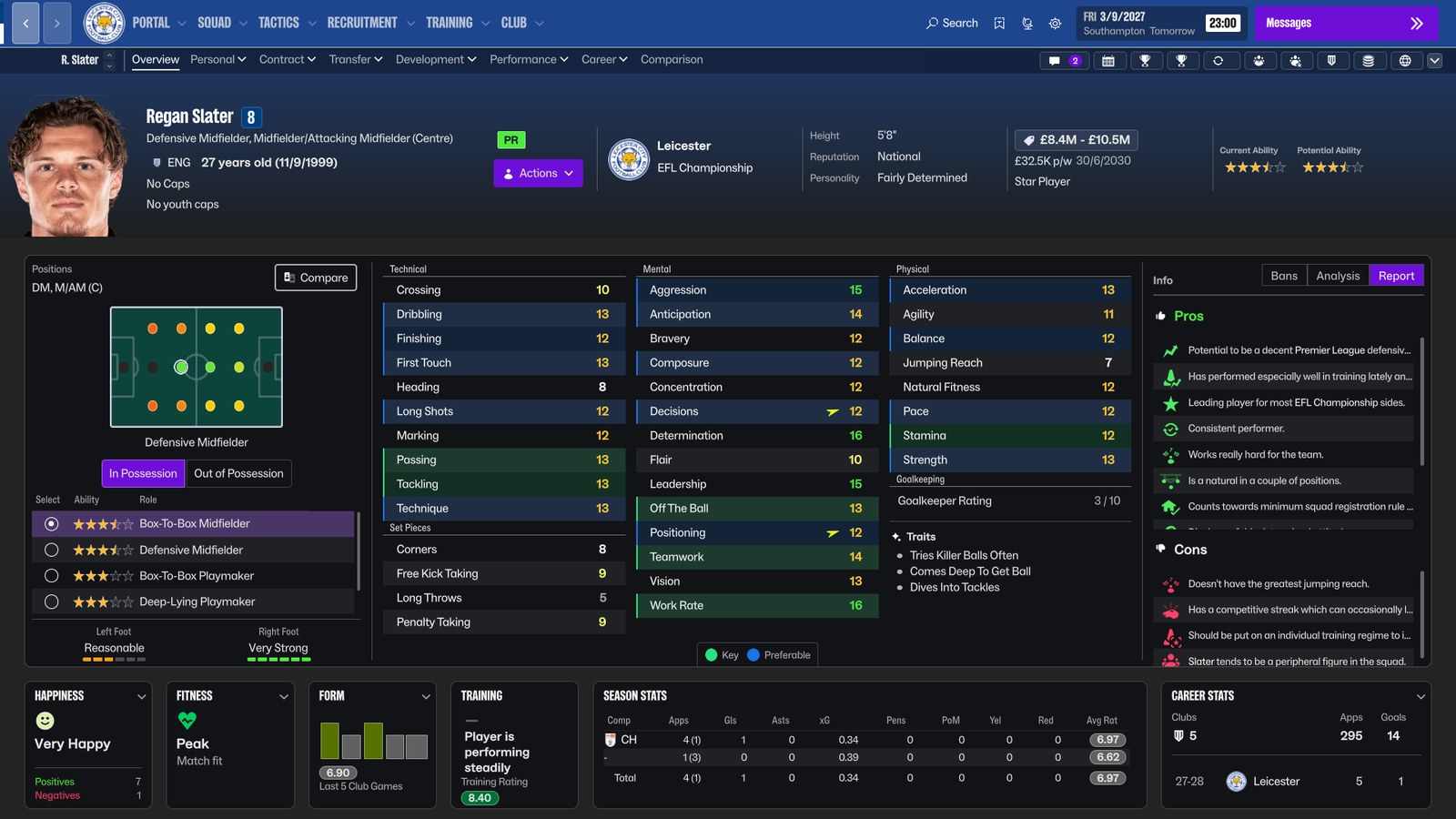
The player profile with the Report tab, on the right (Image: YoshiAlfie)
UI Tweaks: more information on the game’s screens
UI Tweaks is a BepInEx 6 plugin that changes what the screens show, not their colours. In other words, it works on top of YoshiAlfie’s skin or any other skin. These are the changes in version 1.1.1, from 5 November:
- Player profile: first, some of the most important information has moved to save space. The Info panel gets Attribute Analysis and Report tabs, with the coach report and scout reports where they exist. Bans now have their own panel.
- Individual training: on the Individual Training screen, every player gets Praise and Criticise buttons. If you cannot praise or criticise a player, for example because he has just joined or you already did it this week, a small message appears.
- Fixtures: finally, the information has been reordered and there are two new columns, attendance and goalscorers. However, for now the goalscorers’ names are not clickable.
Version 1.1.1 fixed a bug where the praise looked done but the player never received it. The author then added the Report tab and translations of the buttons into many languages. One player also asked for a button to praise the whole squad at once, and YoshiAlfie said he would look into it.
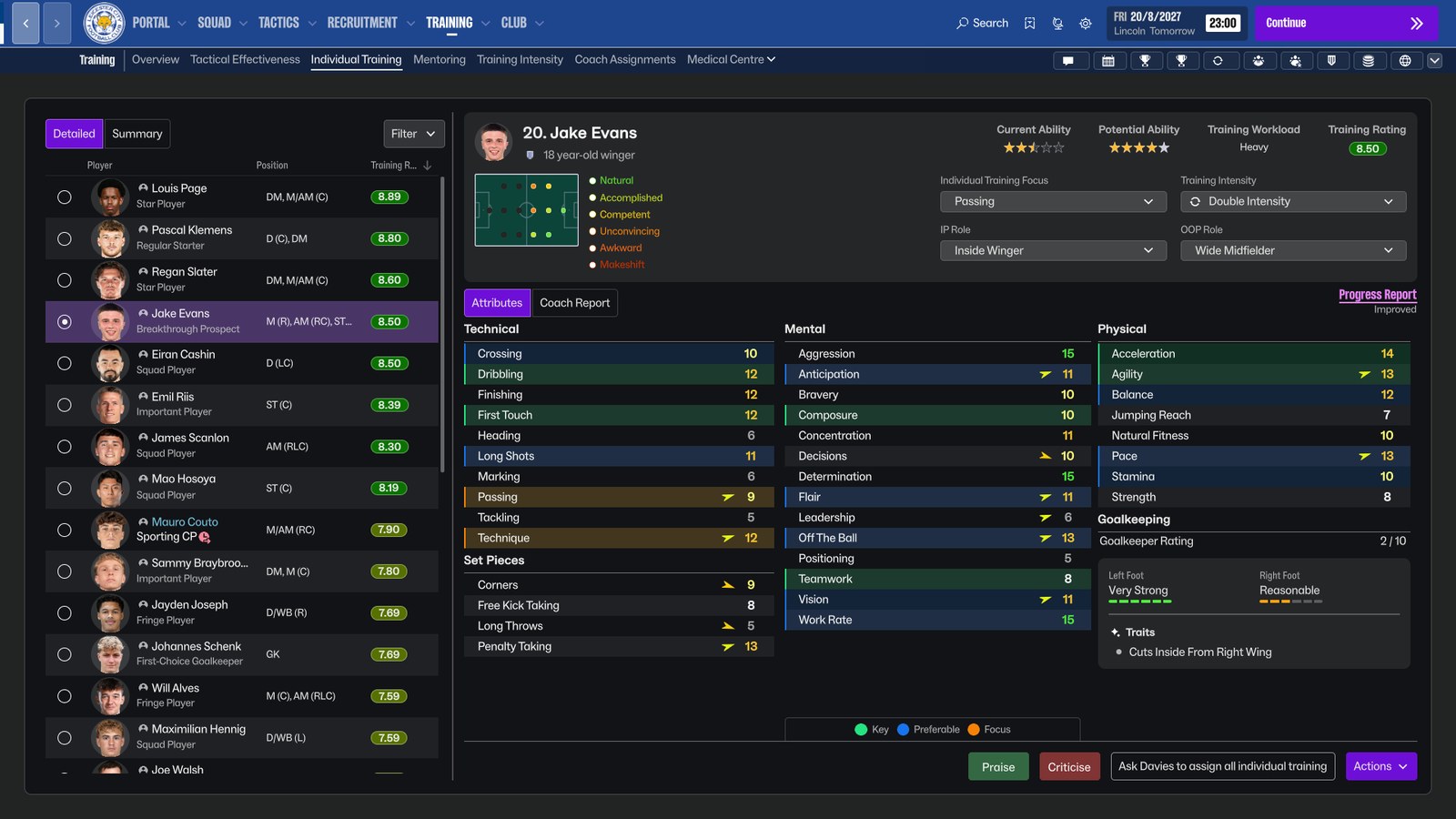
The Praise and Criticise buttons in individual training (Image: YoshiAlfie)
The squad view
YoshiAlfie’s Squad View is a 1 KB .fmf file for the squad screen. Basically, it is FM27’s default view without a few less useful columns and with three new ones: Morale, Physical Condition and Tactical Effectiveness. So you can see at a glance who is in shape and who fits your system. It was built at 1080p, so it should look right on most screens. On larger resolutions, though, there is room to add more columns.
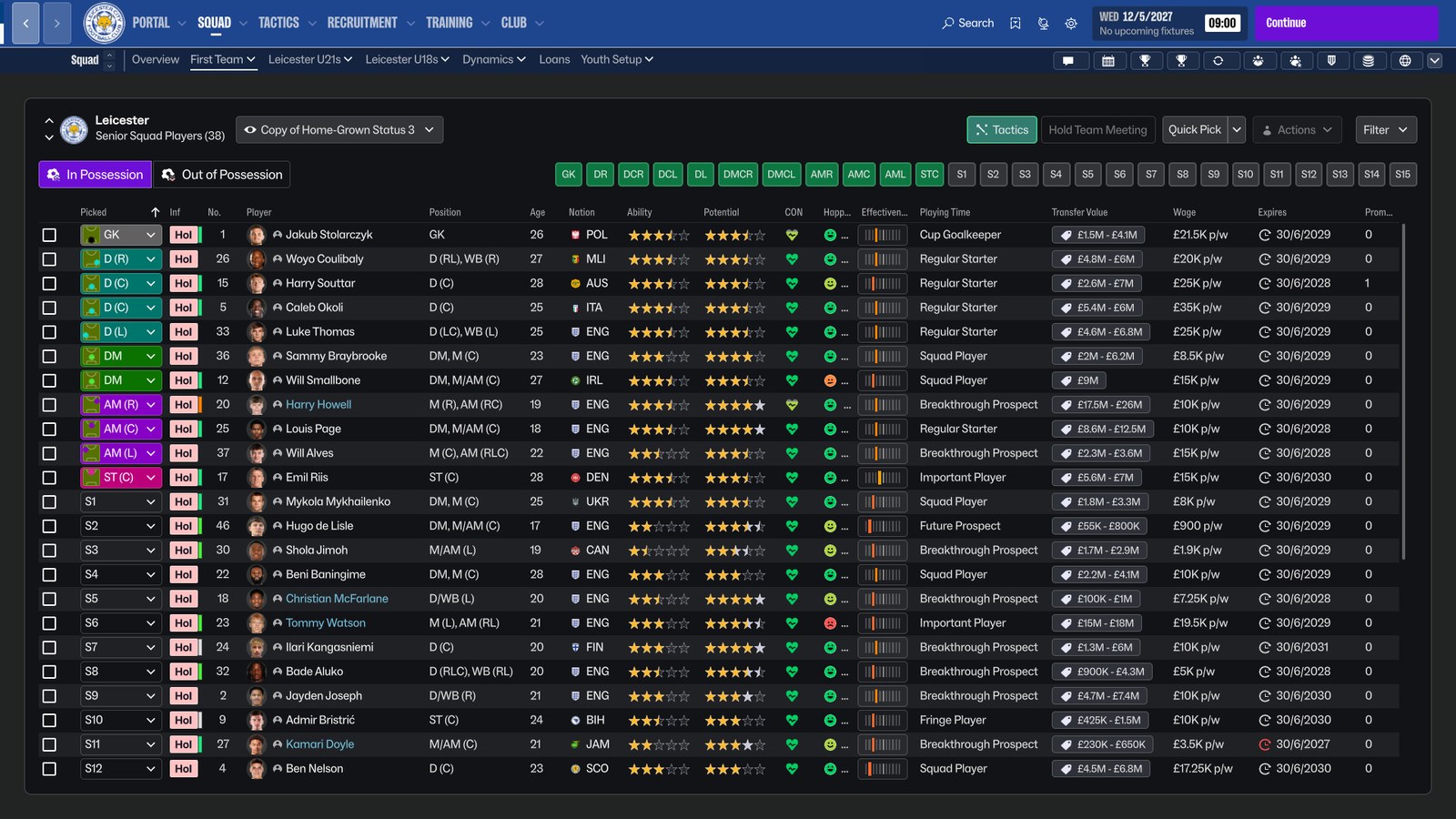
The squad view with morale, physical condition and tactical effectiveness (Image: YoshiAlfie)
How to combine the three
Each file does something different, so they do not clash. The skin changes the look, the plugin adds features and the view tidies the squad columns. For example, the UI Tweaks screenshots were taken with this skin. According to the author, the plugin works with any skin installed in the Documents folder. However, he has not tested it with skins that replace .bundle files and doubts most of them will work. Also, UI Tweaks should get along with other BepInEx 6 mods. YoshiAlfie tested it with Dressing Room Kit Fix, FMKitSwitcher, Skip Intro and Camera Options & Match Speed.
Skin, UI Tweaks and squad view download
All three are free. The skin is at version 1.1, from 4 November, and needs nothing else. UI Tweaks is at 1.1.1, from 5 November, but it needs BepInEx 6 IL2CPP, which is not included. Finally, the squad view is from 4 November and works with or without the other two.
- Skin: Download – YoshiAlfie’s FM27 Skin v1.1
- UI Tweaks plugin: Download – YoshiAlfie’s UI Tweaks v1.1.1
- BepInEx, for the plugin: BepInEx 6 IL2CPP – official page
- Squad view: Download – YoshiAlfie’s Squad View
How to install the three files
Each file installs separately, so you only need the steps for the one you picked.
The skin
- First, extract the zip.
- Then open
Documents\Sports Interactive\Football Manager 27, the folder withgraphicsandeditor data, not the one withfm.exe. If there is noskinsfolder there, create it. - Next, move the
YoshiAlfiefolder intoskins. - Finally, open the game, go to Preferences and pick «YoshiAlfie» in the list next to the Reset to Default button.
UI Tweaks
- First, download the latest
BepInEx-Unity.IL2CPP-win-x64file from the BepInEx page. - Then, in Steam, right-click FM27 and choose «Manage» and «Browse local files». This opens the game folder, which contains
fm.exe. - Next, extract BepInEx into that folder and open the game once. The first launch takes longer. When the game has fully opened, close it.
- After that, extract the mod and put the
YoshiAlfieUITweaksfolder inFootball Manager 27\BepInEx\plugins. - Finally, open the game and you should see the new screens.
The squad view
- First, save the
.fmffile inDocuments\Sports Interactive\Football Manager 27\views. If the folder does not exist, create it. - Then open the squad screen and click the views menu, where the name of the current view appears.
- Finally, choose the import option (Import View) and select YoshiAlfie’s file.
Things to watch
UI Tweaks was made on Linux and should work on Windows, but the author has not tested it on Mac. Also, it was designed for 1920×1080 and has not been tried at other resolutions yet. If you already use BepInEx for Skip Intro or Camera & Match Speed, do not install it again: just put the plugin in the plugins folder. However, an FM27 update may switch plugins off until a new version of BepInEx or the mod comes out. To update the skin, delete the old YoshiAlfie folder and copy the new one. On the other hand, to remove UI Tweaks just delete the YoshiAlfieUITweaks folder.
The files are hosted by their original authors. FMPortugal only points to the official download page — all credit goes to their creators.