Manager Photo FM27 brings back something Sports Interactive left out: putting your own photo on your manager. Instead of the game’s generated 3D face, your manager gets your face on the profile, in the news and on every other screen. The plugin is by FM Tigrotto and it is free.
How Manager Photo FM27 works
Once installed, an «Edit Photo» button appears next to «Actions» on the manager profile, styled like the game’s own buttons. You pick a PNG or JPG from your computer, and the photo replaces the 3D face straight away, with no restart.
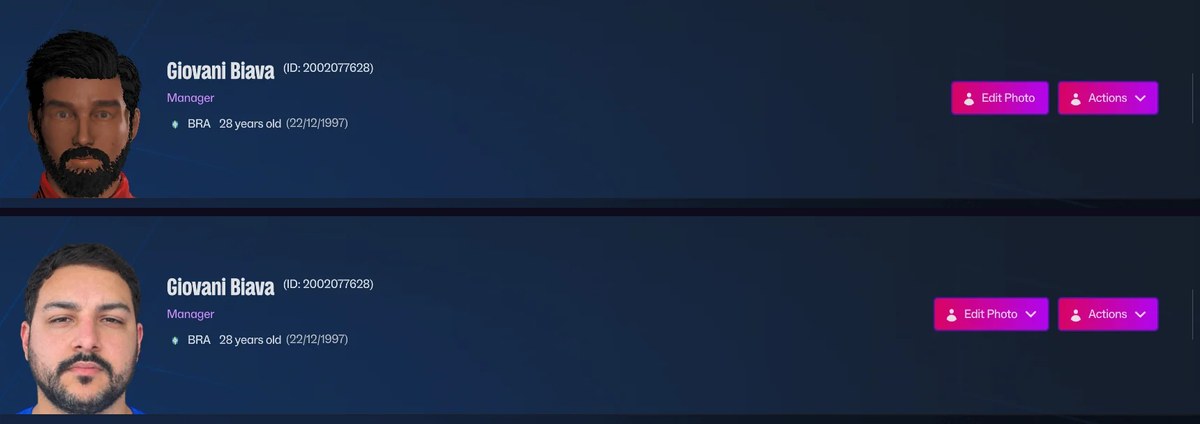
The manager profile without and with a photo (Image: FM Tigrotto)
- Any picture: the plugin crops the centre of the photo to the game’s square portrait shape.
- Everywhere: the photo shows on the profile, in the news and on any screen with your manager’s face.
- Change or remove: once a photo is set, the button opens a menu to change it or go back to the 3D face.

The menu to change or remove the photo (Image: FM Tigrotto)
For example, your photo also shows up in the game’s news, such as when you are unveiled at a new club.
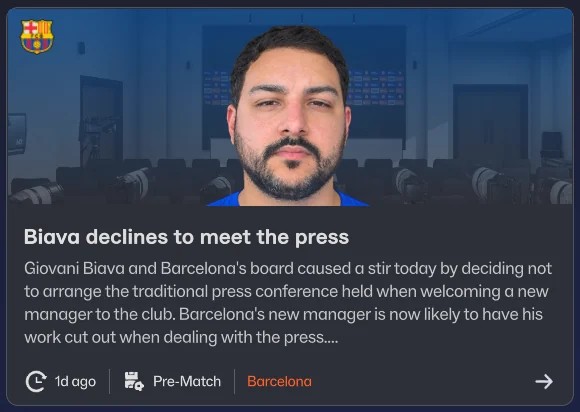
The manager’s photo in a news story (Image: FM Tigrotto)
Manager Photo FM27 download
The plugin is on the official FM Tigrotto page, the same author behind the FM27 real kits.
- First, install BepInEx 6 in the game folder,
Steam\steamapps\common\Football Manager 27. Then open FM27 once until the main menu and close it. - Next, copy the plugin into the
BepInEx\pluginsfolder. - Open the game, go to your manager profile and click «Edit Photo».
- Finally, pick your photo.
The plugin also updates itself every time you open FM. If you already have BepInEx for other mods, such as the 3D Live Action Cam or FMMatchLens, just copy the plugin.
The files are hosted by their original authors. FMPortugal only points to the official download page — all credit goes to their creators.