Heffem Skin FM27 is a dark skin that rebuilds the player profiles, the club page and the match screens. It is by Krysler76, the French skinner who has been making Heffem for several FM editions. It also brings your club’s colours, its own sidebar and one installer that handles every option. Version 1.1 already works with the FM27 update of 10 November and, for the first time, comes with a Mac version.
What Heffem Skin FM27 changes
The player profile is the heart of the skin. You get a compact attribute block, a radar with 16 per-90 stats, the season figures, the report and the training settings, all on one page. There is also a player comparison with a two-player radar.
The club page shows the last eleven, upcoming fixtures, key people, finances and the stadium photo. During matches, you get live analysis blocks with pass and shot maps for both teams. Finally, the half-time and full-time reports have been redesigned and now show the players’ faces.
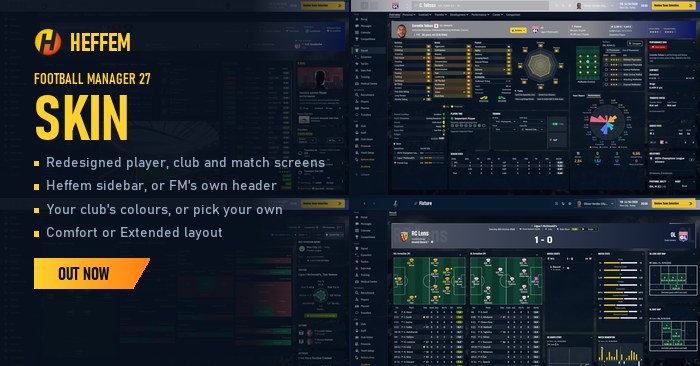
The player profile and match report with Heffem (Image: Krysler76)
What is new in version 1.1
- Player profile: a tile with tactical effectiveness, playing time, fatigue in words and pros and cons coloured by rating. For players at other clubs, that tile shows the contract instead.
- Player pop-up: it now shows personality and preferred foot.
- Faces: the round frames are gone, and a new option handles facepacks with framed portraits.
- Stadiums: clubs without a photo show the skin’s stadium instead of a giant shirt.
- Shortcuts: FM’s 1 to 6 keys work again with the sidebar.
The installer options
Instead of copying folders, you pick everything in the installer, with a preview for each option. For example, the Extended layout (the default) fits more on screen and was built for 1440p, but it also works at 1080p. Comfort, on the other hand, uses larger text and blocks.
Then you can swap the Heffem sidebar for FM’s own header, use a plain background colour and choose a club colour gradient or just the main colour. You can also replace the skin’s yellow and orange and switch on a colour-blind scale, where greens turn blue.
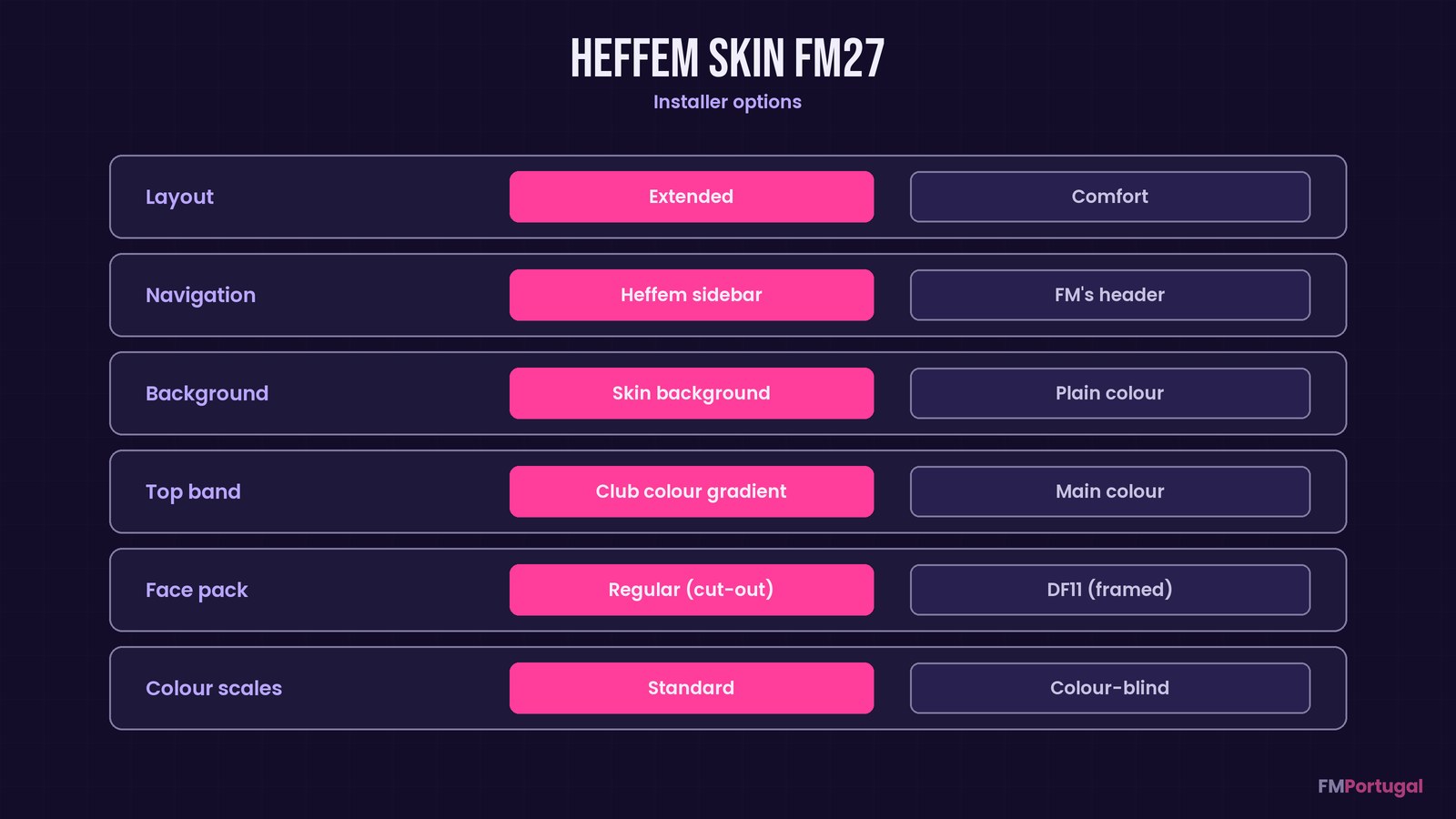
The choices you make in the installer (Image: FMPortugal)
Who it is for
It suits anyone who likes dark skins and wants plenty of information at a glance, especially on a big screen. If you use the framed portraits from DF11 Faces, pick the DF11 option in the installer so the faces show in full. If you would rather have a simpler dark skin in your club’s colours, though, try Kuvaaia27. And to switch skins without fuss, there is also FM 27 Skin Manager.
Download Heffem Skin FM27
The version is 1.1.4, updated on 10 November, and it already works with FM27’s full release. The Windows ZIP is about 30 MB. The Mac version only runs on Apple Silicon Macs (M1 or later) and is still a test build.
Download – Windows Download – Mac
Windows
- First, close FM27.
- Then extract the ZIP, run the
Heffem FM27 Setupinstaller and accept the administrator prompt. If Windows says it protected your PC, click «More info» and then «Run anyway», because the installer is not signed. - Next, check the game folder, choose your options and click Install. It takes a few minutes.
- Finally, start the game.
Mac (Apple Silicon)
- Close FM27, extract the ZIP and open the folder.
- Double-click
Installer Heffem FM27.command. The first time, macOS blocks it: right-click it, choose Open, then Open again. On macOS 15 or later, go to System Settings > Privacy & Security and click «Open Anyway». - The same installer window as on Windows opens. Keep the Terminal window open while it works. You do not need anything else, since Python ships with the skin.
Stadium photos
If you have a stadium pack, put it in your graphics folder before you install the skin. On Windows that is Documents\Sports Interactive\Football Manager 27\graphics; on Mac, ~/Library/Application Support/Sports Interactive/Football Manager 27/graphics. The installer finds the pack by itself, adds the lines it needs to the pack’s config.xml and tells you how many clubs got a photo. So whenever you update the pack, install the skin again.
Things to watch
The Mac version has only been tested on a few machines, so expect the odd bug. If macOS will not let it write into fm.app, go to Privacy & Security > App Management, allow Terminal and try again. Also, FM only reads graphics when it starts: if it was open, restart it.
To change an option or update the skin, run the installer again and click Reinstall; your choices are kept. The author asks for bug reports with screenshots and says he cannot take personal requests. Since the skin writes into the game folder, the safest way back to the original FM is Steam’s file verification.
The files are hosted by their original authors. FMPortugal only points to the official download page — all credit goes to their creators.
Did you make this download? Manage it on FMPortugal →