In FM27, improving the training centre or the academy is a request to the board, and little more. Facilities Manager FM27 changes that. It is a free mod by FMLivingGame that turns facilities into your job: every upgrade has a price, a build time, a contractor and a way to pay, the board has to agree and, in the end, what you build has to be looked after. It also works inside the game, with no separate program and no editor.
⬇️ Jump to the download: Facilities Manager v0.4.0 (with BepInEx)
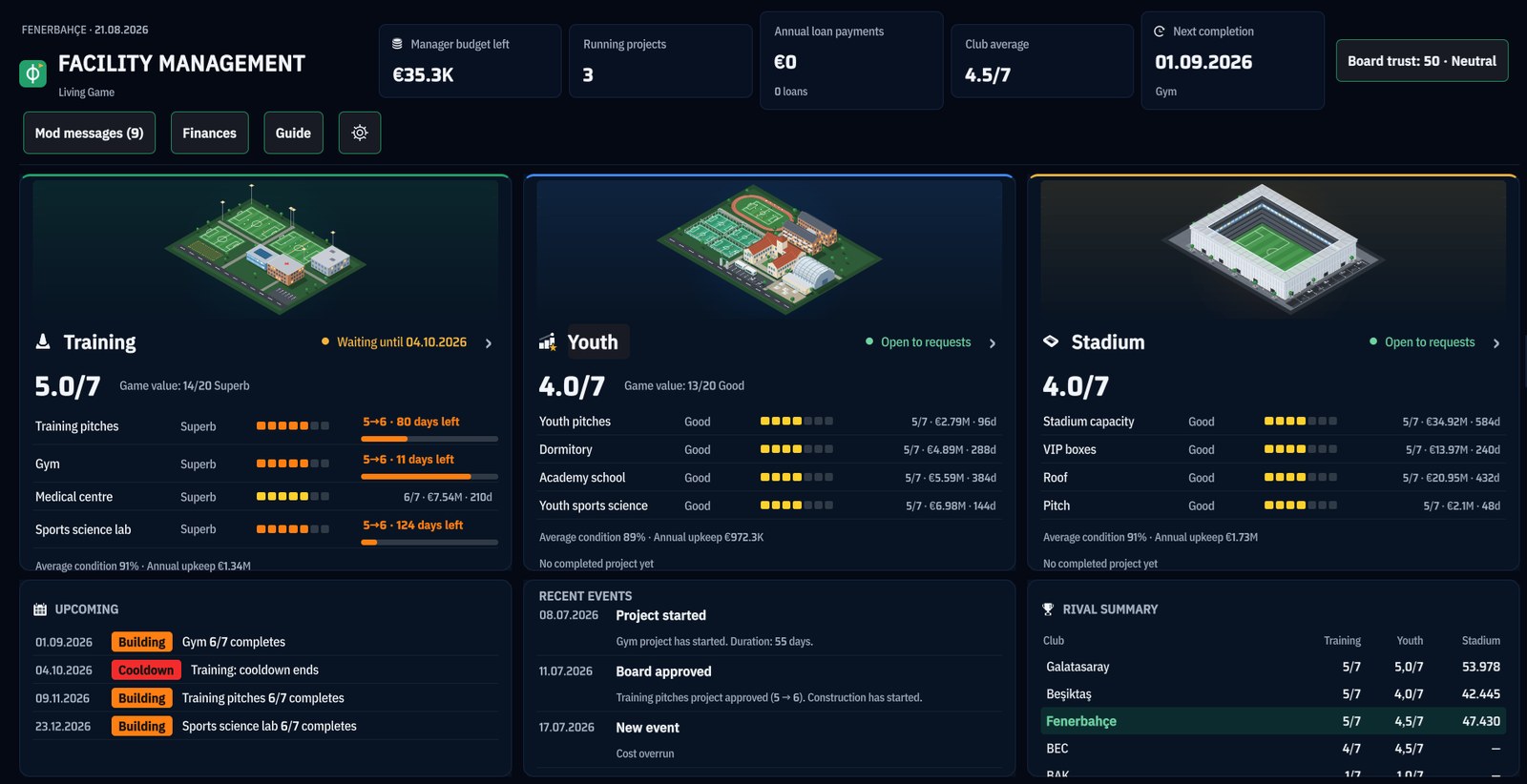
The main screen, with training, youth and stadium (Image: FMLivingGame)
What Facilities Manager FM27 does
First, the mod splits training, youth and stadium into the parts that make them up: pitches, gym, sports science, dormitory, academy pitches, roof and stands, among others. Then the average of those parts is written to the game’s own facility value. In other words, what you do in the mod really counts in FM27.
Every upgrade is a project. First, you choose the contractor: economic, fast or quality, each with a name and a reputation. Then you choose how to pay. There is the manager budget, club funds, a bank loan, the local council, fan bonds or a stadium naming sponsor. Finally, you send the request to the board, which answers a few days later.
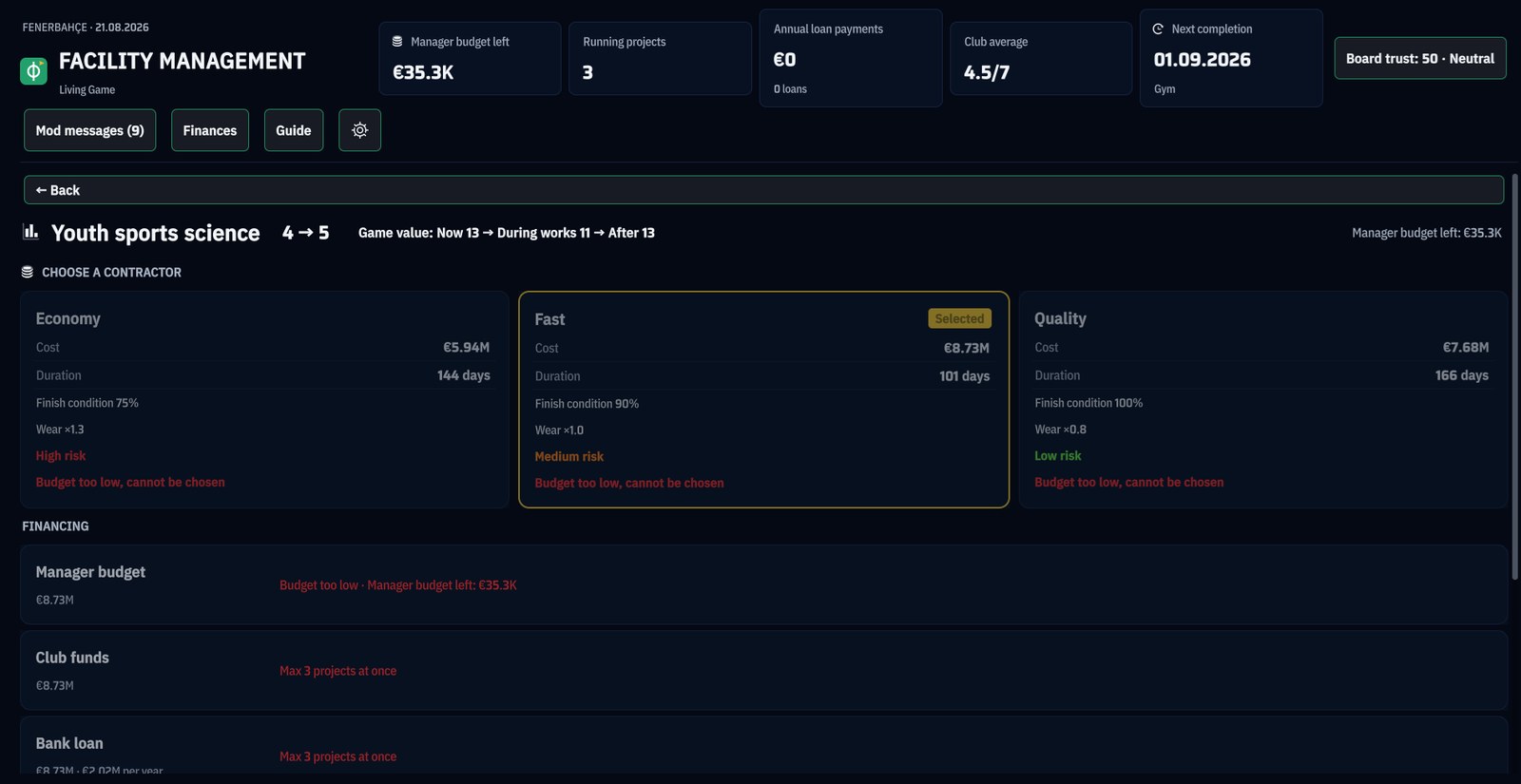
Every project starts with the contractor and how to pay (Image: FMLivingGame)
A board that thinks
The board does not say yes to everything. On the contrary, it weighs the club’s finances, how happy it is with you, how often you ask, the state of the facility and its trust in you, on a scale from 0 to 100. It also always explains why it said yes or no, and a page of its own shows what raises and lowers that trust.
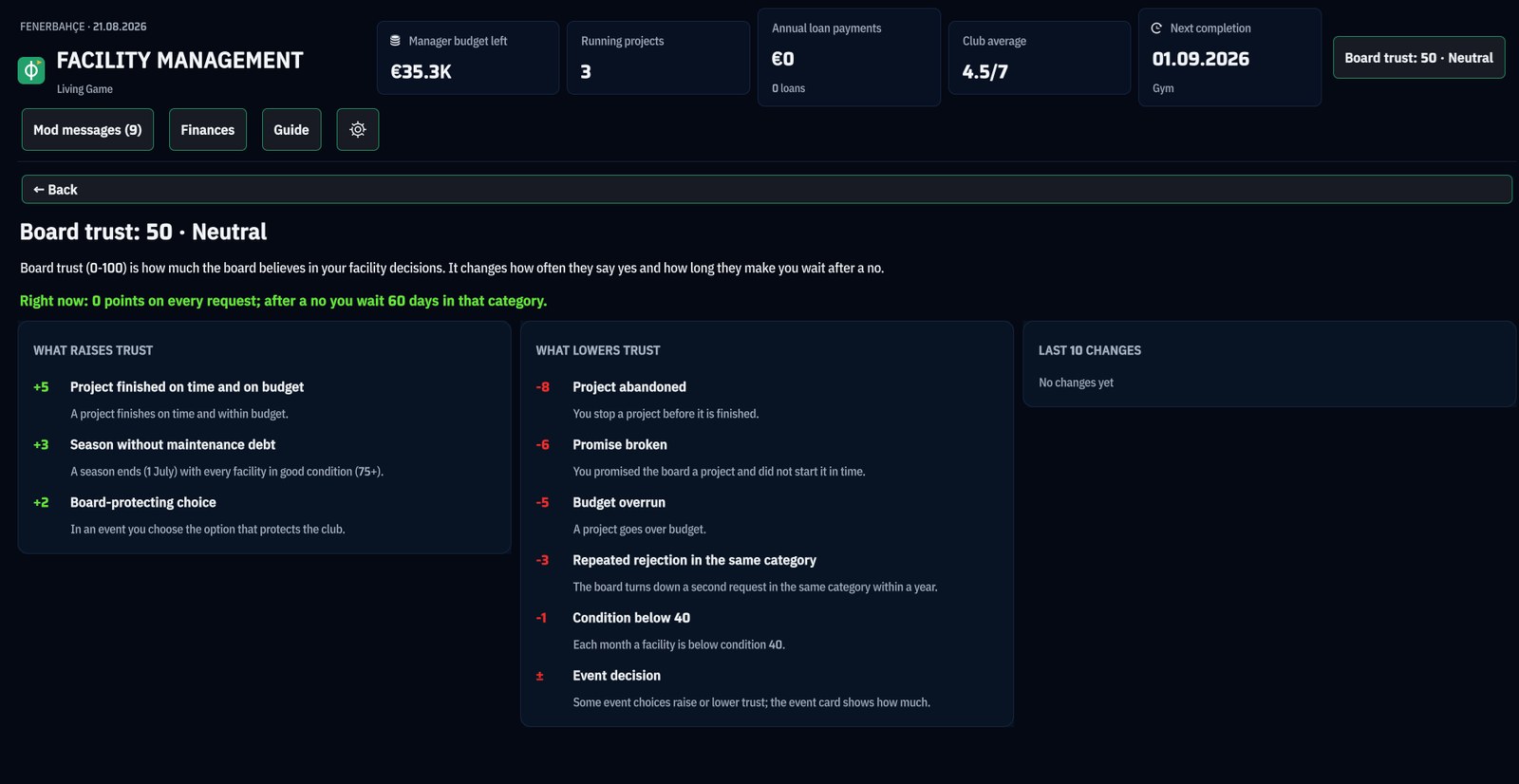
Board trust and what changes it (Image: FMLivingGame)
Once built, every facility wears down. So you pick low, standard or high upkeep, which sets its condition and monthly cost. If you let it slide, you pay later in repairs. There are also 31 events, such as cost overruns, permit delays, a contractor going bust, storm damage or an academy donor. Some grow out of your own decisions, and you can choose how often they happen or turn them off.
More than building work
The mod also has a youth network, with scout offices, school partnerships and links to amateur clubs, which improves youth recruitment. On top of that, costs scale with the club’s finances, from an amateur side to a giant. You can also pin up to 12 rivals and compare training, youth and stadium capacity in a table.
Finally, you get a finance page of your own, with facility debt, the next payment, the loan schedule and a 12-month forecast. Every payment shows straight away in the club balance. Notifications take you straight to the facility they are about, and the mod finds the club you manage by itself. If you are sacked, it freezes, and when you sign for another club it follows you.
Who it is for
It is for anyone who plays long careers and wants club growth to take work. According to the creator, it is not a cheat: it starts from your save’s own facilities and money, the board can say no and you cannot buy a top academy in one season. Add Heffem Academy Manager and youth development gets serious on both sides, and with The Director you get a director of football. All three work together, because they use the same BepInEx. To choose where to invest, see also the best FM27 academies.
What is new in version 0.4
Version 0.4, from 22 November, makes it clear that money spent in the mod is real club money, and FM’s own Finances screen shows the change once you reload the save. In addition, each facility’s page gets a list of what improves the odds of the board saying yes, and rejections end with the same advice. There is also a season-end report on 1 July, with spending, the state of the facilities, the projects, the board’s answers and advice for next season.
On the other hand, amounts now show in your game’s currency, euros included, and the mod finds your club more carefully: when in doubt, it asks you. Finally, after an FM update, every mod page shows a banner explaining what happened and what to do.
Facilities Manager FM27 download
This is version 0.4.0, from 22 November, still an open beta. The ZIP is 35 MB and already includes BepInEx, so it suits anyone who has never installed a mod like this. It was made for FM27 on Steam for Windows, version 27.1.0, and it comes in English, Brazilian Portuguese and five more languages.
Download – Facilities Manager v0.4.0 (with BepInEx)
- First, close FM27. Then, in Steam, right-click Football Manager 27 and choose Manage and Browse local files.
- Next, copy everything inside the ZIP into that folder and agree to merge the folders. The
winhttp.dllfile must end up next tofm.exe. - Then start the game. The first start takes a minute or two longer, only that once.
- Finally, load or start a career and open CLUB › Facilities Management, or press Ctrl+Shift+T.
Things to watch
Since it is a beta, back up your save before installing. If you already use another BepInEx mod, the creator also has a mod-only version, so you do not touch what you already have. After an FM27 update, the mod checks whether it still reads the game correctly and, if not, it pauses itself and writes nothing. In that case, keep playing and wait for the new version, which usually comes within a day or two.
To uninstall, delete the BepInEx\plugins\FacilitiesManager folder. However, do not use Steam’s file check, because it also removes skins. For now, stadium projects only progress inside the mod, without changing the in-game capacity, and side-bar skins are not fully supported yet: in that case, use the floating button or the hotkey.
The mod belongs to FMLivingGame, who offers it for free with nothing locked. FMPortugal only points to the file — all credit goes to its creator.
Did you make this download?