FM27 is tougher than the last few games, and plenty of people noticed it in the first few rounds. In the past, a good tactic won games with almost any squad. Now, your team has to understand what you ask of it, and the transfer market has its own tricks too. That’s why we’ve put together five FM27 tips that many players still don’t use. We tested all of them in an FC Porto save, during the 2026/27 pre-season, and the images come from that save (our game is in Portuguese).
If you’re just starting out, read our Football Manager beginners guide first. Here we go straight to the FM27 tips that make a difference.
1. Speed up Tactical Understanding with friendlies and training
Of the five FM27 tips, this is the one that weighs most on results. The game’s big new feature is Tactical Effectiveness. It lives in Training > Tactical Effectiveness and brings together four meters: Tactical Understanding, Player Ability, Player Buy-In and Next Match Info. We explained it all in detail in our guide to improving Tactical Effectiveness, so here are just the two quickest shortcuts.
First, play more. In Portal > Calendar there’s an Arrange Friendly button at the top. You pick the date, home or away, and the opponent (there are lists of lower-reputation sides, affiliated clubs and even your own U23 and U19 teams). That way, the team gets used to the tactic without putting points at risk. Also, this isn’t just for pre-season: if you take over a club mid-season, book friendlies in the weeks without a match.
Then, listen to the training warning. In our FC Porto save, the screen said we had to spend more training time on our pressing intensity, with a button next to it. That button opens the week’s schedule straight on the Tactical Understanding tab, with sessions for each area: passing style, build-up, chance creation, pressing line, pressing intensity and more. In other words, just swap two or three less useful sessions for the area that’s in red.
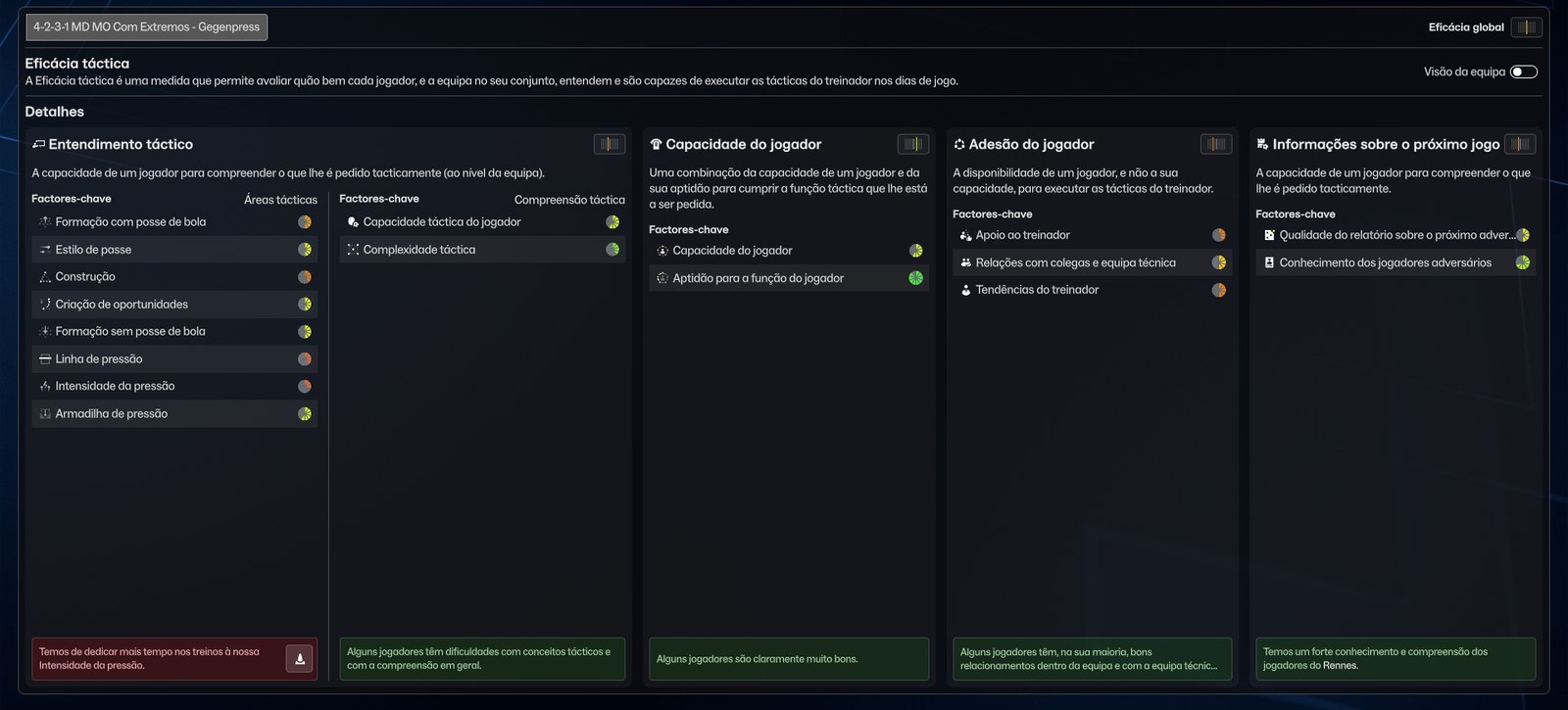
FC Porto’s Tactical Effectiveness screen, with the training warning at the bottom left (Image: FMPortugal)
However, don’t overdo the load. Each session shows its impact on condition and injury risk, and early in the season that matters. If you don’t feel like building training from scratch, our FM27 training schedules come with ready-made weeks.
2. Tell each player how to attack the box
This is one of the newest, because the attacking-the-box instructions arrived with FM27. Even so, many people miss them. On the tactics screen, click a player’s shirt to open the instructions. At the top you choose whether they apply to the position or only to that player. At the bottom right there are two new boxes: attack the box side and attack the box depth.
Depth has three options: attack the defensive line, arrive late in the box, and standard. Side decides where the player runs: centre, left, right, near post or far post. However, not everything is open to every role. The box gets locked depending on the role, with a padlock. For example, our Gabri Veiga as a Shadow Striker was stuck on attacking the defensive line. When we switched him to Attacking Midfielder, arriving late became available.
A combination to try:
- Winger: attack the defensive line, to drag the full-back and centre-back with him.
- Striker: near post, to get in front of his marker.
- Number 10: arrive late in the box, to turn up at the edge of the area while everyone watches the other two.
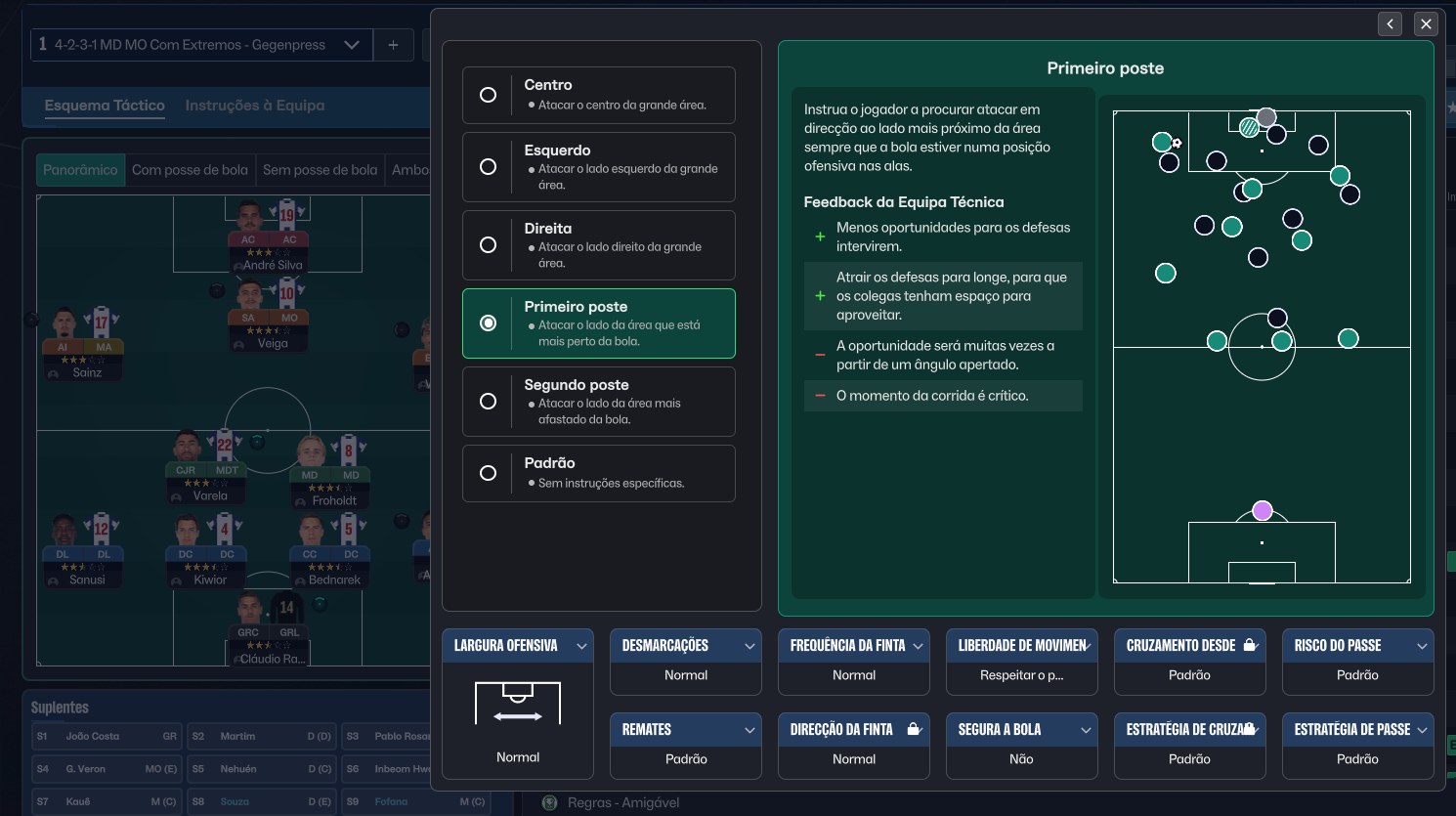
FC Porto’s striker with the near post instruction and the staff feedback (Image: FMPortugal)
Read the staff feedback
Also read the staff feedback next to each option. On the near post, the coaches warn that the shot will often come from a tight angle and that the timing of the run is critical. So it works best with strikers who have good Off the Ball and Anticipation. Got a tall striker who’s good in the air? Then try the far post, with high crosses from the other side. It won’t happen on every move, but it gives you more control over who turns up where. To understand why these runs matter, see how the FM27 match engine works.
3. Let your director build the offer for you
On the offer screen, the right-hand column now talks to you. We wanted Zaydou Youssouf, an Al-Fateh midfielder valued at 21M to 26M euros. Before we touched a single number, the director wrote that his starting point would be 21M euros up front, followed by 4.9M euros in instalments. He also suggested a clause of 7.5M euros after 50 league appearances.
Then, just click the button to use his suggestion and the offer is built for you: a 21M euro base fee, four instalments of 1.22M euros every six months, and the appearance bonus. So you pay 21M euros now, and the screen shows a total potential cost of 33.5M euros, fees included, if everything is met.
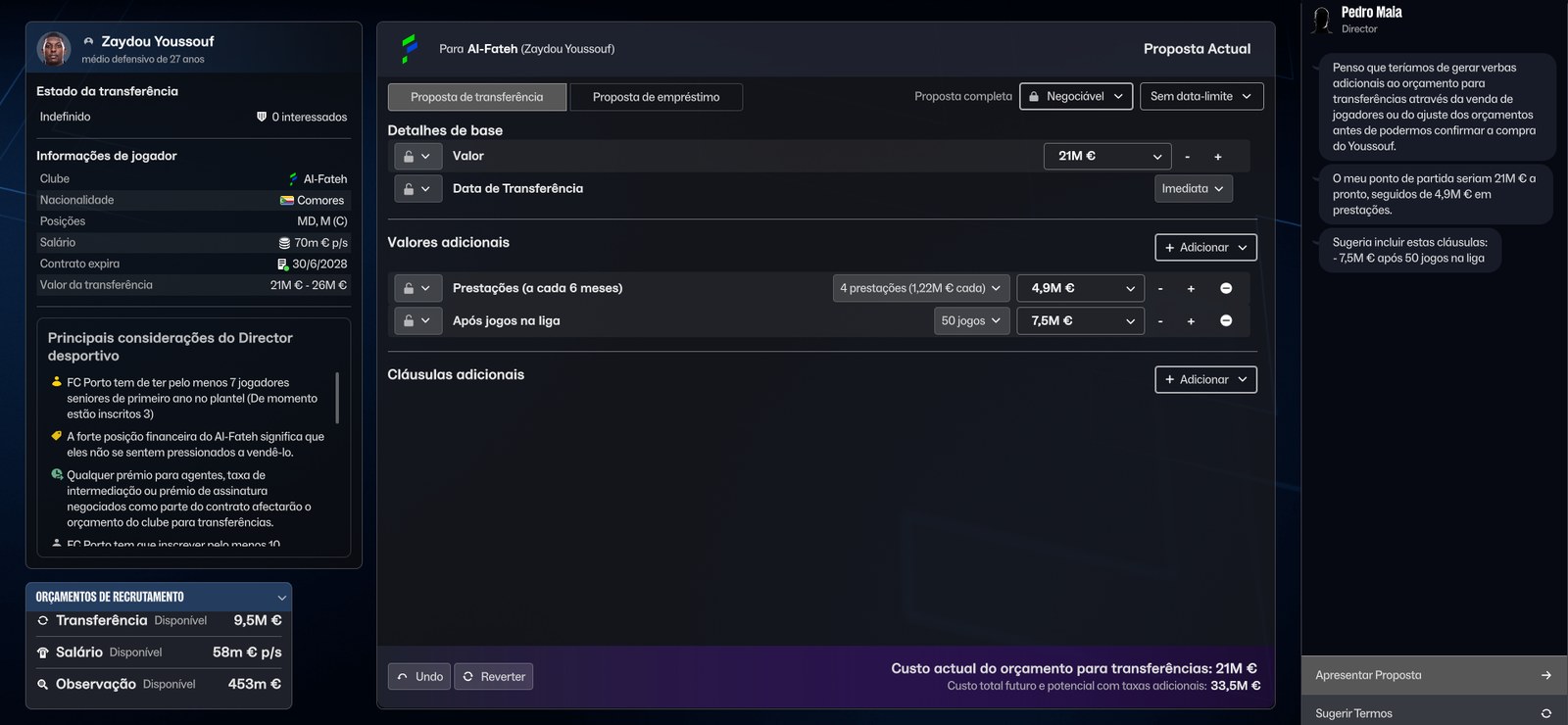
The offer for Youssouf built from the director’s suggestion (Image: FMPortugal)
The director also works as a brake. When we opened an offer for Ricardo Horta, of SC Braga, his first message was that he was almost certain Horta’s asking price would be out of our reach. Also, on the left there’s a box with the director of football’s key considerations: the release clause, squad registration rules and whether the selling club is under pressure to sell. Read it before you put down the first euro.
It makes sense to hire a director of football with good Negotiating, because he’s the one who handles these talks. In our test we didn’t compare different directors, so we can’t tell you how much it changes from one to another.
4. Declare interest before you make the offer
This one isn’t new in FM27, but few people use it. On the player’s profile, go to Transfer > Declare Interest and choose top target, for transfer or for loan. The club announces its interest to the press and the player knows you want him.
For example, we did that with Youssouf. That same day the story came through in our inbox: sources at FC Porto said Youssouf was desperate to make the move happen and was ready to do whatever it took.
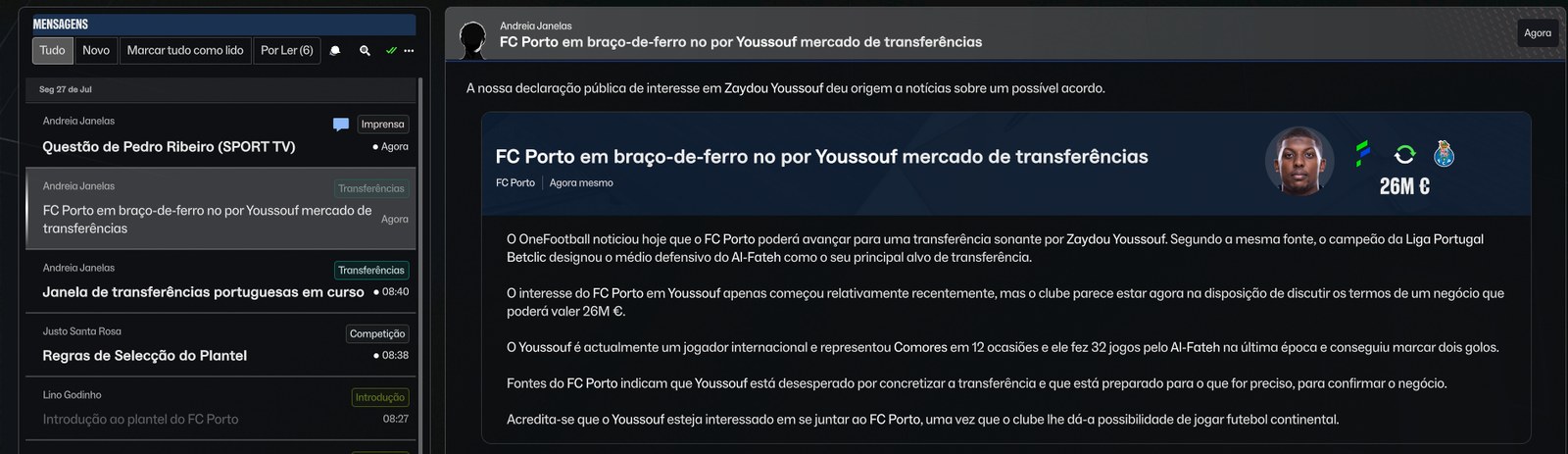
The story that came out on the same day we declared interest in Youssouf (Image: FMPortugal)
From here, the idea is to let the pressure do its work. If the player really wants to come, a low offer turned down by his club can lead him to ask to leave. A player who has handed in a transfer request can get cheaper, because the club knows he wants out. An honest note: we didn’t play the following weeks of this save, so we can’t show you the transfer request or the final price. Also, it doesn’t always happen. Some players say they’re happy where they are, and a rich club is in no hurry to sell (the director himself warned that Al-Fateh’s strong financial position means they don’t feel pressured to sell him).
Before declaring interest, make sure the target is worth it. FMPT Chief Analyst, FMPortugal’s free scout and editor, shows the attributes, potential and personality of any player without spending money on scouting.
5. Control when the game stops
The last of the FM27 tips is a quick one, but it saves hours. From the cog in the top right corner, open Preferences > Detailed > Gameplay. Under the continue options you’ll find the Continue Flow setting, with three modes:
- Streamlined: the game stops less often for news and messages that don’t affect you.
- Balanced: the normal mode.
- Comprehensive: it stops more often, with more news from around the football world.
Many people pick the mode when they create the save and think they’re stuck with it. They’re not: you can change it whenever you like. For example, use Streamlined in the dead weeks between the end of the season and pre-season, and go back to Balanced when the window opens. Also, right below it you decide how often the game takes you to the training screen, the competitions centre and the transfer centre. If your training is already set, the Never option stops the game taking you to that screen. Continue Flow was one of the features announced in the FM27 football world deep dive.
Bonus: watch out for Quick Pick
This one is less a tip than a warning. The Quick Pick button, which chooses your eleven for you, can shuffle your tactic’s out-of-possession slots. Zippo noticed it in FM26 and confirmed it is still there in FM27. In other words, the in-possession setup stays the same, but who fills each out-of-possession slot changes.
For example, in the original tactic the defensive midfielder dropped into the central centre-back slot. After Quick Pick, he dropped to the left centre-back slot instead, and the centre-back who was there moved to the middle. The two forwards up front also swapped sides. On paper, the out-of-possession shape looks the same; on the pitch, the midfielder runs diagonally and the centre-backs all shuffle across, instead of him dropping straight into the middle.
The worst part is that you can’t see this in the Combined view of the tactics screen, only in the Both view. So if you use Quick Pick, open the Both view before the match and check who sits in each out-of-possession slot. If something moved, drag the players back or pick the eleven yourself.
FM27 tips in short
- Book friendlies and add sessions for your weakest tactical area to training.
- Combine the attack the box instructions between winger, striker and number 10.
- Open the offer screen and read the director before typing a fee.
- Declare interest in your main targets and let the press apply pressure.
- Change Continue Flow depending on the time of the season.
- After Quick Pick, check the out-of-possession slots in the Both view.
What comes next
After these FM27 tips, if your team concedes a lot, check whether the problem is Trigger Press, the instruction that may be ruining your defence. To choose signings, the most important attributes in FM27 show what each point is worth in each position. And if you want to test ideas in a separate save, the FM27 In-Game Editor lets you change almost everything.
Our take
None of these FM27 tips is a game-breaking exploit, and that’s a good thing. Most of them just make use of things FM27 already tells you, but that get lost among so many screens. The training warning and the director’s suggestion, for example, are right there in front of everyone. The one that surprised us most was attacking the box: you’ll want to spend half an hour just tuning who goes to the near post. Got another tip few people know? Tell us on the FMPortugal Discord.