The FM27 Media Mod makes the press and the dressing room in Football Manager 27 revolve around your manager. Above all, it gives them a memory. Journalists bring back what you said weeks earlier, notice when you dodge a question and hold a grudge, or soften up, depending on how you treat them. It is a free, open-source mod by Super Bladesman, and it does not touch the match engine.
⬇️ Jump to the download: FM27 Media Mod v0.9.1 beta
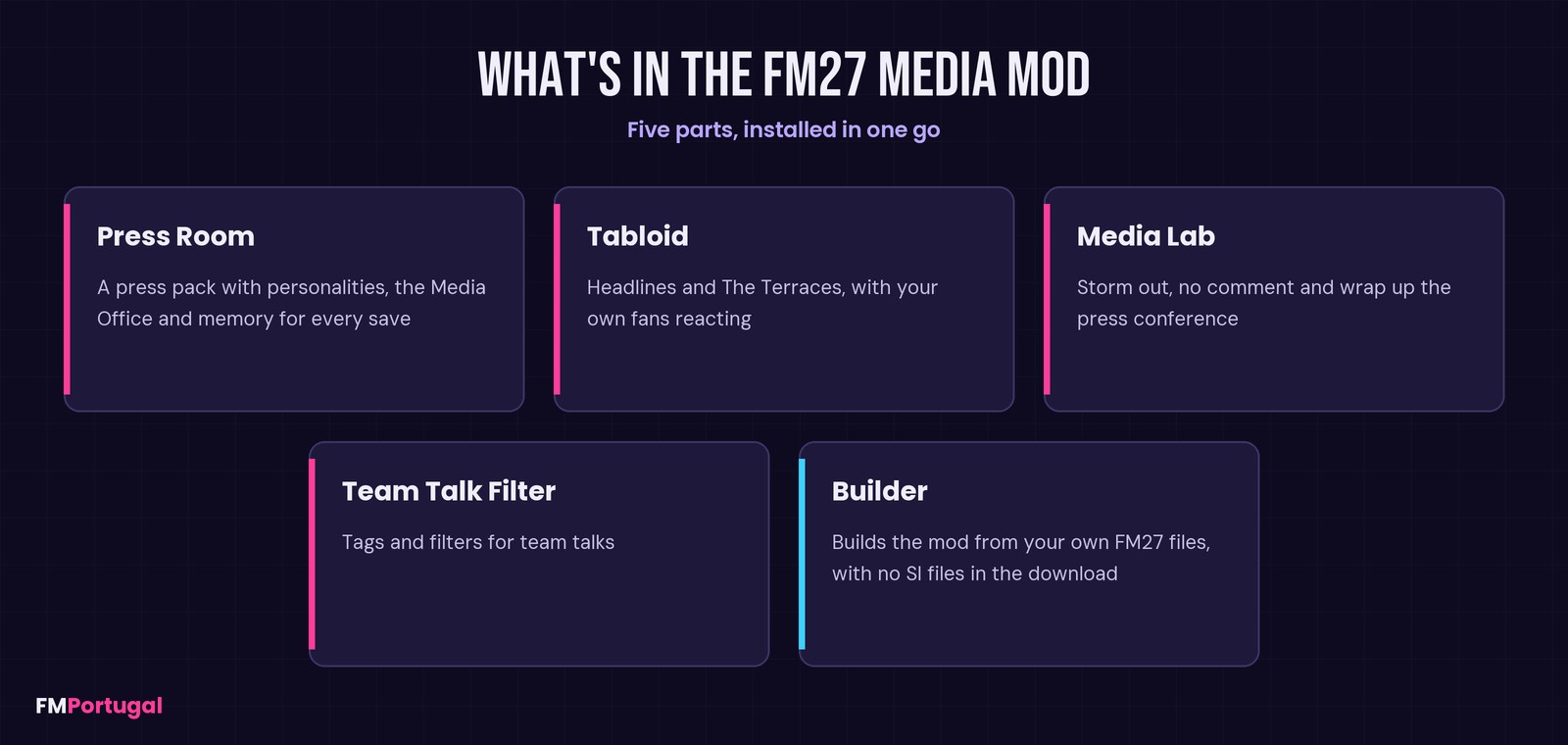
The five parts of the mod (Image: FMPortugal)
What changes in press conferences
First, the press room gets personalities. There are attack dogs, cheerleaders, old-school hacks and insiders, each with their own outlet and their own way of asking. In addition, what you say on the record, what leaks and who you upset carry over from one conference to the next. All of this is kept separately for each save.
You also get three new options: storm out, answer «no comment» or wrap up the conference. Finally, the mod rewrites and adds thousands of lines to press conferences, tunnel interviews, player and staff chats and team talks. In version 0.9.1, for example, 448 lines stopped calling players «they» and now use «he» or «she», as the original game does.
The Media Office
It is a new tab, which you open with the MEDIA button on the right-hand edge of the screen. There, your head of media runs the club’s press office. You can favour one outlet or freeze out another, plant a story or keep one quiet, brief back against an agent and close ranks after a dressing-room row. However, you only have a few hours a week, so every choice costs something.
At the same time, the mod brings new headlines and The Terraces, where your fans react in their club’s own voice. There are also tags and filters for team talks.
Who the FM27 Media Mod is for
It is for anyone who plays long careers and finds that FM27 press conferences repeat themselves quickly. If you already use Interview Plus, note that they do different things: Interview Plus puts the conference in a 3D room, and the FM27 Media Mod changes what is said inside it. However, the creator does not say whether the two were tested together. For more ideas, see our list of the best FM27 mods.
Does the FM27 Media Mod work with other mods?
The mod uses BepInEx, so it works alongside Heffem Academy Manager and BassyBoy’s 3D Stadiums Megapack, as long as there is only one BepInEx in the game folder. In addition, it changes media.fmf and simatch.fmf, but in the latter only the match events file.
So, since 0.9.1 it works alongside mods that replace simatch.fmf, such as ANSUiT’s realistic match ratings, which the creator tested. In that case, install the other mod first and only then start the game: the FM27 Media Mod keeps a copy and adds its changes on top. With the Realism Match Engine there is no test yet. If two mods change the same file, the mod leaves the game as it is and says so in builder.log.
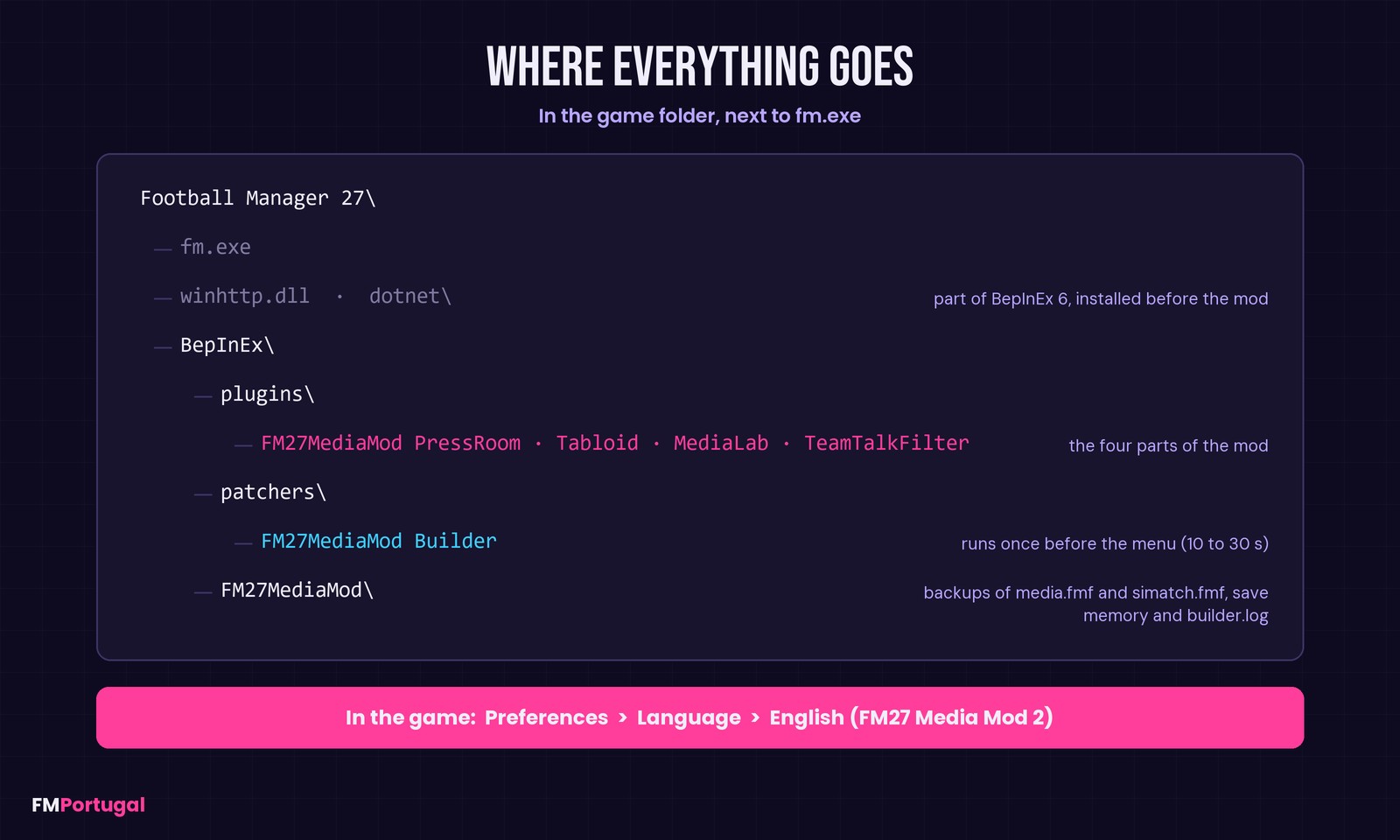
Where each part goes in the game folder (Image: FMPortugal)
FM27 Media Mod download
The version is 0.9.1 beta, from 22 November, in a 3.3 MB ZIP on the creator’s GitHub. It is for FM27 27.1.0 on Windows, with the game in English, and it needs BepInEx 6, which is not in the ZIP. The creator tested it on Steam and says it should work on Epic. It does not work on Mac.
The download does not include any Sports Interactive files either. In other words, the first time you start the game, the mod builds its language and its changes from your own FM27 files.
- First, close FM27. Then, on Steam, right-click Football Manager 27 and choose Manage and Browse local files.
- If you do not have BepInEx 6 yet, download the «Unity.IL2CPP-win-x64» ZIP of build 785 from the BepInEx page and extract it into that folder. Next, start the game once, wait for the menu, which can take several minutes, and close it.
- After that, extract the mod’s ZIP into the same folder and let the folders merge.
- Once you start the game, the mod works for 10 to 30 seconds before the menu, only that first time.
- Finally, in Preferences › Language, choose English (FM27 Media Mod 2). The MEDIA button appears on the right-hand edge.
Things to watch
It is a beta and the creator’s GitHub account is new, so back up your save before you install it. If something goes wrong, the creator asks you to report it on the GitHub Issues page, with LogOutput.log and builder.log. After an FM27 update, the mod redoes its work on its own at the next start. However, if the update changes a file it needs, it leaves the original game alone and waits for a new version.
To uninstall it, delete the FM27MediaMod folders from BepInEx\plugins and BepInEx\patchers, and the BepInEx\FM27MediaMod folder. Then verify the game files on Steam and set the language back to English. But be careful: that check also removes other mods that replace simatch.fmf or media.fmf, so copy them back in afterwards.
The mod is by Super Bladesman, who offers it for free and with open source code. FMPortugal only points to the official file — all credit goes to its creator.
Did you make this download?