SMOC Original FM27 brings back the classic sidebar without changing the game’s colours. The screens you use most are one click away, in a compact bar with icons and your club crest at the bottom. The skin is by Colombian modder Sergio Osorio, it is in alpha and it is free.
What SMOC Original FM27 brings
- Compact sidebar: first, each screen has its own icon, and the club crest sits at the bottom of the bar.
- Reserve and youth teams: also, there are direct shortcuts to the B team, the Under-20s and the Under-18s, with the names the game gives them.
- Stadium and city photos: Club Information shows large stadium and city photos, taken from the graphics you already have installed.
- Faster screens: images load in the background and are cached, so going back to a screen is quicker.
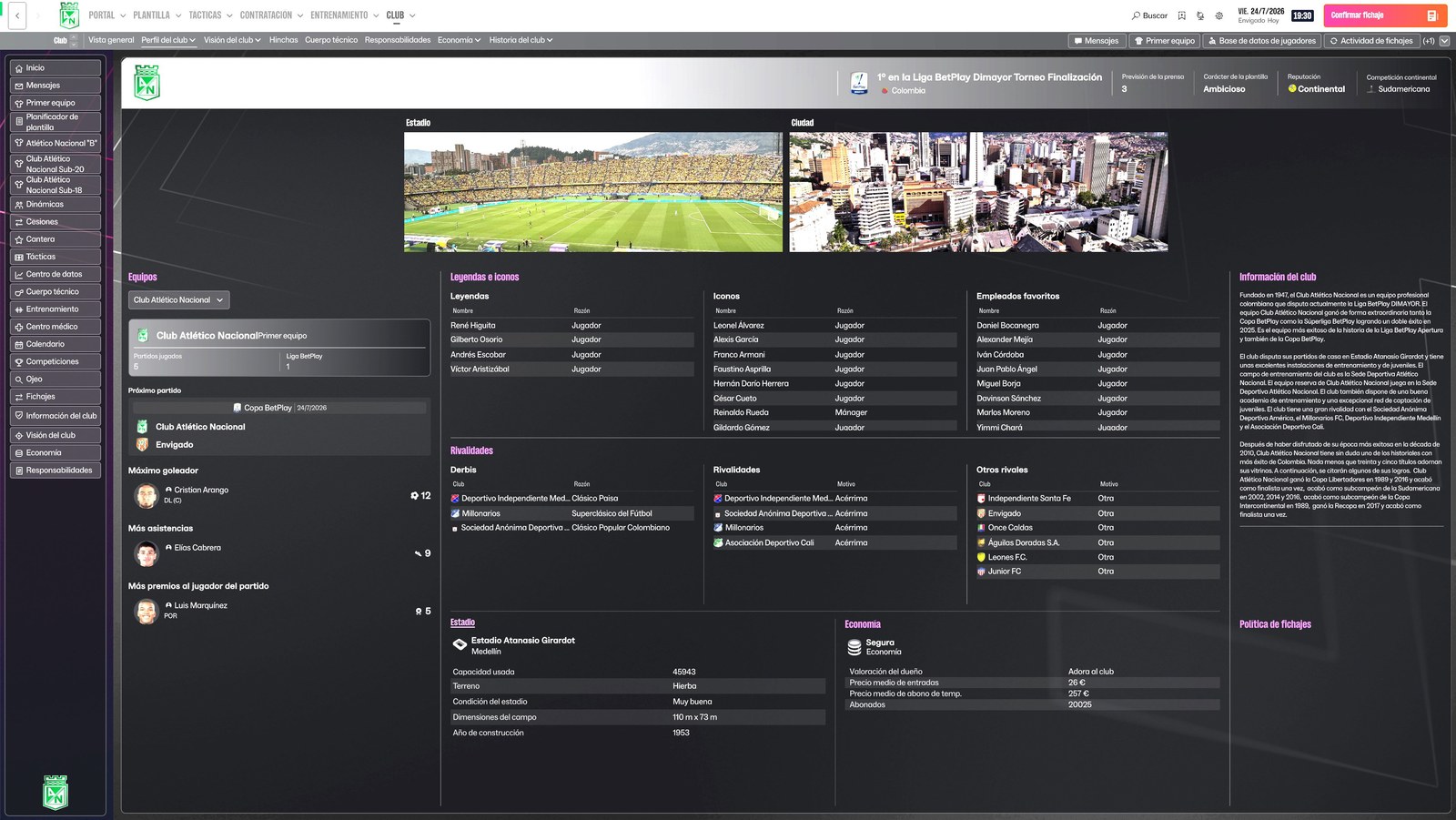
Club Information, with the sidebar and the stadium and city photos (Image: Sergio Osorio)
Fitness numbers are back
In FM27, fitness became just a heart. So SMOC Original adds two numbers next to the heart, on Team Selection and in the squad. For example, «100% · 92%» means 100% fitness and 92% match sharpness. Both values come straight from the game, and a dash means the game did not give a valid value.
Also, the nine substitute slots on Team Selection are almost twice as tall, so they are easier to click. However, dragging a player from the table to the bench is still being tested.
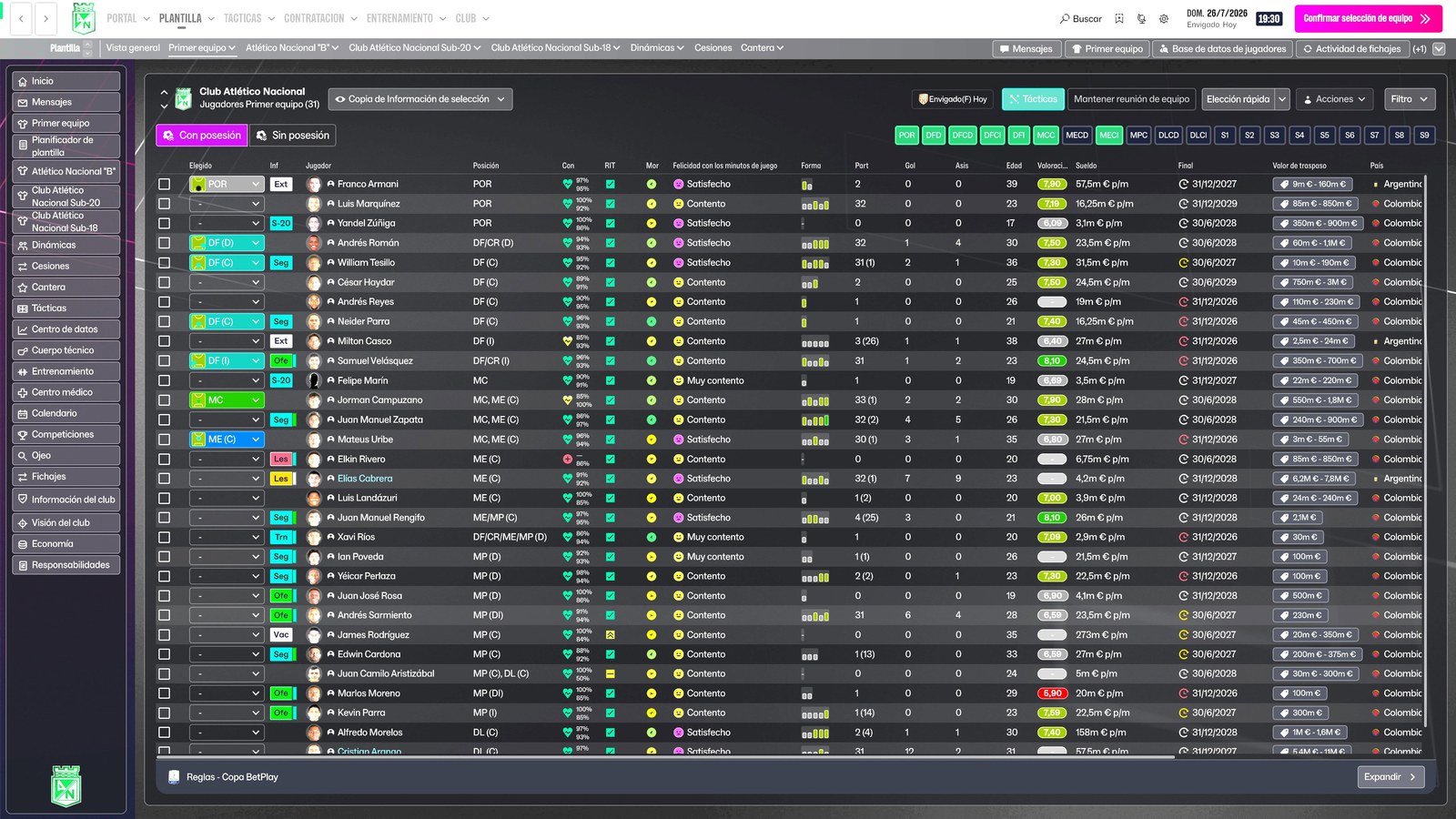
The squad, with fitness and match sharpness as numbers (Image: Sergio Osorio)
SMOC Original FM27 download
The version is 0.1.3 alpha, from 7 November, and it only works on Windows. The author tested it on FM27 27.0.0 with Atlético Nacional. However, the skin needs BepInEx 6 IL2CPP, which is not included, so we also link the official page.
Download – SMOC Original FM27 v0.1.3 alpha
BepInEx 6 IL2CPP – official page
- First, install BepInEx 6 IL2CPP in the game folder and start FM27 once. On Steam, the folder is usually
C:\Program Files (x86)\Steam\steamapps\common\Football Manager 27. - Then close the game and extract the zip anywhere.
- Next, open PowerShell inside the
SMOC Original 0.1.3-alphafolder and run.\Install.ps1 -GamePath 'C:\path\Football Manager 27', with the path to your game folder. - Finally, start FM27, go to Preferences and pick «SMOC Original» in the skin list.
The installer backs up the folders it replaces. Later, if you want to remove it, close the game and run Uninstall.ps1. There is also an optional photo of the Atanasio Girardot stadium, in the graphics-opcional folder, to copy into your graphics folder.
Things to watch
This is the first alpha, so there may still be problems with other clubs, other interface scales or other plugins. In fact, the author asks you to tell him your club, your screen resolution and how the sidebar feels. For the same reason, back up your save before you start. Finally, if you prefer the FM24 sidebar with a look of its own, see the Comeback Skin, and for other BepInEx mods see FM Manager 3D Head.
The files are hosted by their original authors. FMPortugal only points to the official download page — all credit goes to their creators.