TacticalCam has reached FM27 with version 2.0. The free plugin by marceloouw, the author of FM Season Hub, lets you adjust the tactical and broadcast cameras live, and make the ball bigger. It also brings a new mode, Tactical Broadcast, which pairs the tactical camera with TV-style replays.
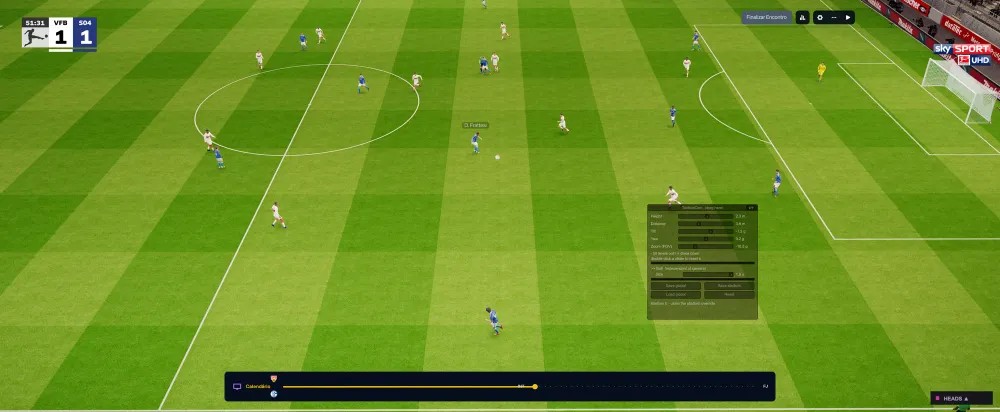
The tactical camera adjusted with TacticalCam (Image: FM Season Hub)
What TacticalCam does
- Five sliders: height, distance, tilt, yaw and zoom, on both the tactical and the broadcast camera.
- Broadcast only: for example, how much of the game’s automatic zoom you keep and how smooth the movement is.
- Bigger ball: make the ball up to 1.5 times bigger, so it is easier to follow. Its position still comes from the match engine.
- Per stadium: save one setup for every stadium and exceptions for the ones you choose.
Tactical Broadcast
It is the new mode in version 2.0 and sits at the end of the camera menu. So in open play you see the tactical camera, which does not cut to the static camera at set pieces. However, for key moments, such as goals, penalties, corners, free kicks and fouls, it switches to the TV cameras. The game remembers your choice.
TacticalCam for FM27 download
The version is 2.0.0 and the file is 37 KB. The link comes from the author’s site. You need BepInEx 6 IL2CPP, which is not included. On the other hand, if you install FM Season Hub, its installer adds the plugin and keeps it up to date.
Download – TacticalCam 2.0 (FM27)
BepInEx 6 IL2CPP – official page
- First, if you do not have BepInEx 6 yet, download the «BepInEx-Unity.IL2CPP-win-x64» file (build 791 or newer) and extract it into the game folder, next to
fm.exe. Start the game once and wait, because the first launch takes a few minutes. - Then create the
BepInEx\plugins\TacticalCamfolder and extract the .zip into it. You should end up withBepInEx\plugins\TacticalCam\TacticalCam.dll. - Next, open FM27 and start a match.
- Finally, press F3 to open the panel. The EN and PT buttons switch the panel’s language.
Things to watch
This version is for FM27 only. For FM26, use TacticalCam 1.x. Also, if you use a CameraInject preset on the tactical camera, the two mods fight over the same frame, so only use one on that mode. With every slider at zero, the picture is the same as the game without the plugin. Finally, for more realism in matches, see the 3D Live Action Cam.
The files are hosted by their original authors. FMPortugal only points to the official download page — all credit goes to their creators.