Praising training player by player is one of the most repetitive jobs in FM26. You open the conversation, pick the line, wait for the reaction and do it all again with the next one. With 25 players in the first team, plus the U20s and U17s, that is half an hour gone every week. Easy Training Talks fixes that: it is a free plugin that praises or criticises the whole squad’s training in one go, through the game’s own conversations.
The plugin is by marceloouw, from FM Season Hub, and it is already on version 1.1. The screenshots are in Portuguese because the author is Brazilian and plays the game in that language.
(Image: FM Season Hub)
What Easy Training Talks does
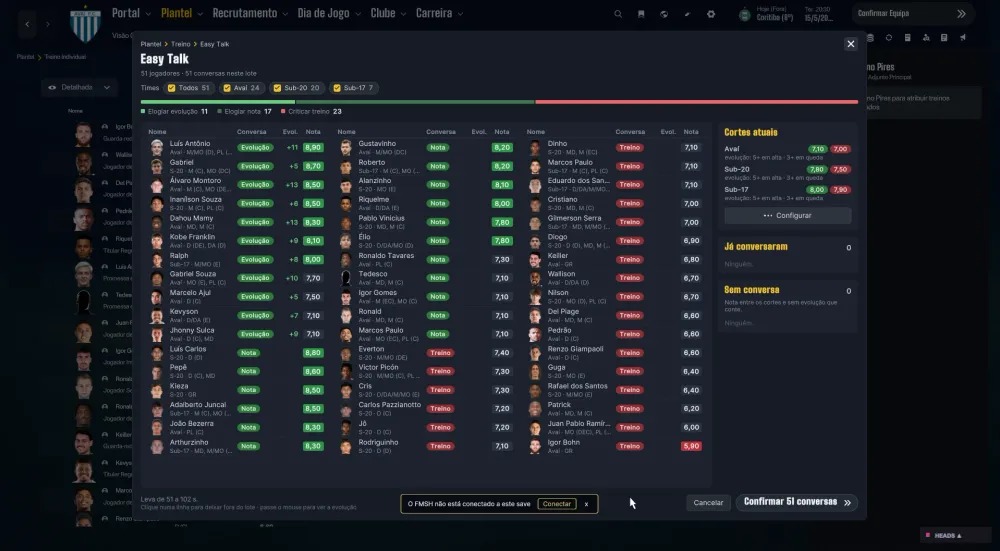
Once installed, an Easy Talk button appears in Squad > Training > Individual Training. The number on the button tells you how many conversations it would start right now, and a green ✓ means there is nothing to do.
- Preview before it starts. You see who gets praise or criticism and why, in a table with photo, rating and team.
- Several club teams. You choose which ones to talk to: first team, U20, U17 or the B team. Each one can have its own cutoffs.
- Speed. The author says it handles around 50 conversations in 9 seconds, with a button to stop halfway.
- Summary at the end. It shows what was done, what did not finish and what never started.
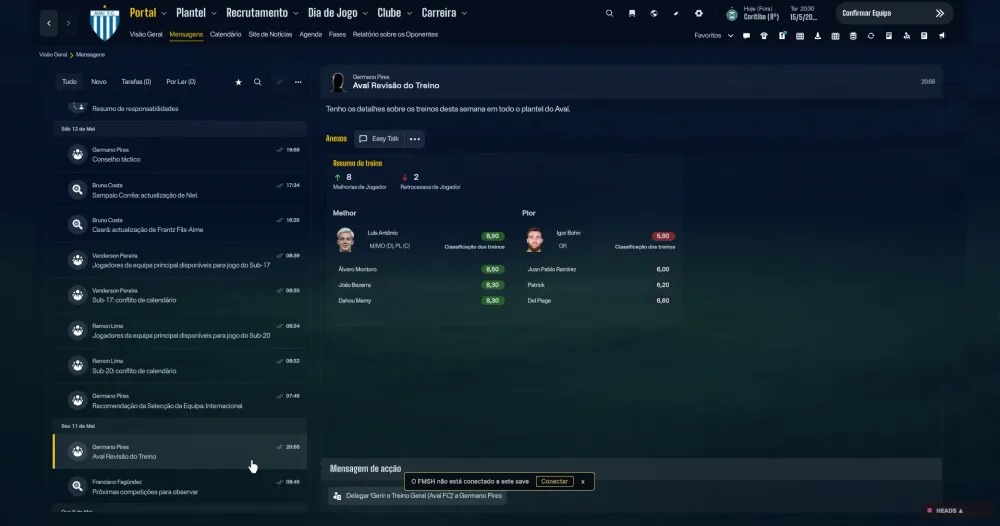
- In messages too. The same button appears in the inbox, in the training review message and in the plan for the coming weeks.
There is one important detail. The plugin does not click anything in the interface or open conversation windows. Instead, it runs the conversations inside the game, exactly the ones you would do by hand, and the game counts them as normal. In other words, the effect on morale is the same.
How it decides who gets praised or criticised
The decision comes from each player’s training rating, with the two decimals you see on screen. By default, the rules are:
- Rating of 7.50 or more: praises development if at least 3 attributes went up, and more went up than down. Otherwise, it praises the rating.
- Rating of 6.50 or less: criticises the training.
- In between: criticises development if at least 3 attributes went down, and more went down than up. Otherwise, there is no conversation.
All three values can be changed from the three dots next to the button, and a ruler shows where each player lands. When a player reacts, the plugin always picks the mildest reply. It never threatens and never sets targets, so you will not cause dressing-room trouble by accident. Only players the game still lets you talk to are included.
(Image: FM Season Hub)
What is new in version 1.1
- You can now switch rating talks and development talks on or off for each club team.
- It is fairer: a player with a poor rating but big progress gets his development praised instead of a telling-off.
- In the preview, click a player’s talk to change it (praise or criticise, rating or development).
- The summary shows how each player took it (accepted, disagreed or no reaction) and his mood.
- You can reopen the last summary from the preview.
- Players who did not train (0.00 rating) are left out.
Requirements
Easy Training Talks works on FM26 for PC and needs BepInEx 6 for IL2CPP (build 755 or newer). BepInEx 5 does not load in FM26. The plugin does not touch the skin, so it works with any skin. The author tested it on the Steam version.
Download Easy Training Talks
The file EasyTrainingTalks-1.1.0.zip is about 135 KB and comes straight from the author’s site. It is free.
Download – Easy Training Talks 1.1 (FM26)
- First, check you have BepInEx 6: the game folder (the one with fm.exe) must contain a BepInEx folder. If it does not, follow the next section.
- Create the folder BepInEx\plugins\EasyTrainingTalks and extract the zip into it. You should end up with BepInEx\plugins\EasyTrainingTalks\EasyTrainingTalks.dll.
- Open FM26 and load your save.
- Go to Squad > Training > Individual Training: the Easy Talk button is in the top bar.
Alternatively, FM Season Hub has its own app that installs the plugin for you, with no files to copy. You will find that option on the official plugin page.
Don’t have BepInEx 6 yet?
- Download the file BepInEx-Unity.IL2CPP-win-x64 (build 755 or newer). Mono builds and anything labelled 5.x will not work.
- Extract it into your FM26 folder, next to fm.exe. You should see the BepInEx and dotnet folders and a winhttp.dll file.
- Start the game once and wait. On first launch BepInEx reads the whole game, which takes several minutes. The game may look frozen or show a black window in the meantime.
- Check that BepInEx\LogOutput.log exists and that the BepInEx\interop folder is full of .dll files. Only then install the plugin.
Automatic updates
The plugin updates itself. When you open the game, it checks FM Season Hub’s public catalogue and, if there is a new version, downloads it for the next launch. According to the author, the catalogue is signed and only the public catalogue is requested. If you would rather control updates, open BepInEx\config\FMActionLink.AutoUpdate.cfg and change autoUpdate = on to autoUpdate = off. That setting covers every plugin by the same author.
If something goes wrong
- Button not showing? Open BepInEx\LogOutput.log and look for the line [EasyTalk] … loaded. If it is not there, BepInEx did not load the plugin.
- Language: the texts follow the game language, in 19 languages. The translations were not reviewed by native speakers.
- Settings: they are stored in BepInEx\config\fm.easytrainingtalks.cfg.
- To uninstall, just delete the BepInEx\plugins\EasyTrainingTalks folder.
See the plugin in action
Credits
Easy Training Talks is by marceloouw, from FM Season Hub. If something does not work, the author asks you to say which skin you use and what happened. Looking for more tools? See our FM26 editors and tools.
The files are hosted by their original authors. FMPortugal only points to the official download page — all credit goes to their creators.