

Anyone who still goes back to Football Manager 2007 knows the problem: the game was made for 2006 monitors. On a modern screen it either sits in a tiny window or gets stretched and blurry, with text you can barely read. FM07 HD fixes that. It is a free mod that runs Football Manager 2007 in HD at any resolution, including 2K and 4K, in borderless fullscreen or in a window of any size.
The mod is by paokkerkir, the same author who in 2020 released the fixes that make FM 2005, 2006, 2007 and 2008 run on Windows 10. Version 1.2 came out on 19 October 2026 and also brings some performance improvements.
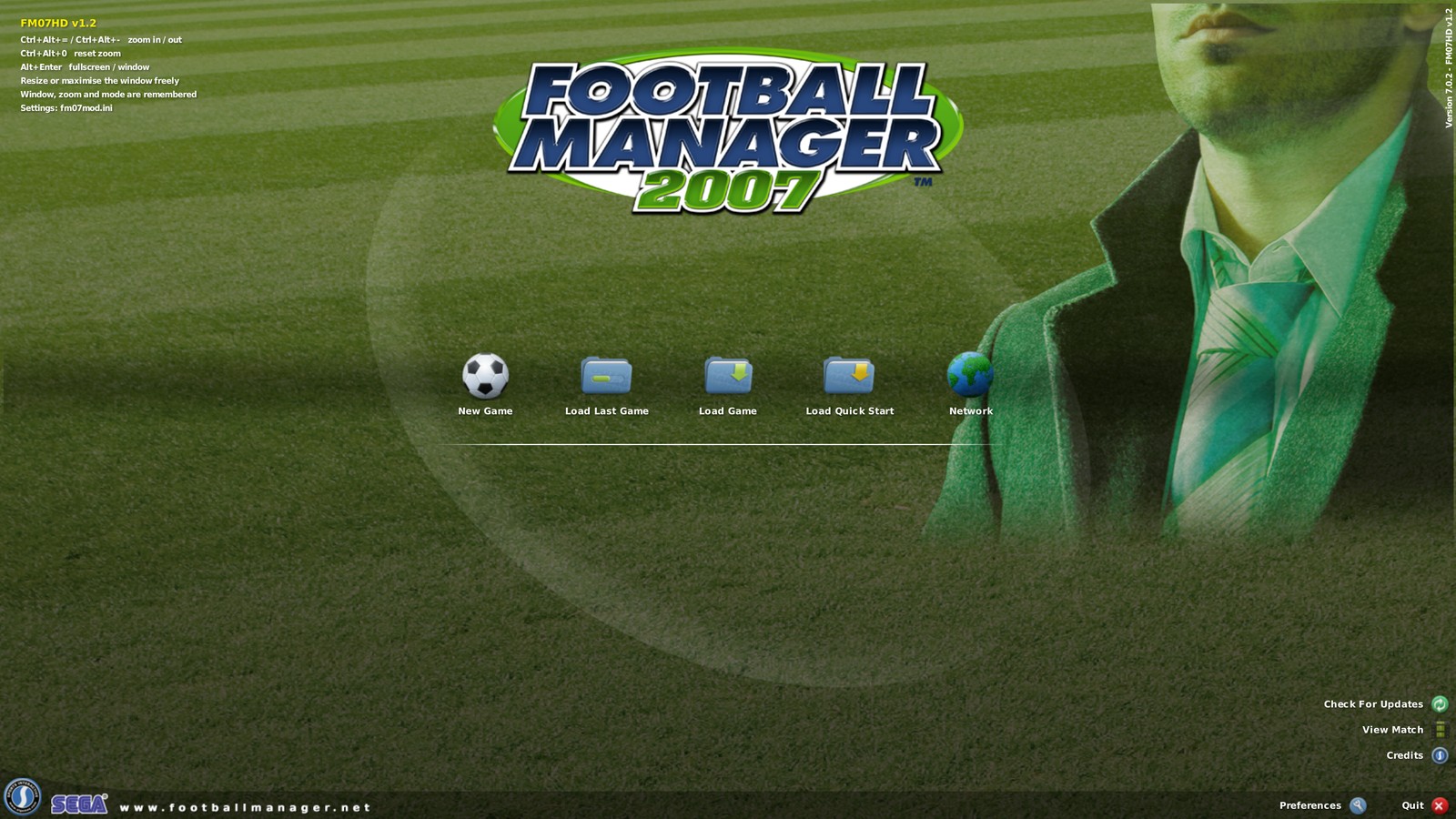
(Image: paokkerkir)
What changes in Football Manager 2007 HD
- Any resolution. The 1600×1200 cap is gone: the window can be resized or maximised freely.
- Borderless fullscreen. By default, fullscreen becomes a desktop-sized window without changing your monitor’s resolution, so switching to other windows is no longer a pain.
- UI zoom up to 4x. Text, boxes and images are drawn at full resolution, so they stay sharp instead of stretched.
- Settings remembered. Window size and position, mode and zoom are saved and restored on the next launch.
- Performance. There are fixes to how the game reads its files, to the 2D match engine and to the tactics screen.
One important detail: the mod only works with FM 2007 on version 7.0.2, the last official patch. If you have another version, the mod detects it and leaves everything untouched. So if your game is not up to date yet, start with the patch (below).
In-game shortcuts
- Ctrl+Alt+= and Ctrl+Alt+-: zoom in and out.
- Ctrl+Alt+0: back to 100%.
- Alt+Enter: switch between fullscreen and window.
The shortcuts also appear in a small legend on the start screen, as you can see in the image above.
Download FM07 HD
The file FM07HD-v1.2.zip is about 100 KB and comes straight from the author’s GitHub.
Download – FM07 HD v1.2 (Football Manager 2007)
- First, make sure your Football Manager 2007 is on version 7.0.2.
- Extract all files from the zip into the game folder, next to fm.exe.
- Start the game as usual, from the shortcut or with a double-click. No extra program needed.
If you play in a very wide window, there is also an optional fix. In the 2D match, the foul, card and offside banner appears two or three times. To fix it, copy data\panels\match notification.xml from the zip over the game’s original. Back up the original first.
Don’t have patch 7.0.2 yet?
The same author has a 7.0.2 patch installer already prepared to work on Windows 10 and 11. Install the original game first, then apply this patch. It is an .exe file, so, as with any executable, run it through your antivirus before opening it.
Download – FM 2007 patch 7.0.2 for Windows 10/11
If the game opens with the crowd noise but stays on a black screen, the author points to two causes. First, DirectX 9.0c is missing, and you can install it from Microsoft’s site even on Windows 10 and 11. Second, DirectPlay is turned off. To enable it, go to Control Panel > Programs > Turn Windows features on or off and tick DirectPlay.
Advanced settings
The fm07mod.ini file, next to fm.exe, stores everything the mod does. In most cases you will not need to touch it, but some options are handy:
- mode: start in a window, in fullscreen or with the game’s own choice.
- window_width and window_height: the window size at launch (1600×900 by default).
- exclusive_fullscreen: set to 1 to go back to the old fullscreen that changes the monitor resolution.
- zoom: follows Windows scaling by default; you can fix it at, say, 1.5 for 150%.
- hires_text: set to 0 to scale the whole image instead of drawing sharp text.
How to uninstall
Just delete dsound.dll and fm07mod.ini from the game folder. If you replaced any .xml file, restore your backup.
What the community is saying
The author’s post on r/footballmanagergames had 97% approval. Even so, the comments show appetite for more: one player has already asked for an FM 2008 version, and another regretted that FM 2007 is the only one from 2005 to 2008 that does not run on Linux. The same author’s 2020 guide to getting these classics running on Windows 10 had almost 200 comments, most of them thanking him.
Credits
FM07 HD and the Windows 10 patch are by paokkerkir, and the mod code is on the author’s GitHub. If you love the classics, see our ranking of every Football Manager.
The files are hosted by their original authors. FMPortugal only points to the official download page — all credit goes to their creators.