It is a small detail, but it makes a difference: seeing Salah with his «11» in the official Premier League font instead of the game’s generic numbers. These alternative shirt number fonts, made by the_hoyle, replace the numbers shown on the player profile, the tactics screen and during matches with real league and club fonts.
The thread started on FM23 in January 2023 and grew to 15 packs. Players have since confirmed the numbers work on FM24, and in October 2026 another community member added two more.
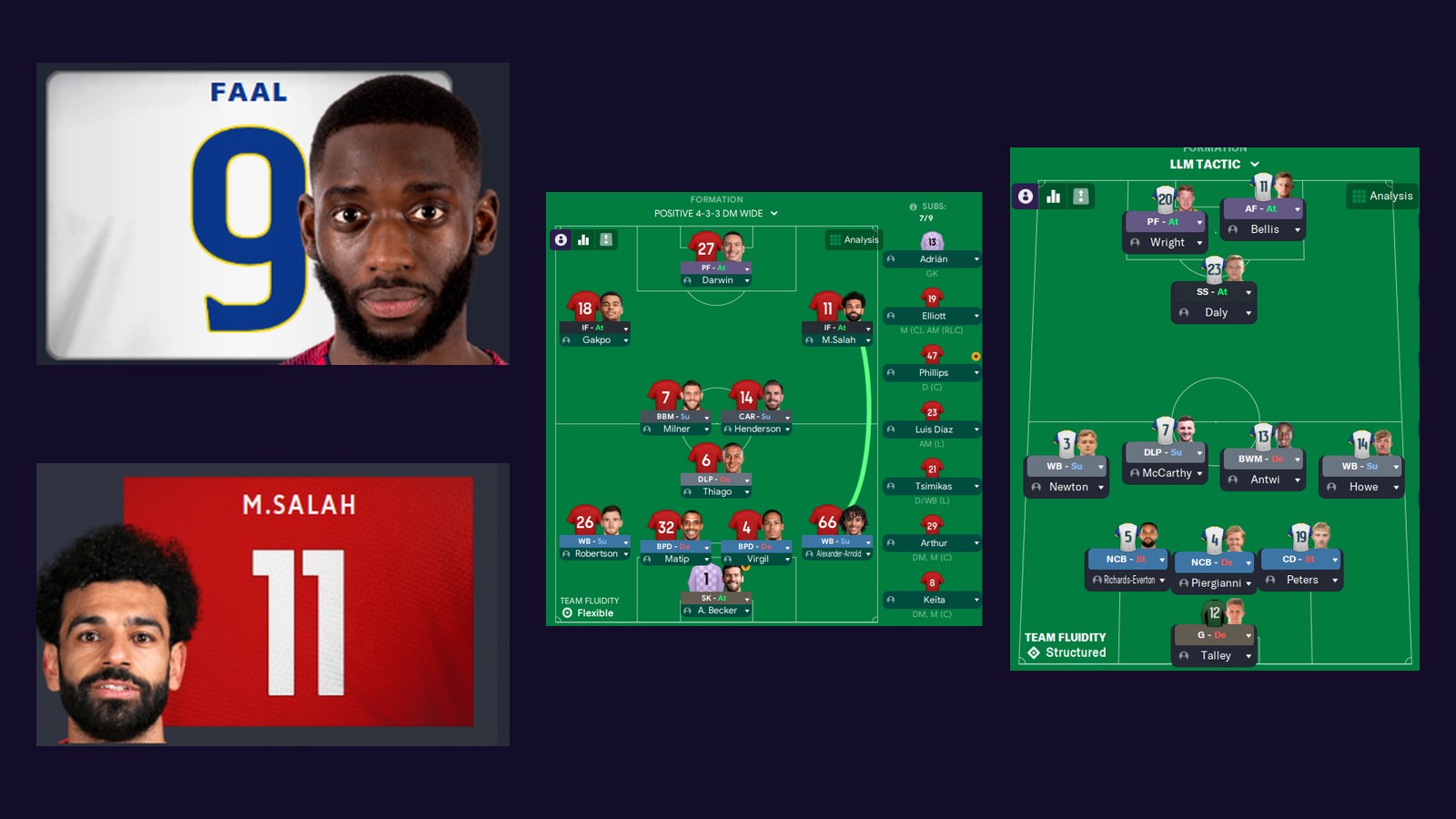
(Image: montage of screenshots by the_hoyle)
Where the numbers appear
Each pack includes two sets of images: the large numbers, shown on the player profile, and the small numbers, seen on the tactics screen and during matches. Your team’s shirts then take on the look of the league or club you choose.
Requirements
- FM23 or FM24. The numbers were made for FM23 and, according to players in the thread, also work on FM24.
- A skin with its full folders. This is the important part: the numbers only work with skins you download with all their folders, not those that come as a single .fmf file. The screenshots, for example, use the Tato23 and WTCS5 skins.
Download the shirt number fonts
The files are hosted in the original Sports Interactive forum thread, so when you click you may first see a quick Cloudflare check before the download.
Leagues
- Premier League 2023/24 Download – Premier League 2023/24
- Premier League 2022 Download – Premier League 2022
- EFL 2022 v1 Download – EFL 2022 v1
- EFL v2 Download – EFL v2
- La Liga 2022 Download – La Liga 2022
- Serie A 2022/23 Download – Serie A 2022/23
- Ligue 1 2022 Download – Ligue 1 2022
- World Cup 2022 (Adidas) Download – World Cup 2022 (Adidas)
Clubs
- Real Madrid 2001 Download – Real Madrid 2001
- Bayern 2019 Download – Bayern 2019
- Bayern 2015 Download – Bayern 2015
- Dortmund 2022 Download – Dortmund 2022
- Dortmund 2021/22 Download – Dortmund 2021/22
- Hertha 2022 Download – Hertha 2022
- Feyenoord 2017 Download – Feyenoord 2017
New community packs (2025–2026)
- Premier League 2023 (missionwinlater) Download – Premier League 2023 (missionwinlater)
- PSG 2025/26 (missionwinlater) Download – PSG 2025/26 (missionwinlater)
- La Liga 2023/24 (FM Rensie) Download – La Liga 2023/24 (FM Rensie)
- First, open the .zip and go into the folder inside.
- Copy the Graphics folder.
- Paste it into your skin folder: Documents\Sports Interactive\Football Manager 2023\skins\skin name (or Football Manager 2024 on FM24).
- When Windows asks, agree to replace the files.
- Finally, open the game and check the new numbers.
Tips and details
- EFL v2: a mix of two EFL fonts, with the league logo and the dots of the 2018 style. For the dots to show in the right colour, change the Number Outline Colour in the kit details using the in-game editor.
- Premier League 2023/24: the author made the numbers slightly smaller on purpose, to match the name on the shirt better.
- Premier League 2023 (missionwinlater): made in October 2026 by a player still on FM24. As he says himself, he eyeballed it, so it may differ slightly from the original.
- If the numbers stop showing, first check the skin has its full folders. In the thread, one player had the issue and it later worked again without changing anything.
Want to make your own?
The author does not create the fonts: he downloads them online and prepares the images in GIMP. In 2026 other players started doing the same. Their tips: use the transparent 0.png file in each folder as a base, and a font size of 250 to 275 px for the large numbers and 100 px for the small ones. The outline of each number has to be done by hand, though, and that is the part that takes longest.
Credits
The numbers are by the_hoyle, with fonts shared by missionwinlater, NV Heat and BlackDynamite10. The new 2026 packs are by missionwinlater, and the La Liga 2023/24 one by FM Rensie. Looking for more? See our FM24 kits.
The files are hosted by their original authors. FMPortugal only points to the official download page — all credit goes to their creators.