Kojuro Skin FM27 gives the game a dark, black and white look and changes several screens you use every day. It is by Portuguese modder KojuroPP, who has made the Kojuro Skin for several editions, and it is free. Also, it needs no plugins and no BepInEx: it only replaces some of FM’s own interface files.
The look of Kojuro Skin FM27
First, every screen gets the same dark background, with no 3D backgrounds and no different background per screen. FM’s background designs turn black and white. Also, player, club, nation and competition pages lose the club colour wash behind them. Finally, FM27’s purple accent becomes cyan.
The player profile
- New header: a club-coloured card with the name, a big squad number and the photo, next to a two-column info grid.
- Pros and cons as icons: hover over each one to read it.
- Database IDs: the player, club, nation and competition IDs sit in small boxes you can select and copy with Ctrl+C.
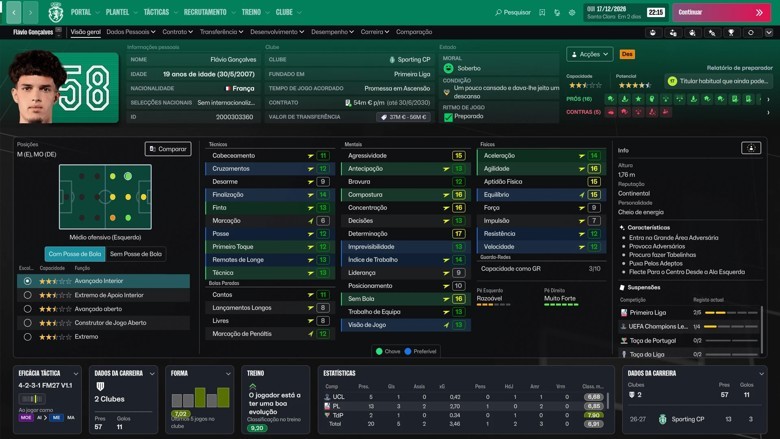
The player profile, with the club-coloured card and a big squad number (Image: KojuroPP)
Faces on the pitch and a squad pyramid
In tactics and during matches, the pitch shows the players’ faces, and so does the match squad strip. If you have a facepack, the skin uses your faces. Also, each shirt carries the nationality flag in the corner, and the pitch gets mown-grass stripes instead of FM’s flat green.
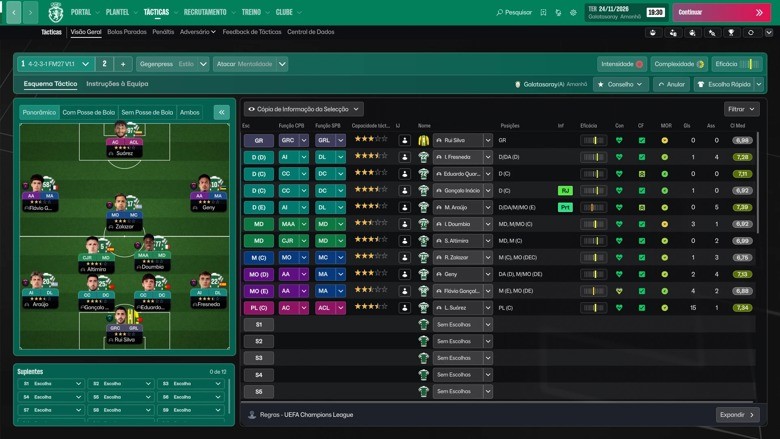
Player faces on the tactics pitch (Image: KojuroPP)
Then, in the squad Dynamics tab, the hierarchy becomes a pyramid of faces, with each player’s playing time. A green arrow marks a player who just moved up a level. If you hover over a face, you see FM’s note about that player’s place. Social groups change too: each group is a band with every player’s face, name and level.
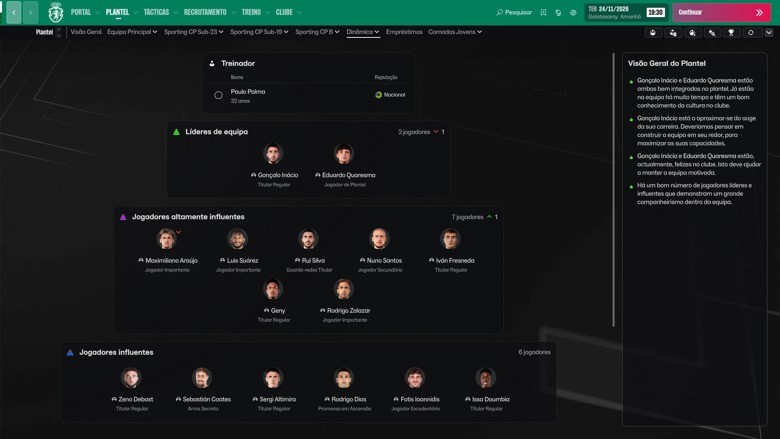
The squad hierarchy as a pyramid of player faces (Image: KojuroPP)
Scouting, training and the club page
- Recommended players: in the scouting cards view, the attributes sit in the middle of the card. So you can judge a suggestion without opening the player.
- Individual training: every row has Praise and Criticise buttons, which open FM’s own dialog. When the game does not allow it for a player, a faint bubble shows instead.
- Stadium card: the club page gets a card with the ground’s photo, name, capacity, year and city.
- Tables: finally, nation columns show only the flag, without the country name.
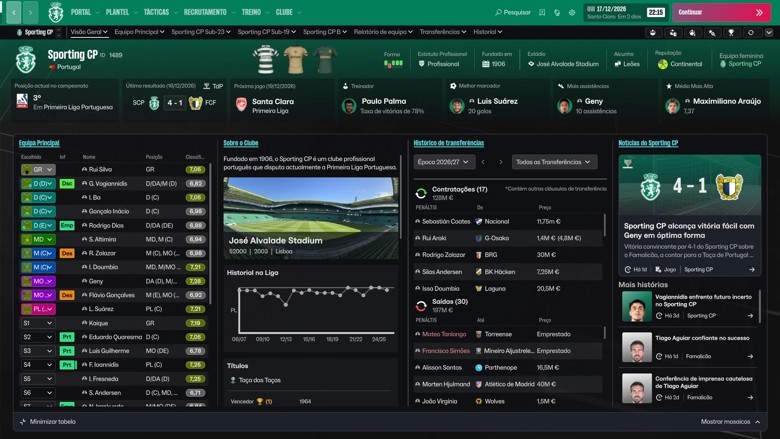
The club page, with the stadium card (Image: KojuroPP)
Download Kojuro Skin FM27
The version is 1.0.1, from 8 November, and the file is about 283 MB. It works on Windows, with FM27 on Steam and Game Pass. We also link the author’s Ko-fi page: the skin is free, but you can pay what you want there to support it.
Download – Kojuro Skin FM27 v1.0.1 Author’s Ko-fi page
- First, close FM27 completely.
- Then open the game’s interface folder. On Steam, right-click Football Manager 27, choose Manage > Browse local files and open
fm_Data\StreamingAssets\aa\StandaloneWindows64. On Game Pass, openC:\XboxGames\Football Manager 27\Content\fm_Data\StreamingAssets\aa\StandaloneWindows64. - Next, back up the 11 files in that folder that have the same names as the files in the skin’s
steam(orgamepass) folder. - After that, copy the 11 files from the
steamorgamepassfolder intoStandaloneWindows64and choose to replace the files. - Finally, start FM27 and keep the game’s default skin selected in Preferences.
Stadium photos on the club page
Out of the box, the stadium card shows a neutral picture. However, with a stadium pack, each club shows its own ground. For that, the author made the Stadium Pack Converter, free and open source. With FM closed, you open the program, choose the pack’s folder and click Convert Stadium Pack. The photos go to Documents\Sports Interactive\Football Manager 27\graphics\Stadium Pack. If Windows says it protected your PC, click «More info» and then «Run anyway», because the program is not signed.
Things to watch
The skin only works on the FM27 builds it was made for: Steam 59361792-1793652891 and Game Pass 59245056-1793823875. So after an FM update the skin disappears. In that case, do not copy the old files over the new version: wait for a new version of the skin. To remove it, restore your backup or use Steam’s file check or the Xbox app’s repair. Finally, if you prefer a skin with the classic sidebar, see SMOC Original FM27.
The files are hosted by their original authors. FMPortugal only points to the official download page — all credit goes to their creators.
Did you make this download? Manage it on FMPortugal →