facegen gives every newgen in Football Manager 27 a face, drawn in anime style on your own graphics card. The program reads your save, picks the players you will actually look at, draws a portrait of each one in their club kit and puts the images into the game by itself, with no files to copy by hand. It is by junepaykim, it is free, open source (MIT licence) and runs on Windows.
⬇️ Jump to the download: facegen v0.1.1 (Windows)
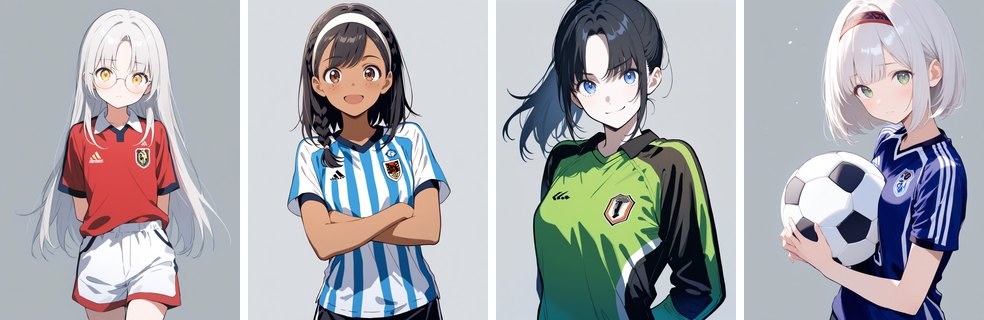
Four made-up players, drawn the way the program does it today (Image: junepaykim)
What facegen does
FM invents new players every season and they arrive without a photo. A few seasons in, your league is full of faceless wonderkids. So facegen handles it in four steps:
- It reads the save: first, it copies your newest save and reads every player and club from the copy.
- It picks who matters: your club and the stars get the best of three tries plus a detail pass, decent players in your league get one, and everyone else is skipped.
- It draws on your card: each player gets a portrait in their club kit, made on your PC, with no online service.
- It publishes: finally, it writes the images and
config.xmlinto FM27’s graphics folder. You press Reload Skin and the faces appear.
Faces that grow with the player
Each player gets a sheet of their own: hair, eyes, skin tone and accessories. So when he changes club or gets older, the program draws him again from that sheet and from a crop of the old face. The result is the same player, in the new kit and a little older.
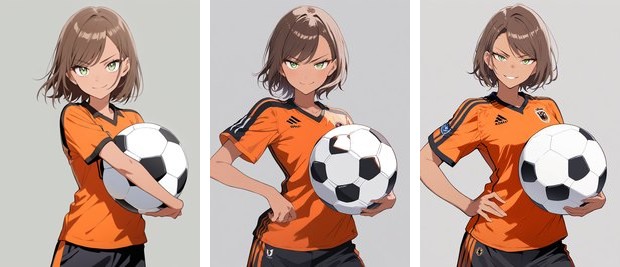
The same player at 22, 27 and 31 (Image: junepaykim)
Who it is for
It is for anyone who plays long careers and likes the anime style. If you prefer realistic faces, see the photorealistic faces or FM27 Face Generator, which makes realistic portraits to drag in with FaceDrop.
facegen download
The latest version is 0.1.1, from 18 November. The installer is about 17 MB, but on first launch the program downloads Python and the libraries (about 3 GB) and, after asking you, the image models (11.6 GB). You need 64-bit Windows 10 or 11 and an NVIDIA graphics card with about 8 GB. All in all, keep around 20 GB free.
Download – facegen v0.1.1 (Windows)
- First, run
facegen-setup-0.1.1.exe. If Windows warns you, click More info and then Run anyway. - Then leave Start facegen now ticked. A window sets up Python and asks once before downloading the models.
- Next, the dashboard finds the FM27 folder, checks the graphics card and reads your newest save once FM27 saves.
- Finally, with FM27 closed, let it draw. Then open the game and press Reload Skin to see the faces.
Things to watch
The installer is not digitally signed, so Windows warns you. To check the file, compare its SHA-256 with SHA256SUMS.txt on the creator’s page. Also, the program draws while FM27 is closed, because the graphics card is the same one the game uses. To uninstall it, use Windows Apps: it asks whether to delete the faces from FM27 and the program’s data too.
facegen is by junepaykim. FMPortugal only points to the official download — all credit goes to its creator.
Did you make this download? Manage it on FMPortugal →