The broadcast scoreboards in FM27 Scoreboard Megapack only came with Windows instructions. Now Avi123 has made an adaptation for Apple Silicon Macs (M1 or newer). It is an unofficial installer that uses Sethem’s original megapack and a BepInEx loader made for Mac. It also adjusts the scoreboard size during highlights, commentary and tactics.
⬇️ Jump to the download: Scoreboard Megapack for Mac 1.1.2
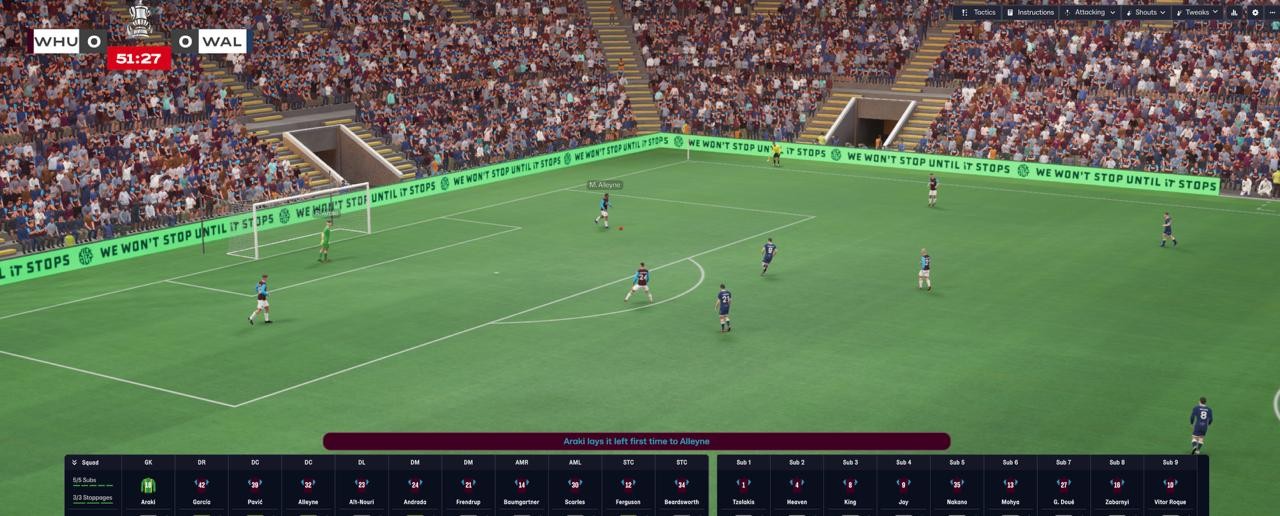
The scoreboard in an FM27 match, on an Apple Silicon Mac (Image: Avi123)
What the Mac version does
First, it installs the same megapack scoreboards on your Mac, one for each competition, in a TV broadcast style. Then it adds adaptive sizing: the scoreboard is full size during highlights and smaller when you open commentary or tactics. It also fixes the flickering scoreboard and shows the score at half-time and full-time.
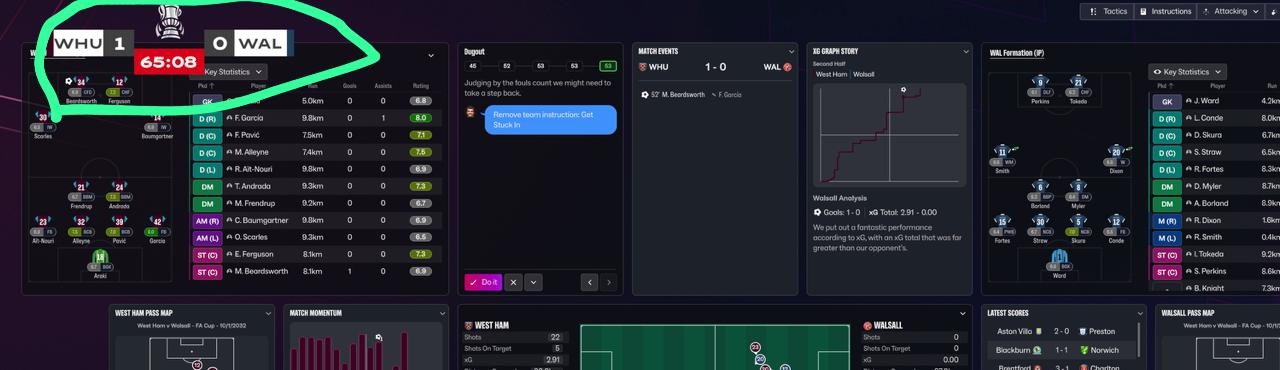
The compact scoreboard, with the tactics screens open (Image: Avi123)
Who it is for
It is for anyone who plays FM27 on a recent Mac and wants Sethem’s scoreboards, which so far only worked on Windows. On Windows, use the original FM27 Scoreboard Megapack, which has the creator’s own instructions.
Mac version download
The version is 1.1.2, from 24 November, in a 48 KB ZIP, for FM27 27.1.0 on Steam. Before installing it, you need three things: codexx01‘s BepInEx 6 for Apple Silicon, Sethem’s original megapack, which the installer can also download by itself, and Python 3.10 or newer for Apple Silicon. It is still in testing, so the creator asks you to say whether it works on your Mac.
Download – Scoreboard Megapack for Mac 1.1.2 BepInEx for Apple Silicon (codexx01) Python for macOS
- First, install codexx01’s BepInEx 6 for Apple Silicon (second button, a 31 MB ZIP), launch FM27 through Steam to the main menu and quit.
- Then install Python 3.10 or newer for Apple Silicon, if you do not have it yet.
- Next, extract the ZIP. In Terminal, type
cdand a space, drag the extracted folder into the window and press Return. - Then run
python3 fm27_scoreboards.py install. The installer downloads Sethem’s original megapack by itself. - Finally, launch FM27 through Steam with your BepInEx launch configuration and watch a match. To check it, run
python3 fm27_scoreboards.py status.
Things to watch
This adaptation is not by Sethem, so Mac problems should go to Avi123, with your Mac model, macOS version and FM27 version. Also, after an FM27 update you may need to wait for a new version. To remove everything, close the game and run python3 fm27_scoreboards.py uninstall. If you only want to turn off adaptive sizing, use disable-adaptive instead of uninstall.
The Mac adaptation is by Avi123, built on Sethem’s FM27 Scoreboard Megapack and codexx01’s BepInEx for Apple Silicon. FMPortugal only points to the file — all credit goes to its creator.
Did you make this download?