FM Shadow Scout is a free FM27 scouting tool that tells you who to look at, but never how good each player is. It was made by the FM Extra Time team, who also made the Comeback Skin, and it reads your save on your computer to suggest names. So the scouting is still done in the game, by your scouts.
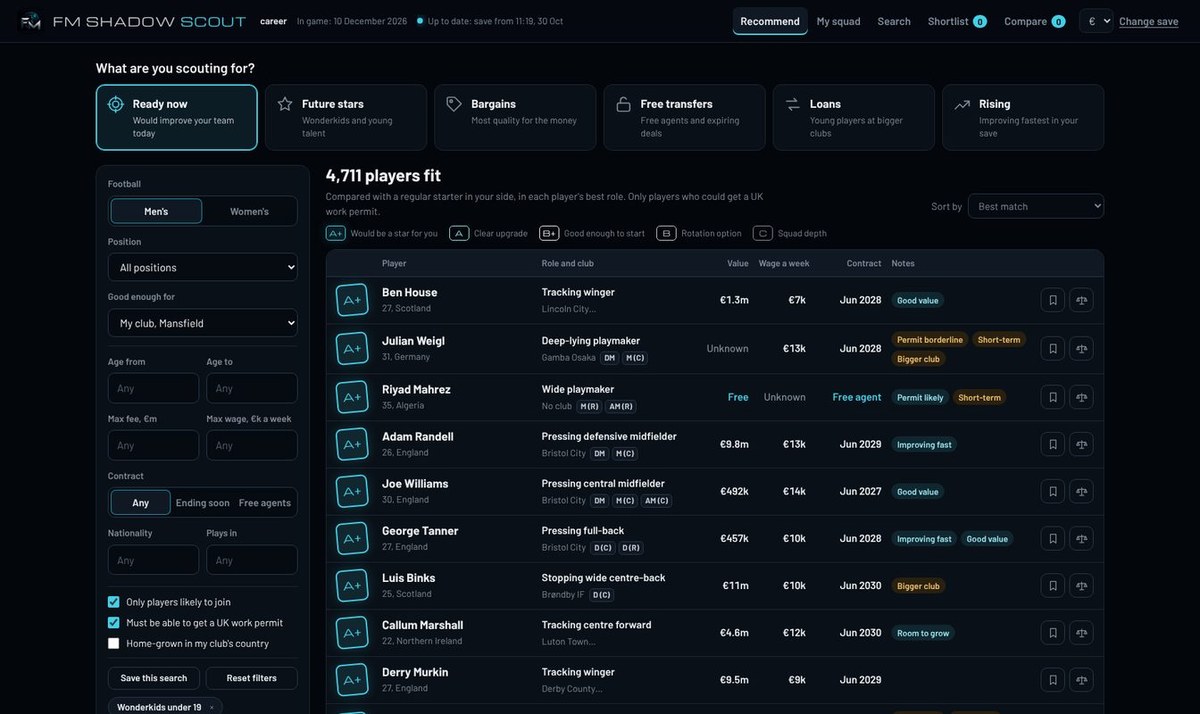
The Recommend screen, with the six searches on top and the filters alongside (Image: FM Extra Time)
How FM Shadow Scout works
First, you pick your FM27 save, which the app reads on your computer without uploading anything. Then you say what you need, for example a striker who is ready now, a wonderkid, a loan or a free transfer, with your budget and limits. Next, you get names, roles and reasons, but no numbers. Finally, you send your scouts and make the call yourself.
What it brings
- Six searches: ready now, future stars, bargains, free transfers, loans and the players improving fastest in your save.
- Fits your club: it compares every player with your squad, role by role, to know who would be an upgrade.
- Real-world filters: age, fee, wage, contract, nationality, UK work permits and home-grown status.
- Men’s and women’s: it works with both in the same save.
- Shortlist and export: for example, you compare two players side by side and export the shortlist straight into FM.
- Keeps up with your save: when you save in FM, the app reads the new file, so transfers and contracts stay current.
What it will never show you
The app uses the hidden numbers to find good players, but it keeps them hidden. In other words, you do not see attributes, current ability or potential. So the authors say it is not cheating: it is like asking a good scout for a shortlist, and you can still get it wrong.
FM Shadow Scout download
The latest version is 1.3.4, from 2 November. It now opens saves from that day’s FM27 update and saves where the game created a new club, such as a B team, which used to fail. It works on Windows 10 and 11, needs no account and takes 16.7 MB. The link comes from the author’s site.
Download – FM Shadow Scout v1.3.4 (Windows)
- First, run the installer. If Windows says it does not recognise the app, click «More info» and then «Run anyway».
- Then open the app and pick your FM27 save.
- Next, say what you need and add your budget and limits.
- Finally, to take the shortlist into the game, click «Export to FM». In FM, open your shortlist and import the «Shadow_Scout» list.
Things to watch
The app only reads your save and never changes it, and the file never leaves your computer. Also, when it opens, it tells you if a new version is out: just run the new installer, without removing the old one. However, for now it is Windows only. Finally, if you would rather see attributes and potential, try FMSuperScout or Talent Seer.
The files are hosted by their original authors. FMPortugal only points to the official download page — all credit goes to their creators.