FMDataDisplay is a free FM27 plugin that gives every player a 0 to 100 performance rating. Made by fredGob, it reads every player’s stats from the game engine and shows the rating in new columns, in your squad and in player search. You can also sort them like any other column in the game.
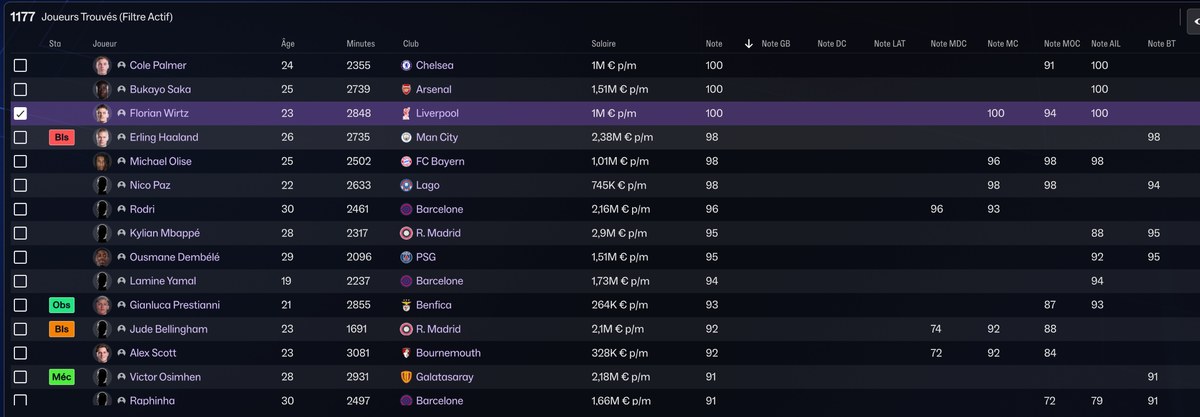
Player search, with the overall rating and a rating per position (Image: fredGob)
What FMDataDisplay brings
- Ratings by position: an overall rating and one for each profile, from goalkeeper to striker, across eight profiles.
- Staff stars: for example, each coach’s stars in every training area, worked out by the plugin.
- The whole database: it reads every player who has played at least one minute, without the game’s 10,000-result search limit.
- Weekly update: the plugin works out the ratings again every game week, in the background. You can also press F9.
- Recruitment sheet: a table of every player with ratings, stats, wage, value and contract, to open in a spreadsheet.
How the rating works
Each position profile uses its own per-90 stats, such as progressive passes, duels, shots and possession won. Then each number is compared with players in the same league and adjusted for the league’s level and the team’s style. So the rating only depends on what the player did on the pitch, not on attributes. However, anyone under 200 minutes gets a 0, for lack of data.
FMDataDisplay download
The version is 0.12.0, from 3 November, and it is the first public one. It works with FM27 on Steam, on Windows and on Linux with Proton. You need BepInEx 6 IL2CPP, which you download from the official site. The links come from the author’s GitHub.
Download – FMDataDisplay v0.12.0
BepInEx 6 IL2CPP – official page
- First, download BepInEx 6 Bleeding Edge, Unity IL2CPP, Windows x64 (build 791 or newer). Extract it into the game folder, next to
fm.exe. In Steam, you get there by right-clicking FM27, Manage, Browse local files. - Then start the game, reach the main menu and quit. The first launch takes a few minutes.
- Next, extract
FMDataDisplay-0.12.0.zipinto the same game folder. After that, copy the subfolders of thevuesfolder, exceptfmf, intoC:\Users\(your name)\AppData\LocalLow\Sports Interactive\Football Manager 27. - Finally, load your save, open your squad and wait about 3 minutes, or press F9. Then pick the «Notes FM27» view.
Things to watch
The documentation and column names are in French. Also, after an FM27 update, the plugin may stop working until a new version comes out. On Linux, you need to add WINEDLLOVERRIDES="winhttp=n,b" %command% to the game’s launch options in Steam. Finally, if you prefer a separate app, see FM Player Analyzer.
The files are hosted by their original authors. FMPortugal only points to the official download page — all credit goes to their creators.