Atmosfera 360 FM27 by MiguelFM was the most popular atmosphere mod for FM26 and has now arrived for FM27, free. It makes dozens of leagues look licensed, with the TV logo, a scoreboard for each competition, the pre-match ceremony and the fans’ chants. So a Primeira Liga or Libertadores match starts to look like a real broadcast.
⬇️ Jump to the download: Atmosfera 360 (option 1)
What Atmosfera 360 brings
- Before the match: first, the mod draws the starting line-ups, the league table and the teams walking out.
- During the match: a scoreboard and TV logo for each competition, as in real broadcasts.
- Fans: crowd chants, with separate volume for home and away fans.
- Setup app: the pack includes the Atmosfera 360 Setup app, where you choose what to use without touching files.
However, this free version does not include the commentary mod or the club adboards, which the author offers separately on MiguelFM Patreon.
The leagues included
The list is long. In Europe, the mod covers 23 countries. For example, Portugal has the Primeira Liga, and England, Spain, Italy, Germany and France have their top two divisions and cups. Turkey, the Netherlands, Belgium, Scotland, Poland, Austria, Switzerland, Greece, Denmark, Sweden and Norway are in too, among others.
- South America: Argentina and Brazil (with the second tier and the cup), Uruguay, Paraguay, Chile, Peru, Colombia and Ecuador.
- Rest of the world: MLS, Liga MX, Japan, China, Saudi Arabia, Australia, Israel and New Zealand.
- International: Champions League, Europa League, Conference League, Libertadores, Sudamericana, World Cup and AFC Champions League.
How to set it up
Everything is set in the Atmosfera 360 Setup app. First, you pick your FM27 folder, the one with BepInEx. Then each tab handles one part of the mod. At the end, you click Save and restart the game, because FM only reads the changes when it starts.
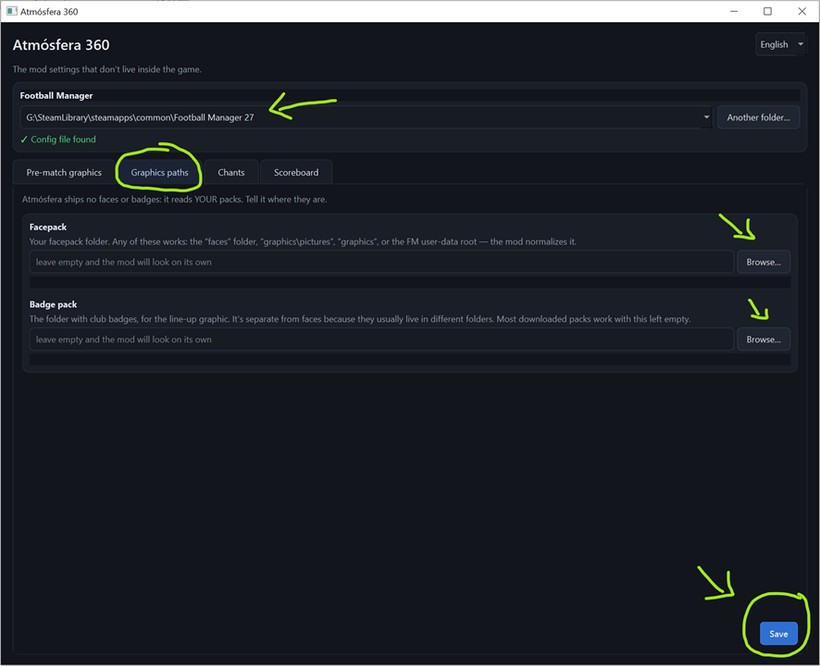
The faces and badges folders tab (Image: MiguelFM)
- Graphics paths: the mod ships no faces or badges, so it uses your packs. Here you tell it where they are, so they show up in the line-up graphics. Leave it empty and it looks on its own.
- Pre-match graphics: choose between the mod’s graphics and the game’s, turn the league table after the line-ups on or off, and hand any leagues back to FM.
- Chants: lower the chants if they drown out the commentary or the match sound.
- Scoreboard: change the size and position of the scoreboard.
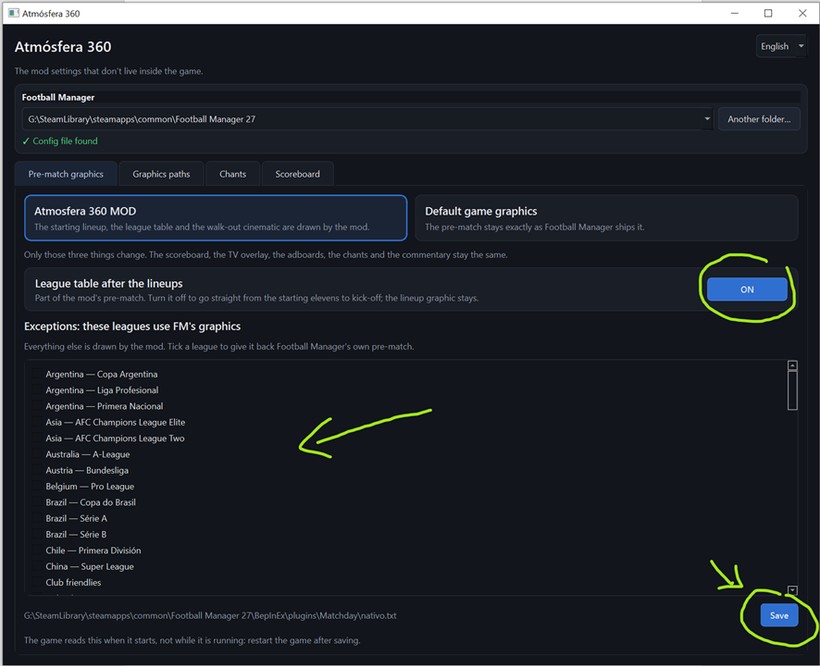
The pre-match graphics and the leagues that keep FM’s own (Image: MiguelFM)
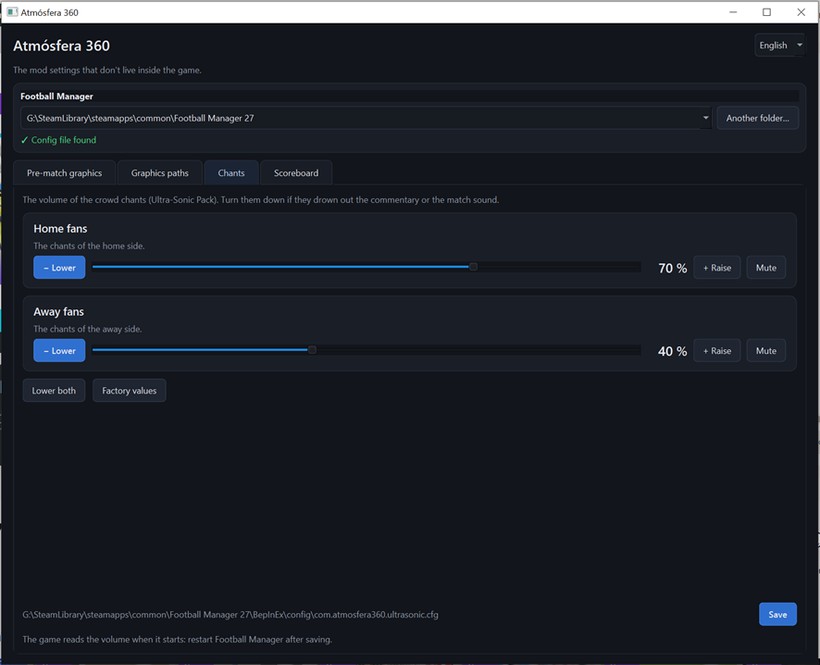
Home and away chant volume (Image: MiguelFM)
To complete the atmosphere, add Matchday Sounds and the broadcast cameras.
Watch the video
In the video, MiguelFM shows a Turkish Süper Lig match with the mod: the teams walking out, the scoreboard and the TV logo.
Süper Lig 26/27 pic.twitter.com/95EUjCtKRF
— MiguelFM (@MiguelFMAds) October 6, 2026
Atmosfera 360 FM27 download
The file is the same on both links, a .rar that Windows 11 opens on its own; on Windows 10, use 7-Zip. If one link fails, use the other.
Download – Atmosfera 360 (option 1) Download – Atmosfera 360 (option 2)
The mod is free, but it takes a lot of work to maintain. So, if you like it, subscribe to MiguelFM on Patreon: as well as supporting the author, you get the club adboards, the commentary mod and new versions as soon as they are out.
- First, close the game and extract the .rar.
- Then copy everything in the pack, as it is, into the folder where the FM27 executable is. According to the author, this is the way to go if you do not have BepInEx yet, because the pack already includes it.
- Next, open the Atmosfera 360 Setup app and pick your FM27 folder, the one with BepInEx. If the app says it cannot find the config file, check that you picked the FM27 folder and not the FM26 one.
- Finally, set the options, click Save and start the game.
Things to watch
The author tested the mod with FM27’s default skin. So if the tactics buttons misbehave, the skin you are using is the most likely cause. Also, the mod was made for Windows and there is no confirmation that it works on Mac.
See also the best FM27 mods, with the mods we have already covered.
The files are hosted by their original authors. FMPortugal only points to the official download page — all credit goes to their creators.
Did you make this download? Manage it on FMPortugal →