FM27 Graphics Manager is a free Windows app that downloads, installs, updates and removes face, logo and kit packs for Football Manager 2027. Made by SiRRAHx, it takes away the boring part of extracting files, copying folders and fixing paths by hand. So you pick a pack from a list, press a button and the app puts everything where the game expects to find it.
The FM27 Graphics Manager icon (Image: SiRRAHx)
What FM27 Graphics Manager does
- One place for your packs: first, you get a list of the best-known face, logo and kit packs, which you install and remove with one click.
- Everything in the right folder: the app extracts the files, strips extra wrapper folders and leaves the pack in
graphics, inside your FM27 folder. - Packs kept up to date: also, it checks the creators’ sites for new versions and shows an Update button. Monthly update files go on top of the pack you already have.
- No duplicate faces: if a player already has a face in another pack, you can leave it out, so packs do not fight over the same player.
- Setup check: the Check my setup button finds and fixes the usual reasons graphics do not show in game.
- Space and backups: for example, the My packs tab shows how much space each pack uses, and you can back up your packs and settings to move them to another PC.
- Background downloads: finally, if you close the window the download carries on, and you get a notification when it finishes.
Who it is for
It is for anyone who wants the game full of faces and badges but has no patience for folders. So it is handy above all if you are setting up FM27 for the first time or moving to a new computer. The pack list also updates itself online, which means new packs show up without an app update. However, if you prefer to do it all by hand, our articles still explain each pack: DF11 faces, Cut-Out faces, newgen faces and TCM27 logos.
How the app gets the packs
Packs with a direct link download straight away when you press Download & install in the Browse tab. However, some are only on the creator’s site and ask you to sign in. In that case, the app opens the page in its own window. You sign in, press the site’s download button, and the app catches the file and installs it. If you already downloaded a pack in your browser, use Install from file on that pack’s card. You can also add any pack that is not on the list by pasting a link to its page.
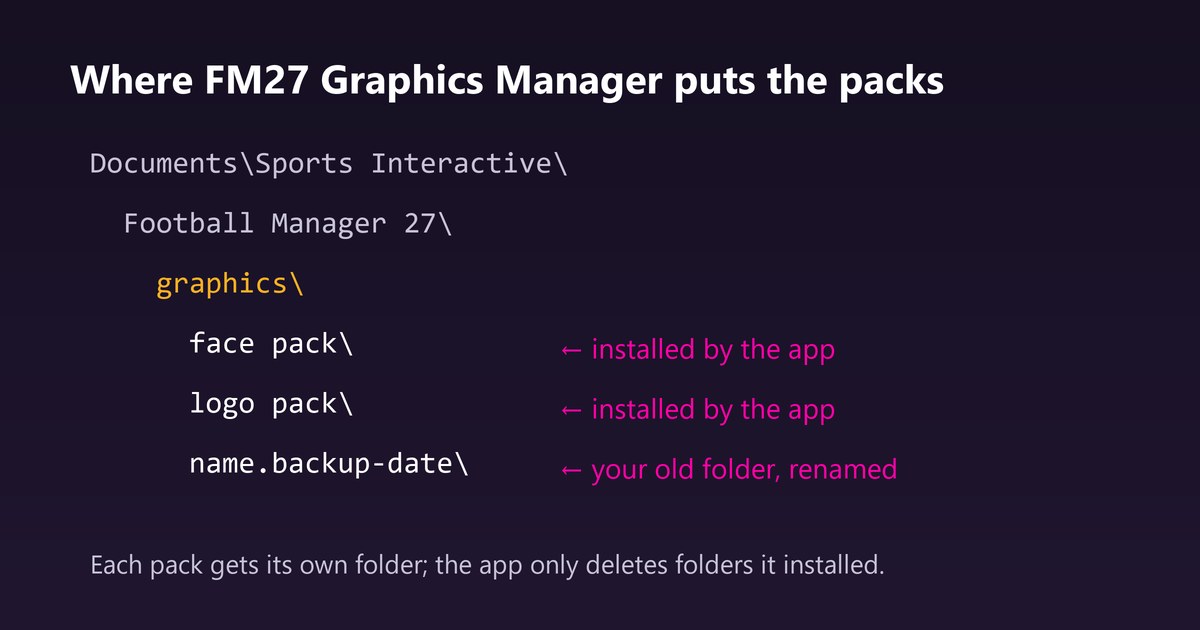
Each pack gets its own folder inside graphics (Image: FMPortugal)
FM27 Graphics Manager download
The latest version is 1.0.1, from 2 November, which fixes the JavaScript error that closed version 1.0.0 as soon as it opened. The installer is about 103 MB and works on Windows only. You do not need admin rights. However, .rar packs need 7-Zip installed, while .zip and .7z packs work out of the box.
Download – FM27 Graphics Manager v1.0.1
FM27 Graphics Manager on GitHub
- First, download
FM27-Graphics-Manager-Setup-1.0.1.exeand open it. - If Windows shows «Windows protected your PC», click «More info» and then «Run anyway». The warning appears because the app is not code-signed.
- Next, choose where to install it and which shortcuts you want.
- The first time you open the app, pick a folder for downloads and your FM27 folder, usually
Documents\Sports Interactive\Football Manager 27. - Finally, go to Browse, pick a pack and press Download & install. Close and reopen FM27 to see the new graphics.
Things to watch
FM27 only loads new graphics when it starts. So, if faces do not show, close the game completely and open it again. If they are still missing, run Check my setup and look in My packs for warnings on the pack, such as a missing config.xml. The app only deletes the folders of packs it installed itself. However, if you already have a folder with the same name, it is not deleted: it is renamed to <name>.backup-<date>. If you are on 1.0.0, install 1.0.1 by hand, because that version closes before it can update itself. Your packs and settings are kept. Finally, the app is fan-made and has no link to Sports Interactive or SEGA.
The files are hosted by their original authors. FMPortugal only points to the official download page — all credit goes to their creators.